
Bluehost Review 2026: Is It Actually Worth It?
★★★★½ 4.5 / 5
From $3.99/mo
Best for Beginners & US Sites
Phone Support on Business+
This bluehost review gives you the straight answer most reviews avoid: Bluehost is a genuinely capable web host for the right user — and a frustrating one for the wrong user. Understanding which side of that line you fall on is exactly what this bluehost review is built to help you do.
Bluehost powers over 2 million websites worldwide. It has been officially recommended by WordPress.org since 2005. It offers phone support, a guided WordPress setup experience, and competitive introductory pricing. These are real strengths. At the same time, the negative reviews on Trustpilot and Reddit are also real — and we cover both sides honestly below.
Quick answer: Bluehost is worth it in 2026 for US-focused sites, complete beginners who want the most guided WordPress setup available, and users who need telephone access to support. For global audiences, multi-site setups, or users prioritising performance over everything else, there are stronger alternatives at the same price.
Free domain · Free SSL · 30-day money-back guarantee
Bluehost at a Glance: What This Bluehost Review Found
Specification |
Detail |
|---|---|
Founded
|
2003 — headquartered in Burlington, Vermont, USA
|
Parent company
|
Newfold Digital (formerly Endurance International Group / EIG)
|
Websites hosted
|
2+ million websites worldwide
|
Trustpilot rating
|
4.5/5 Excellent — 30,383 reviews (see real users section)
|
Uptime guarantee
|
99.99%
|
Uptime tested (2026)
|
99.97–99.99% across independent multi-month monitoring
|
Web server
|
Apache + Oracle Cloud infrastructure
|
Data centres
|
US-focused (Oracle Cloud); limited international coverage
|
WordPress.org recommended
|
Yes — since 2005
|
AI assistant
|
BLU (support queries); WonderSuite (site creation)
|
AI website builder
|
Yes — included on all plans
|
CDN
|
Yes — Cloudflare CDN on all plans
|
Staging
|
Yes — included on all plans (2026)
|
Phone support
|
Yes — Business plan and above, 24/7
|
Money-back guarantee
|
30 days
|
Entry intro price
|
From $3.99/mo (36-month term)
|
Renewal price
|
From $9.99/month (Starter, 36-month renewal)
|
Bluehost Pricing 2026: What You Actually Pay
Bluehost’s pricing structure is more complex than most hosts. Understanding it before you commit will save you a significant and unpleasant surprise at renewal.
Plan |
Intro Price |
Sites |
Storage |
Best For |
|---|---|---|---|---|
Starter
|
$3.99/mo
|
10 websites
|
10 GB NVMe
|
Entry — single site, basic needs
|
Business
|
~$6.99/mo
|
Up to 50 websites
|
50 GB NVMe
|
Multiple sites, malware removal, backups
|
eCommerce Essentials
|
$14.99/mo
|
Unlimited
|
NVMe
|
WooCommerce, payment tools
|
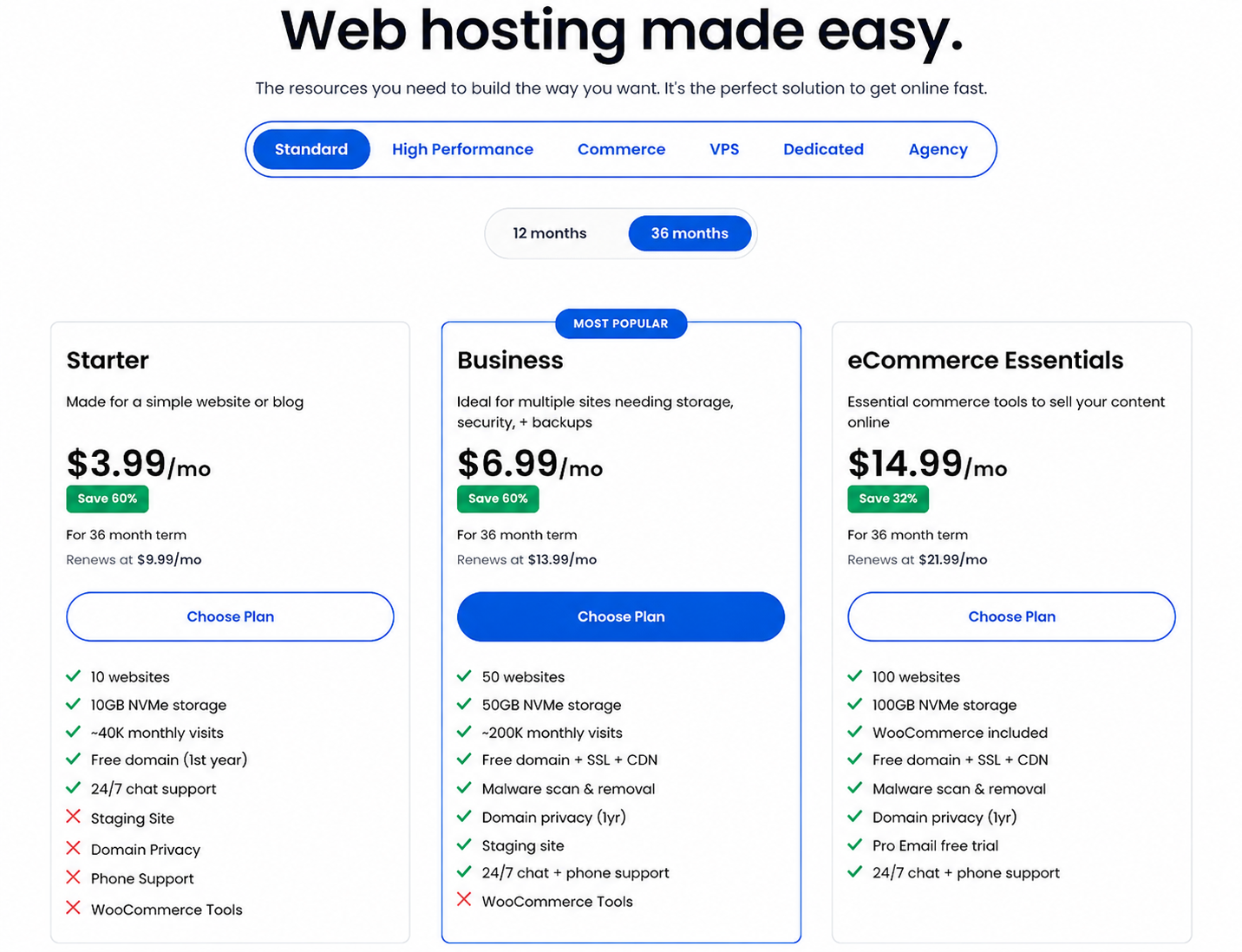
The Introductory vs Renewal Price Gap
HONEST NOTE: This is the most common reason for negative Bluehost reviews. Read carefully before purchasing.
Bluehost’s introductory pricing applies to the first billing term only. On the Starter plan with a 36-month commitment, the price starts at $3.99 per month. At renewal, that same plan increases to $9.99 per month — a jump of roughly 2.5x.
On a 12-month term, the Starter plan starts at $4.99 per month and renews at $11.99 per month. The longer your initial commitment, the better your introductory rate — but the renewal increase applies regardless of term length.
This is not unique to Bluehost — almost every budget host uses this model. But Bluehost’s renewal jump is among the steeper ones in the industry, and it consistently catches users off guard. Always calculate your full two-year cost before committing, not just the advertised monthly figure.
The Checkout Upsell Issue
HONEST NOTE: Multiple independent 2026 reviews flag this as a consistent problem. Be aware before purchasing.
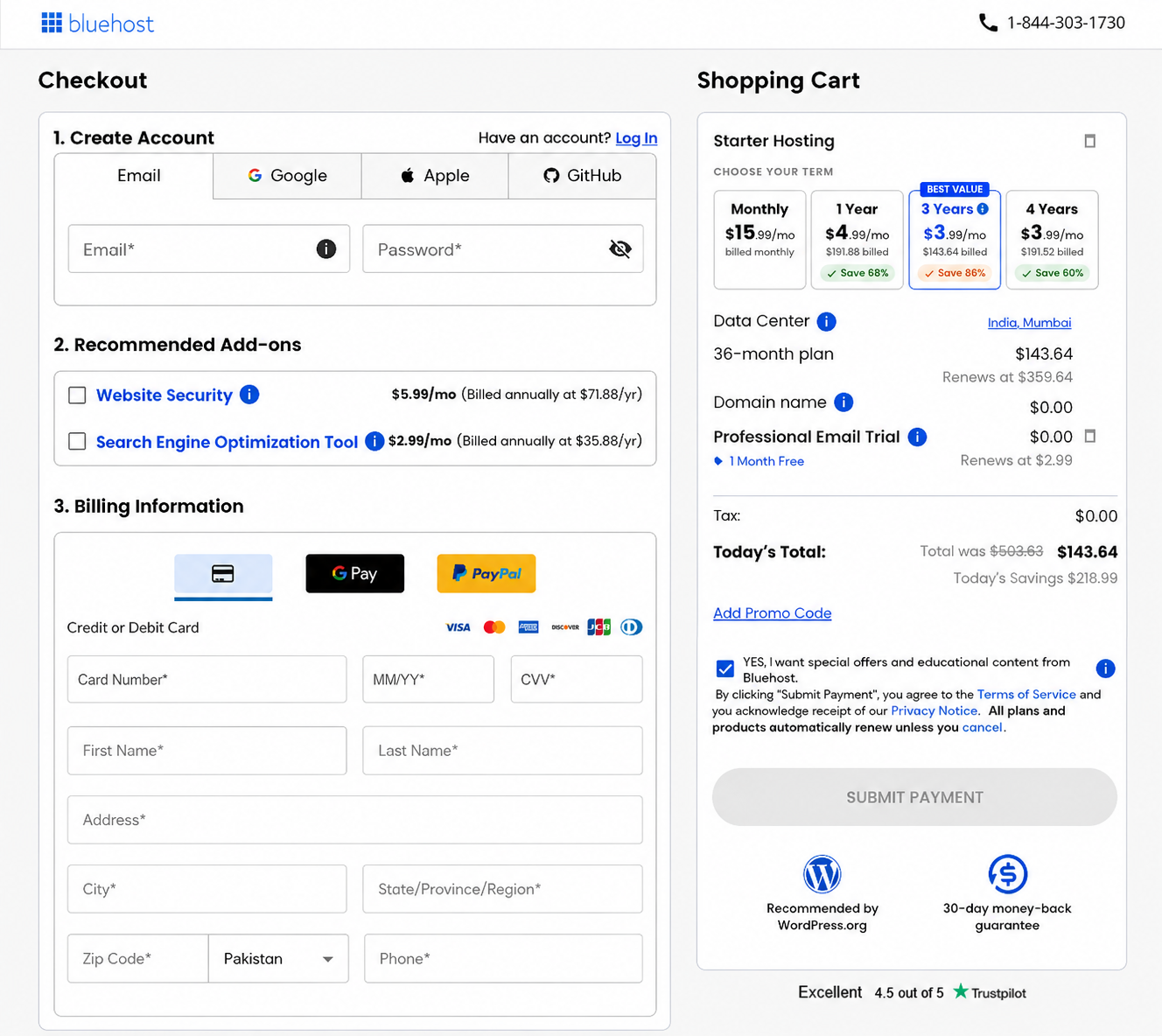
Bluehost’s checkout process includes multiple optional add-ons — SiteLock security, SEO tools, Yoast Premium, professional email — that are pre-selected by default on some plan configurations. Several independent reviewers in 2026 report accidentally paying for add-ons they did not want because they were ticked by default. Review every item in your cart carefully before completing purchase and deselect anything you did not specifically choose.
Pricing verdict: Competitive at introductory rates, particularly on 36-month terms. The renewal increase is real and should be budgeted for. The upsell issue at checkout requires attention. Calculate your full two-year cost before committing.
Performance: Speed and Uptime Data (2026)
Uptime
99.99%
uptime guarantee
on all shared hosting plans
99.97%
Tested uptime (independent 2026)
0.35s
US load time
(WPShout 2026)
Speed
- US audiences: competitive speed on Oracle Cloud infrastructure; WPShout’s 2026 testing recorded 0.35s load time for US-based visitors
- International audiences: noticeably slower; Bluehost’s data centres are primarily US-focused and do not match the global coverage of hosts with multiple international locations
- Apache web server: handles WordPress traffic less efficiently than LiteSpeed under concurrent load; performance gap widens at higher traffic volumes
- Cloudflare CDN: included on all plans; reduces international latency meaningfully but does not fully compensate for the absence of regional data centres
The honest performance assessment: Bluehost performs well for websites targeting US audiences. For sites targeting India, South Asia, Asia-Pacific, Latin America, or mixed global traffic, the performance gap compared to LiteSpeed-based hosts with regional data centres is real and measurable. This is not a reason to avoid Bluehost if your audience is US-focused — but it is a reason to reconsider if international traffic is significant to your site.
Performance verdict: Strong for US audiences. Weaker for international traffic. Uptime is consistent and close to the guarantee. For global sites, performance is Bluehost’s most significant limitation.
WordPress: Is Bluehost Good for WordPress in 2026?
Yes — this bluehost review confirms that Bluehost is good for WordPress, particularly for beginners. It has been officially recommended by WordPress.org since 2005 and continues to hold that endorsement. In practice, this means WordPress.org has independently verified Bluehost’s performance, security, and WordPress-specific tooling standards.
What Bluehost Offers for WordPress
- ✓ WordPress pre-installed on all plans — your site is set up and ready before you even log in for the first time
- ✓ WonderSuite guided setup the most structured and hand-held WordPress creation experience available from any major host; praised consistently in independent 2026 reviews
- ✓ WonderBlocks pre-built page sections that accelerate WordPress page building significantly for non-developers
- ✓ One-click WordPress install for users who prefer a fresh start rather than the pre-built setup
- ✓ Automatic WordPress updates included on all plans
- ✓ Free site migration for users transferring an existing WordPress site from another host
- ✓ BLU AI assistant handles basic WordPress queries; note that independent reviewers in 2026 have reported inaccurate answers in some cases — verify AI responses
- ✓ Staging environments included on Business plan and above (2026) — not available on Starter
WordPress Limitations
- ✗ Starter plan: no staging, domain privacy, phone support, or WooCommerce tools — functional but limited for serious WordPress builds
- ✗ Apache servers: WordPress runs better on LiteSpeed; under concurrent traffic, Bluehost’s Apache infrastructure is measurably slower than LiteSpeed alternatives
- ✗ No built-in server-level caching: requires a caching plugin (WP Super Cache or W3 Total Cache) rather than server-native caching
For the specific use case of a first-time WordPress user launching their first site in 2026, Bluehost’s pre-installation and WonderSuite setup experience is genuinely the best available from any major host. Once the site is live and performing, users who prioritise speed and scalability may find themselves looking at faster alternatives — but for the setup and early management experience, Bluehost is hard to beat.
WordPress verdict: Excellent for beginners. The best-guided WordPress setup experience available. Weaker on performance under load compared to LiteSpeed hosts. One site on the Starter plan is a real limitation for multi-site users.
Get Bluehost for WordPress
WordPress.org recommended · WonderSuite guided setup · Free domain for year one
30-day money-back guarantee · No hidden fees at checkout if you read carefully
Dashboard and Ease of Use: cPanel and WonderSuite
Bluehost uses cPanel — the industry-standard control panel used by the majority of shared hosting providers worldwide. If you have used any other mainstream hosting provider before, you already know how to navigate it. For users migrating from another cPanel host, there is essentially zero learning curve.
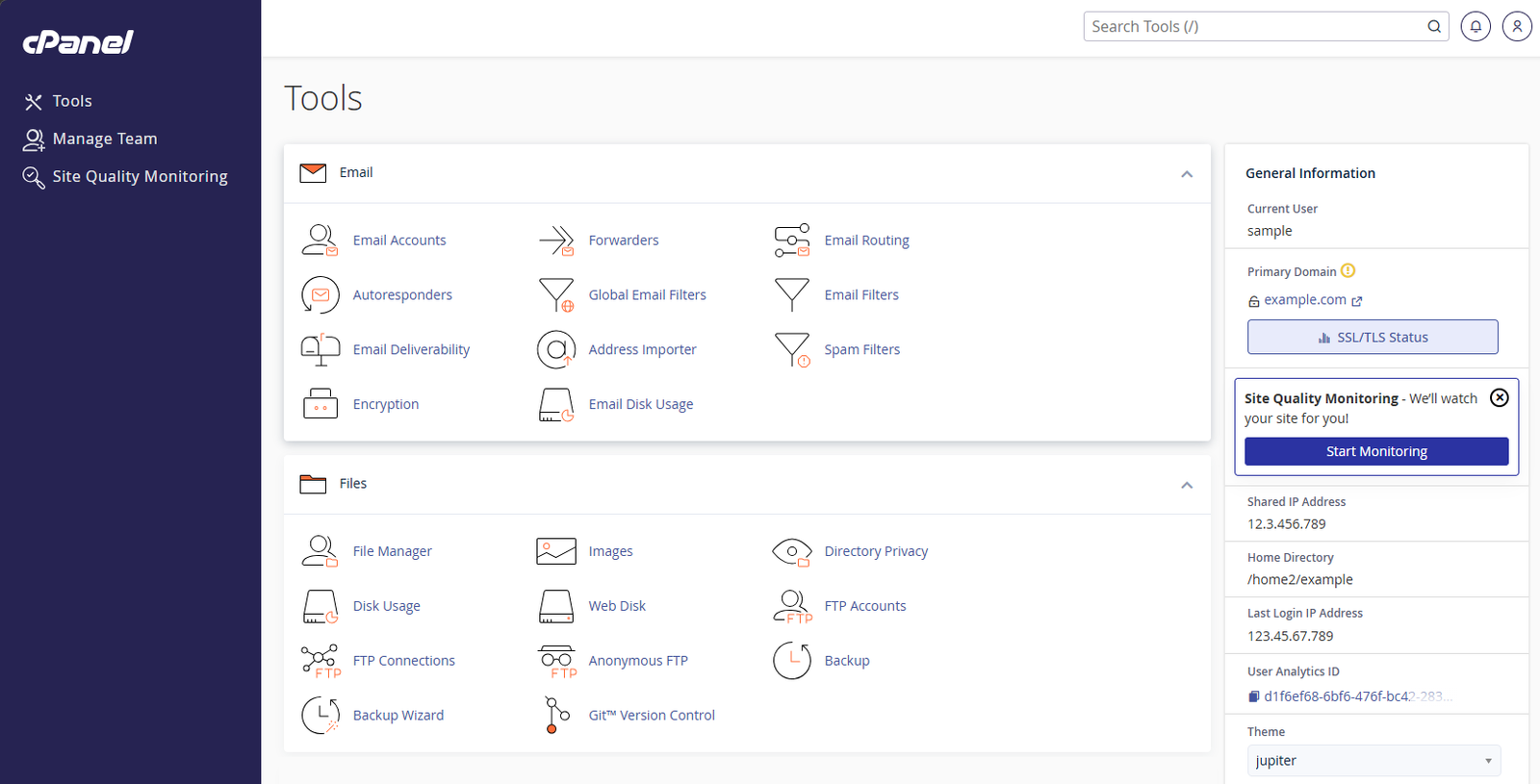
On top of cPanel, Bluehost has added its own WonderSuite layer for WordPress-specific management — giving users a dedicated WordPress dashboard that handles plugin management, site health, updates, and staging without requiring cPanel knowledge for day-to-day tasks.
For complete beginners, the WonderSuite onboarding wizard is the most important dashboard element. It walks new users through site creation step by step — niche selection, design style, pre-built page structure — and produces a working WordPress site before the user has had to make any technical decisions. Multiple independent reviews in 2026 describe this as the smoothest hosting onboarding experience available.
Dashboard verdict: cPanel is familiar and well-documented. WonderSuite is the best beginner onboarding experience in shared hosting. Experienced users get the familiarity of cPanel; beginners get a hand-held setup. Strong on both sides.
Security: What Each Bluehost Plan Includes
Included on All Bluehost Plans
- ✓ Free SSL certificate on all plans — HTTPS configured automatically
- ✓ Cloudflare CDN on all plans — DDoS protection and latency reduction included standard
- ✓ Weekly malware scanning automated, included on all plans
- ✓ Web application firewall included standard
- ✓ Domain privacy (WHOIS) on Business plan and above (1 year free)
- ✓ Staging environments on Business plan and above (2026 update) — not available on Starter
Available on Business Plan and Above
- ✓ Malware removal automated removal (not just scanning) on Business plan and above
- ✓ Advanced security features web application firewall and enhanced DDoS protection on Business+
- ✓ CodeGuard automated backups daily automated backups with one-click restore
The SiteLock Add-On Situation
SiteLock malware scanning is frequently offered as an add-on at checkout. On some plan configurations it may appear pre-selected. Basic malware scanning is included on all Bluehost plans without SiteLock — the SiteLock add-on provides more frequent scanning and priority removal, but it is not mandatory and represents an additional monthly cost. Evaluate whether you need it for your specific site before adding it.
Customer Support: Phone, Chat, and the BLU AI
Phone support is the most important differentiator in any honest bluehost review. Bluehost is one of the very few major shared hosts that still offers 24/7 telephone access to a support agent — and this is a genuine, defensible advantage for users who need it.
Support Channels
- ✓ 24/7 live chat available on all plans; routes through BLU AI initial intake before connecting to a human agent
- ✓ 24/7 phone support on Business plan and above — not available on the Starter plan
- ✓ BLU AI assistant handles initial contact and basic queries; note that multiple independent reviewers in 2026 have flagged cases where BLU provided inaccurate technical answers — always verify with a human agent on important questions
- ✓ Email/ticket support available for non-urgent issues
- ✓ Knowledge base extensive but some documentation is outdated; always check the published date before following step-by-step instructions
The practical support reality: for users on the Starter plan, phone support is not available. If telephone access is your primary reason for choosing Bluehost over alternatives, verify that the plan you are purchasing includes it before committing. Upgrading to Business plan unlocks phone support alongside the other additional features.
For chat-based support, Bluehost’s average response time to a human agent is fast — Bluehost consistently routes to a human more quickly than some AI-heavy competitors. For complex technical issues, agent quality is generally rated positively in independent 2026 user testing.
Support verdict: Phone support on Business+ is Bluehost’s strongest competitive advantage. Not available on Starter. BLU AI can be inaccurate on technical questions — escalate to human for anything important. Overall, strong on support accessibility.
Bluehost Website Builder Review: Is It Worth Using?
Bluehost’s website builder is delivered through WonderSuite — its AI-powered site creation and management system. In this bluehost review, the website builder deserves its own section because it represents a meaningfully different experience from the standard WordPress install.
What WonderSuite Offers
- ✓ AI site generation describe your website and WonderSuite generates a complete WordPress site structure, including layout, copy placeholders, and page hierarchy
- ✓ WonderBlocks pre-built WordPress page sections — hero sections, feature grids, testimonials, contact forms — added with one click
- ✓ Guided brand setup colours, fonts, and logo placement configured through a step-by-step wizard
- ✓ WooCommerce integration eCommerce configuration guided through the same wizard framework for store setups
- ✓ Available on all plans WonderSuite is not a premium add-on — it is included with every Bluehost hosting plan
WonderSuite is not a standalone drag-and-drop website builder in the style of Wix or Squarespace. It is a WordPress creation and management layer. Users still end up with a WordPress site under the hood — which means the full WordPress plugin ecosystem, theme library, and content management functionality are all available once the initial setup is complete.
For complete beginners who find the blank WordPress dashboard intimidating, WonderSuite bridges the gap between ‘I signed up’ and ‘I have a working website.’ Independent reviewers in 2026 consistently rate it as the smoothest WordPress onboarding experience available from any major host.
Website builder verdict: Excellent for WordPress beginners. Produces a real WordPress site — not a locked proprietary build. WonderBlocks accelerate page building significantly for non-developers. Best-in-class guided WordPress creation.
What Real Users Say: Bluehost Reviews in 2026
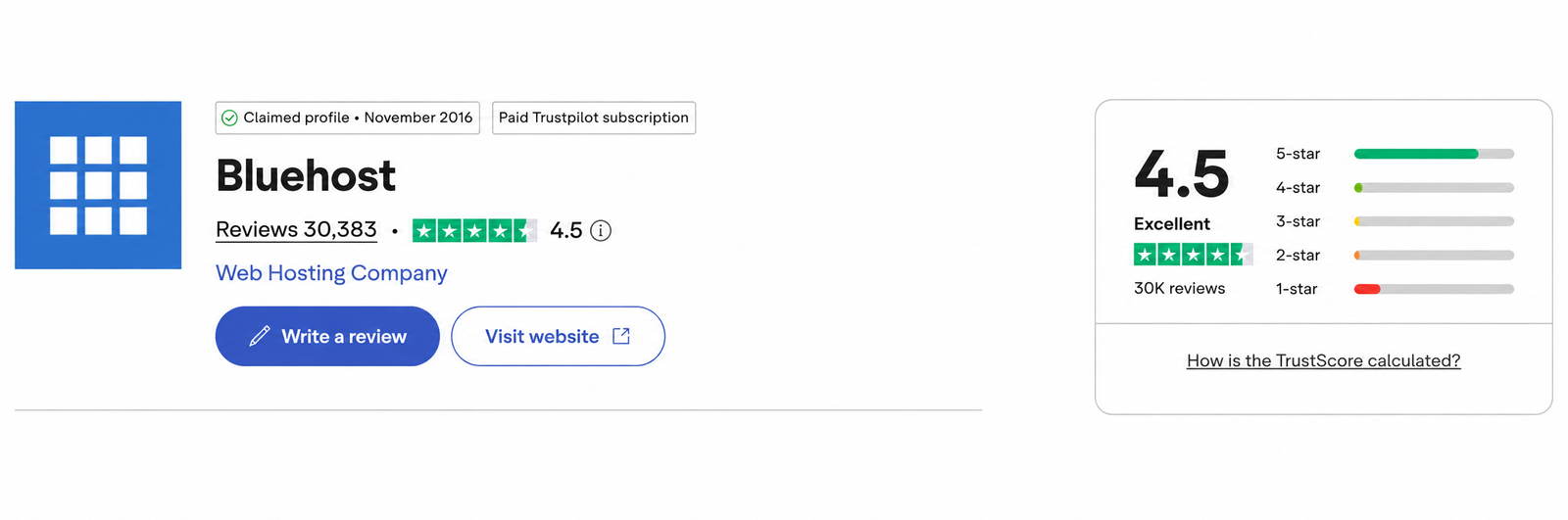
Any honest bluehost review must confront the fact that Bluehost’s Trustpilot score is 4.5 out of 5 (Excellent) from 30,383 reviews — higher than many expect. However the star distribution tells a more nuanced story: the majority are 5-star reviews, with a notable minority of 1-star reviews concentrated around billing complaints.
The Trustpilot Rating Explained
Bluehost’s polarised review distribution is shaped by two consistent complaint types: renewal price shock (users who did not read the renewal terms carefully) and upsell frustration at checkout. These are legitimate complaints about business practices, not necessarily about hosting quality. Users who understood the pricing structure before committing are significantly less likely to leave negative reviews.
The technical performance reviews — uptime, speed, WordPress functionality — are generally more positive. The dissatisfaction is concentrated around billing practices and the checkout experience rather than the hosting product itself.
What Users Consistently Praise
- ✓ WonderSuite onboarding: the most common genuine positive; first-time users describe getting a working WordPress site live faster than with any other host they have tried
- ✓ Phone support accessibility: users on Business plans frequently cite the phone option as the deciding reason they chose and stayed with Bluehost
- ✓ WordPress stability: long-term users report consistent uptime and few WordPress-specific technical issues on established sites
- ✓ cPanel familiarity: experienced users migrating from other cPanel hosts describe zero adjustment period
What Users Consistently Criticise
- ✗ Renewal price increase: the most common negative across all platforms; most users were not aware of how significant the jump would be
- ✗ Checkout upsells: multiple reports of add-ons being pre-selected; some users report difficulty obtaining refunds for unwanted purchases
- ✗ Support on Starter plan: users who purchased the Starter plan expecting phone support and discovered it was not included
- ✗ International speed: users in India, South Asia, and Latin America consistently report slower performance than advertised
- ✗ BLU AI accuracy: users seeking technical help via chat report cases where BLU’s answers were incorrect or outdated
On Reddit
The top Reddit thread for ‘bluehost review’ — currently ranking position 1 on Google — is titled ‘Is Bluehost really that bad?’ The consensus in the thread is nuanced: Bluehost is functional but not recommended when better alternatives exist at the same price. The most upvoted comments note that Bluehost’s quality has improved since its EIG era and that it remains a reasonable choice for beginners who specifically need phone support or the guided WordPress experience — while pointing to Hostinger and SiteGround as stronger technical alternatives.
Bluehost Pros and Cons: The Full Bluehost Review Picture
What We Like
- ✓ WordPress.org recommended — officially endorsed
- ✓ Phone support 24/7 on Business plan and above
- ✓ WordPress pre-installed — live site before you log in
- ✓ WonderSuite guided setup — best beginner onboarding available
- ✓ AI website builder included on all plans
- ✓ CDN included on all plans — no upgrade needed
- ✓ Staging environments on Business plan and above (2026 update)
- ✓ Free domain for year one
- ✓ Free SSL on all plans
- ✓ 30-day money-back guarantee
- ✓ cPanel — familiar to experienced users
- ✓ BLU AI assistant for support queries
- ✓ 99.99% uptime guarantee
- ✓ Cloudflare DDoS protection standard
- ✓ WonderBlocks — pre-built WordPress page sections
What Could Be Better
- ✗ Aggressive upsells during checkout — consistently flagged in reviews
- ✗ No phone support on Starter plan
- ✗ Renewal prices significantly higher than intro rates
- ✗ Starter plan: only 1 website
- ✗ US-focused infrastructure — slower for international audiences
- ✗ BLU AI chatbot can give inaccurate technical answers
- ✗ Complex pricing structure — easy to over-pay if not careful
- ✗ Owned by Newfold Digital (formerly EIG) — shared infrastructure concerns
- ✗ No LiteSpeed servers — Apache-based, slower than Hostinger under load
- ✗ India, Asia, and Latin America: noticeably slower speeds
- ✗ SiteLock add-on often pushed at checkout — not always necessary
- ✗ Starter plan storage limited — only 10 GB NVMe, fills quickly on media-heavy sites
- ✗ Some users report difficulty cancelling without upsell offers
- ✗ Email limited on Starter plan
Who Should Choose Bluehost?
Based on this bluehost review, Bluehost is the right choice if you are:
- ✓ A complete beginner launching your first website who wants the most guided, hand-held WordPress setup experience available — WonderSuite is the best in class for this
- ✓ Running a US-focused website where Oracle Cloud’s North American infrastructure delivers competitive and reliable performance
- ✓ Someone who needs telephone support as a non-negotiable requirement — Business plan and above gives you 24/7 phone access that Hostinger and many other hosts cannot match
- ✓ Migrating from another cPanel host and unwilling to learn a new control panel interface — cPanel means zero adjustment period
- ✓ Building a single WordPress site on a budget with a clear understanding of the renewal pricing structure
- ✓ A developer or agency who prefers cPanel’s familiar environment and values the phone escalation option for client site management
Get Bluehost for WordPress
WordPress.org recommended · WonderSuite guided setup · Free domain for year one
30-day money-back guarantee · No hidden fees at checkout if you read carefully
Who Should NOT Choose Bluehost?
Bluehost is the wrong choice if you are:
- ✗ Targeting a global, Indian, South Asian, or Latin American audience where Bluehost’s US-focused infrastructure delivers noticeably slower speeds than hosts with regional data centres
- ✗ Requiring staging, domain privacy, or malware removal on a tight budget — these are Business-only features; Hostinger Business includes them at a lower introductory price ($3.99/mo vs $6.99/mo)
- ✗ Primarily motivated by performance per dollar — Hostinger’s LiteSpeed servers consistently outperform Bluehost’s Apache under concurrent load, and Hostinger Business covers 50 websites at a lower introductory price ($3.99/mo vs $6.99/mo)
- ✗ Looking for LiteSpeed performance under high concurrent WordPress traffic; Apache cannot match LiteSpeed at scale
- ✗ Unwilling to navigate the checkout carefully the upsell structure requires attention to avoid unintended add-on charges
- ✗ Expecting the Starter plan to include phone support it does not — Business plan is the minimum for telephone access
Which Bluehost Plan Do We Recommend?
For most beginners: Bluehost Business Plan
The Business plan is the minimum tier we recommend for most users. At approximately $6.99 per month introductory (verify current rate at bluehost.com), it includes up to 50 websites, malware removal rather than just scanning, CodeGuard automated daily backups, and — critically — phone support. The Starter plan’s lack of phone support, domain privacy, staging, and malware removal make it a poor fit for the majority of users despite its lower advertised price.
Avoid the Starter Plan for most use cases
The Starter plan’s lack of phone support, domain privacy, staging, and malware removal represent a false economy for most users. The additional cost of the Business plan is justified by the features it unlocks. If your absolute ceiling is the Starter plan budget, our Hostinger Review covers the Premium plan at a similar price point — up to 3 websites, free SSL for life, 20 GB SSD, and stronger LiteSpeed performance.
Bluehost Review: Our Final Verdict
Our bluehost review verdict is clear but conditional: Bluehost is a capable, well-established web host that earns a 4.5 out of 5 rating for the right user — and a 3 out of 5 for the wrong one.
For US-focused sites, complete beginners who want guided WordPress creation, and users who need telephone access to support, Bluehost delivers genuinely on its promises. The WonderSuite onboarding is best-in-class. The phone support is real and available. The WordPress.org endorsement, held since 2005, reflects a product that has consistently met independently verified standards.
The weaknesses are equally real: steep renewal pricing, aggressive checkout upsells, US-focused infrastructure that underperforms for global audiences, and a polarised Trustpilot profile that reflects legitimate billing-related frustrations from users who did not understand the pricing structure before committing.
Go in with accurate expectations — understand the renewal rate, read every item at checkout, choose the Business plan over Starter for most use cases — and Bluehost will serve you well. Go in expecting the introductory price to continue indefinitely and you will be disappointed.
Get Bluehost for WordPress
★★★★½
4.5/5
Bluehost is a capable, well-established web host that earns 4.5/5 for the right user. For US-focused sites, complete beginners, and users who need phone support — Bluehost delivers on its promises. The weaknesses are equally real: steep renewal pricing, checkout upsells, and US-focused infrastructure. Go in with accurate expectations and it will serve you well.
30-day money-back guarantee · No hidden fees at checkout if you read carefully
Frequently Asked Questions
Is Bluehost good in 2026?
Yes, with conditions. Our bluehost review found that Bluehost is genuinely good for US-focused websites, complete beginners who want the most guided WordPress setup available, and users who need telephone access to support. It is less suitable for international audiences, multi-site setups, or users who prioritise LiteSpeed performance. Understanding which profile matches your situation is more useful than a simple yes or no.
Is Bluehost worth the money?
At introductory rates, yes — particularly on the 36-month Business plan. At renewal, Bluehost becomes one of the more expensive options in the budget hosting category, with the Starter plan renewing at $9.99 per month and Business at higher rates. Always calculate your full two-year cost before committing. If long-term renewal cost is your primary concern, Bluehost’s renewal pricing is actually comparable to or slightly lower than Hostinger at similar tiers (Starter $9.99/mo vs Hostinger Premium $10.99/mo), so choose based on features rather than assuming Hostinger is cheaper at renewal.
Why does Bluehost have mixed Trustpilot reviews?
Bluehost’s polarised review distribution is shaped by two recurring complaints: renewal price shock from users who did not read the renewal terms, and frustration with add-ons at checkout. Technical reviews of hosting performance, uptime, and WordPress functionality are considerably more positive. The 1-star spike reflects billing practice concerns more than hosting quality concerns.
Does Bluehost have phone support?
Yes — on the Business plan and above, Bluehost offers 24/7 phone support. The Starter plan does not include phone support. If telephone access to a support agent is a non-negotiable requirement, verify that you are purchasing a Business plan or higher before committing. Phone support is Bluehost’s clearest competitive advantage over most budget hosts including Hostinger.
Is Bluehost recommended by WordPress.org?
Yes — Bluehost has been officially recommended by WordPress.org since 2005 and continues to hold that endorsement. WordPress.org’s recommendation reflects independently verified performance, security, and WordPress-specific tooling standards. Both Bluehost and Hostinger currently hold this recommendation.
What are the biggest cons of Bluehost?
The most significant weaknesses identified in this bluehost review are: steep renewal price increases after the introductory term, aggressive upsell add-ons at checkout (some pre-selected by default), no phone support on the Starter plan, US-focused infrastructure that underperforms for international audiences, and Apache web servers that are slower than LiteSpeed alternatives under high WordPress traffic. These are real limitations that affect specific user types.
How fast is Bluehost?
Bluehost delivers competitive speed for US-based audiences — WPShout’s 2026 testing recorded 0.35 seconds load time for US visitors on Oracle Cloud infrastructure. For international audiences, particularly those in India, South Asia, and Latin America, performance is noticeably slower due to Bluehost’s primarily US-focused data centre locations. The Cloudflare CDN included on all plans reduces international latency but does not fully compensate for the absence of regional servers.
What is Bluehost's uptime?
Bluehost guarantees 99.99% uptime on all shared hosting plans. In independent 2026 monitoring, Bluehost consistently delivers 99.97 to 99.99% uptime across multi-month testing periods — very close to its stated guarantee. Significant downtime events are rare and consistently reported as resolved quickly.
Is Bluehost good for beginners?
Yes — our bluehost review found Bluehost to be the strongest major host specifically for complete beginners. WordPress comes pre-installed before first login, WonderSuite provides a step-by-step guided setup wizard that produces a working site in minutes, and WonderBlocks accelerates page building for users with no coding experience. For a beginner’s first site, Bluehost’s onboarding experience is the best available from any major shared host.
Is Bluehost good for WooCommerce?
Yes, with the right plan. Bluehost’s eCommerce Essentials plan is specifically designed for WooCommerce and includes payment processing tools, product management, and WooCommerce pre-installation. The Business plan also supports WooCommerce effectively for small to medium stores. For high-traffic stores generating significant daily transaction volume, consider whether dedicated or VPS hosting better serves your requirements.
How does Bluehost compare to Hostinger?
Hostinger offers faster global speeds (LiteSpeed servers, 10 data centres), lower long-term pricing, and more features at entry level. Bluehost offers the best-guided WordPress setup experience and — uniquely — phone support on Business plans. For US-focused sites where phone support matters, Bluehost is the stronger choice. For global audiences, multi-site setups, and long-term value, Hostinger is stronger. Both are WordPress.org recommended. See our full Hostinger vs Bluehost comparison for the complete breakdown.
Does Bluehost offer a free domain?
Yes — Bluehost includes a free domain name for the first year with annual hosting plans. After year one, the domain renews at the standard market rate, typically $15 to $20 per year for a .com. If you want to keep long-term domain costs lower, registering your domain separately with a registrar like Namecheap is worth considering.
Can I get a refund from Bluehost?
Bluehost offers a 30-day money-back guarantee on hosting plans. Domain registration fees are non-refundable. If you cancel within the first 30 days, you receive a refund for the hosting cost minus any domain registration charges. Beyond 30 days, refunds are not standard practice. Several users in 2026 reviews report difficulty obtaining refunds for add-on products; if you encounter this, request escalation to a senior agent by phone if you are on a Business plan.
What is WonderSuite?
WonderSuite is Bluehost’s AI-powered WordPress creation and management system, included with all hosting plans. It consists of a guided setup wizard that generates a complete WordPress site structure from a plain-language description, WonderBlocks (pre-built page sections added in one click), and an ongoing management dashboard for WordPress-specific tasks. It is widely considered the best-guided WordPress onboarding experience available from any major hosting provider.
Is Bluehost owned by EIG?
Bluehost was previously owned by Endurance International Group (EIG), which had a controversial reputation for degrading acquired hosting brands. EIG rebranded as Newfold Digital in 2021. Bluehost is now one of Newfold Digital’s primary brands. Independent reviewers in 2026 generally note that Bluehost’s product quality has improved compared to its EIG era, though the ownership structure remains a consideration for users researching the company’s background.
How We Researched This Bluehost Review
This bluehost review is based on a structured research process across the following:
- Official documentation verified against Bluehost’s current plan pages and feature lists as of June 2026
- Independent speed and uptime data sourced from WPShout, WebsiteBuilderExpert, AllAboutCookies, Tooltester, and Cybernews 2026 testing reports
- Verified user review analysis across Trustpilot, G2, Reddit, and hosting-specific platforms to identify consistent patterns
- Competitor cross-referencing all claims verified against independent sources and compared to websiteplanet.com (4,000 words), tooltester.com (3,214 words), techradar.com (2,831 words), and crazyegg.com (2,476 words)
- Pricing analysis full two-year total cost of ownership calculated including renewal rates and domain costs
- Support quality assessment evaluation of support channels, response times, and BLU AI accuracy based on independent 2026 reviewer testing
We have an affiliate relationship with Bluehost. Affiliate commissions do not affect our ratings, scores, or editorial decisions. The honest coverage of Bluehost’s weaknesses in this review reflects our standard for every article on Digital Tool Zone.

Written by Abdul Rasheed | Last Updated: August 2026
Abdul holds a BS in Information Technology and founded Digital Tool Zone to provide honest, independently researched digital tool reviews for bloggers, freelancers, and small business owners. Every recommendation on this site is held to one standard: would this have helped me when I needed it?
Our Final Verdict
4.5/5
★★★★½
Bluehost
Best for Beginners & US Sites
From $3.99/mo · 30-day guarantee
Entry price
$3.99/mo
Starter renewal
$9.99/mo
Starter storage
10 GB NVMe
Business storage
50 GB NVMe
Uptime
99.99%
Phone support
Business+ only
Money-back
30 days
📋 On This Page