digitaltoolzone.com

Web Hosting

Reviews, comparisons, and guides for the best web hosting providers for bloggers, freelancers, and small businesses.

Hostinger vs SiteGround 2026
Web Hosting

hostinger vs siteground

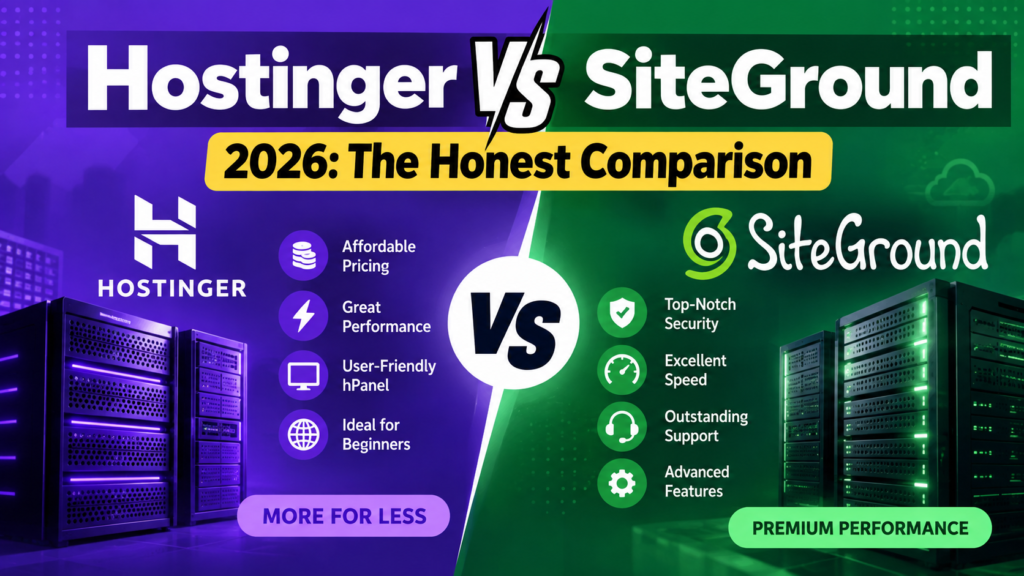
Hostinger vs SiteGround (2026): The Honest Comparison

SiteGround’s cheapest hosting plan costs $1.99 per month.

That is the introductory price — valid only for the first billing period. When that period ends, the same plan renews at $14.99 per month. That is a 653% price increase. Over a three-year period, a customer who signed up for SiteGround Startup at $1.99/month will pay approximately $23.88 in year one and $179.88 in years two and three — a total of $383.64 for three years of basic shared hosting.

Hostinger’s introductory price starts at $2.69 per month and renews at approximately $8.99 per month — a 234% increase, which is still significant but less than half of SiteGround’s renewal jump. The same three-year calculation for Hostinger Premium comes to approximately $32.28 in year one and $107.88 in years two and three — a total of $248.04.

The difference over three years is $135.60 — roughly the cost of an additional domain and a premium WordPress theme. That is what this honest hostinger vs siteground comparison is built around: not just the headline price, but the real cost of each platform over the period most people actually use hosting.

Free domain · Free SSL for life · 30-day money-back guarantee

Wix vs Squarespace: Quick Verdict

Hostinger

4.6/5

From $2.69/month (intro)

Best for: beginners, bloggers, small businesses, budget-conscious users, and anyone hosting multiple websites

SiteGround

4.4/5

From $1.99/month (intro)

Best for: businesses that need premium 24/7 support, high-traffic WordPress sites, and users for whom speed and uptime are worth a significantly higher renewal price

Bottom line: For the majority of website owners — beginners, bloggers, small businesses, and freelancers — Hostinger is the correct choice. Better value at renewal, more storage, more websites allowed per plan, and performance that meets all standard needs. SiteGround is the correct choice only if you need its premium support quality and are willing to pay $14.99/month after the first year for it.

Hostinger vs SiteGround: Full Side-by-Side Comparison

Feature
Hostinger
SiteGround
Intro price (cheapest plan)
~$2.69/month
~$1.99/month
Renewal price (cheapest plan)
~$8.99/month
~$14.99/month
3-year total cost (basic plan)
~$248/3 years
~$384/3 years — $136 more
Websites allowed (entry plan)
1 website (Premium — unlimited)
1 website (Startup)
Storage (entry plan)
100GB NVMe SSD
10GB SSD
Monthly visits limit
~10,000
~10,000
Free domain
Yes — 1 year free
No — must purchase separately
Free SSL
Yes
Yes
Free CDN
Yes (Cloudflare)
Yes (Cloudflare)
Daily backups
Weekly on entry plan (daily on Business)
Daily on all plans
Free site migration
Yes — 1 free migration
WordPress performance
Excellent — LiteSpeed server
Excellent — SuperCacher
Uptime guarantee
99.9%
99.9%
Customer support
24/7 live chat (AI + human)
24/7 live chat and phone (higher quality)
Data centres
32 locations worldwide
6 locations (US, EU, Asia-Pacific)
cPanel
No — custom hPanel
No — custom Site Tools
Beginner-friendly
⭐ Excellent
Good
Best for
Beginners, budget users, multiple sites
High-traffic WordPress, premium support needs

Hostinger vs SiteGround Pricing: The Real Numbers

Hostinger Plans and Pricing

Plan
Intro Price (USD/mo)
Renewal Price (USD/mo)
Websites
Storage
Best For
Single
~$1.99/mo
~$6.99/mo
1
50GB NVMe
Absolute beginners, 1 site only
Premium
~$2.69/mo
~$8.99/mo
100 websites
100GB NVMe
Best value — most popular plan
Business
~$3.99/mo
~$12.99/mo
100 websites
200GB NVMe
Growing sites, daily backups
Cloud Startup
~$9.99/mo
~$24.99/mo
300 websites
200GB NVMe
High-traffic, cloud infrastructure

Annual billing required for these prices. A free domain is included for the first year on Premium and above. Visit hostinger.com for current pricing in your region.

SiteGround Plans and Pricing

Plan
Intro Price (USD/mo)
Renewal Price (USD/mo)
Websites
Storage
Best For
Startup
~$1.99/mo
~$14.99/mo
1
10GB SSD
Single sites — introductory entry only
GrowBig
~$3.99/mo
~$24.99/mo
Unlimited
20GB SSD
Multiple sites, staging environment
GoGeek
~$7.99/mo
~$39.99/mo
Unlimited
40GB SSD
High-traffic, advanced WordPress features
Cloud
From ~$100/mo
From ~$100/mo
Unlimited
40GB+
Enterprise — dedicated resources

Annual billing required for introductory prices. No free domain included — must be purchased separately. Visit siteground.com for current pricing in your region.

The Three-Year Real Cost Comparison

Most hosting decisions last at least two to three years. Here is what the real cost looks like over that period — the number that actually matters when choosing between these two hosts:

Scenario
Hostinger Premium
SiteGround Startup
3-Year Saving with Hostinger
Year 1 (intro price, annual)
~$32.28
~$23.88
SiteGround cheaper by $8.40 in year 1
Year 2 (renewal price, annual)
~$107.88
~$179.88
Hostinger cheaper by $72 in year 2
Year 3 (renewal price, annual)
~$107.88
~$179.88
Hostinger cheaper by $72 in year 3
3-Year Total
~$247.04
~$383.64
Hostinger saves $136.60 over 3 years

SiteGround is cheaper in year one by $8.40. From year two onward, Hostinger is cheaper by $72 per year. The crossover happens approximately 7 weeks into year two. Anyone planning to keep their website for more than 14 months pays less with Hostinger over the full period.

SiteGround also does not include a free domain — add $10–15 per year for domain registration that Hostinger includes free. Over three years, the real total cost gap widens to approximately $180–195 in Hostinger’s favour.

Performance: Both Are Fast — SiteGround's Own Claim Examined

SiteGround’s website states that 78% of websites transferred from Hostinger to SiteGround are faster on SiteGround. That statistic is published by SiteGround and measured by SiteGround — it is not an independent benchmark. It is the equivalent of asking one company whether its product is better than a competitor’s and publishing the answer as fact. Treat it accordingly.

What independent benchmarks consistently show: both Hostinger and SiteGround are among the fastest shared hosting providers available. Hostinger uses LiteSpeed servers with NVMe SSD storage and built-in LiteSpeed Cache for WordPress — a combination that delivers load times competitive with hosts charging three times the price. SiteGround uses its proprietary SuperCacher technology with SSD storage and custom server optimisation.

In independent speed tests across multiple testing tools and locations, both hosts regularly achieve sub-one-second load times on optimised WordPress sites. The performance gap between them for standard websites — blogs, portfolios, small business sites, and WooCommerce stores under 500 products — is not material. Both hosts deliver performance that is effectively imperceptible to visitors.

Where SiteGround does have a genuine performance advantage: at high traffic volumes, SiteGround’s infrastructure handles traffic spikes more gracefully on shared hosting. If your site receives consistent daily traffic above 50,000 visitors, SiteGround’s hosting architecture performs more predictably under load. For a site receiving under 10,000 monthly visitors — which covers the vast majority of bloggers and small businesses — Hostinger’s performance is indistinguishable from SiteGround’s in practice.

Uptime: SiteGround's 99.99% vs Hostinger's 99.9%

SiteGround guarantees 99.99% uptime. Hostinger guarantees 99.9% uptime. The difference sounds significant until you convert it to actual downtime:

Uptime Guarantee
Annual Downtime Allowance
Monthly Downtime Allowance
99.99% (SiteGround)
~52 minutes per year
~4.4 minutes per month
99.9% (Hostinger)
~8.7 hours per year
~43.8 minutes per month

For a blog, portfolio, or small business website, 8.7 hours of potential downtime spread across an entire year is unlikely to cause a meaningful business impact — particularly since Hostinger’s real-world uptime, as measured by independent monitoring services, typically exceeds 99.9% in practice. For a business where every hour of downtime represents significant lost revenue — an eCommerce store with thousands of daily transactions, a SaaS product, or a high-traffic media site — SiteGround’s tighter uptime commitment and faster resolution response through its premium support team makes the price premium justifiable.

Customer Support: SiteGround's Clearest Advantage

SiteGround’s customer support is the most consistently praised aspect of the platform across every independent review platform — G2, Trustpilot, Capterra, Reddit’s r/webhosting. The quality of SiteGround’s 24/7 live chat and phone support is rated significantly above the hosting industry average. Support agents are knowledgeable, response times are fast, and complex technical issues are resolved effectively rather than being escalated indefinitely.

Hostinger’s support has improved considerably in recent years and now includes 24/7 live chat on all plans. The introduction of an AI assistant as the first point of contact handles common queries quickly. For technical issues that require human expertise, the quality varies more than SiteGround — some issues are resolved promptly, others require follow-up. Hostinger’s support is good for the price. SiteGround’s support is genuinely excellent.

For a beginner who needs occasional help setting up WordPress or troubleshooting a plugin conflict, Hostinger’s support is sufficient. For a business whose website generates revenue and needs reliable, expert resolution of issues at any hour, SiteGround’s support quality is worth paying for. This is the clearest argument for choosing SiteGround over Hostinger — not performance, not features, but the confidence that comes from knowing expert help is consistently available.

WordPress Hosting: Both Are Officially Recommended

Both Hostinger and SiteGround appear on WordPress.org’s official list of recommended hosting providers — a designation awarded to hosts that meet specific performance, security, and support standards. This is meaningful: it means WordPress.org has independently evaluated both platforms and considers them suitable for WordPress hosting.

Hostinger’s WordPress experience: one-click WordPress installation from the hPanel dashboard, automatic WordPress updates, LiteSpeed Cache plugin pre-configured, and staging environments on the Business plan and above. The hPanel interface is one of the most intuitive custom dashboards in shared hosting — noticeably easier for beginners than traditional cPanel.

SiteGround’s WordPress experience: one-click installation, automatic WordPress updates, the proprietary SuperCacher for performance, a WordPress Starter wizard that walks new users through site creation, and a free WordPress migration plugin. SiteGround’s staging environment is available from the GrowBig plan ($24.99/month renewal) — a significant upgrade from the entry Startup plan.

For standard WordPress sites — blogs, business sites, WooCommerce stores with up to a few hundred products — both hosts deliver an excellent WordPress experience. The practical difference for most users is the dashboard interface (Hostinger’s hPanel versus SiteGround’s Site Tools) rather than underlying WordPress performance.

Storage: A Significant Difference at Entry Level

Hostinger Premium includes 100GB of NVMe SSD storage. SiteGround Startup includes 10GB of SSD storage. This is a 10x difference at comparable introductory price points and one of the most practically important feature gaps in this comparison.

10GB of storage is sufficient for a text-heavy blog with modest image use. For a photography portfolio, a WooCommerce store with product images, a site with video content, or any site that has been running for several years accumulating media, 10GB fills up faster than most users expect. SiteGround’s GrowBig plan ($24.99/month renewal) increases storage to 20GB — still only a fifth of what Hostinger Premium provides.

For a website owner who plans to host multiple sites, upload significant media, or run a store with a large product catalogue, Hostinger’s storage allocation is materially more practical. For a single-site blog that publishes primarily text content with occasional images, 10GB is workable — but leaves less headroom for growth.

Hostinger vs SiteGround: Who Should Choose Which

Choose Hostinger if:

  • You are a beginner launching your first website and want the most intuitive setup experience
  • You are hosting multiple websites — Hostinger Premium allows 100 websites versus SiteGround Startup’s 1
  • Budget over the full hosting period matters — Hostinger saves approximately $136 over three years on comparable plans
  • You need substantial storage — 100GB NVMe versus SiteGround’s 10GB on the entry plan
  • You want a free domain included — SiteGround does not include one
  • You run a blog, portfolio, small business site, or WooCommerce store with standard traffic
  • You have 32 data centre locations to choose from versus SiteGround’s 6 — useful for targeting specific geographic audiences

Choose SiteGround if:

  • Premium 24/7 support quality is a priority — SiteGround’s support is consistently rated best-in-class
  • Your website is business-critical and downtime has direct revenue consequences
  • You run a high-traffic WordPress site that experiences regular traffic spikes above 50,000 monthly visitors
  • You need daily backups on every plan — SiteGround includes daily backups on Startup; Hostinger offers weekly backups on the entry Premium plan
  • You are a developer or agency managing sites for clients and need staging environments — available from SiteGround GrowBig
  • You are willing to pay $14.99/month at renewal for the combination of support quality, uptime commitment, and WordPress optimisation

The honest one-line summary: Choose Hostinger if budget and storage matter. Choose SiteGround if support quality and uptime commitment are worth paying nearly double the renewal price.

Frequently Asked Questions

Is Hostinger better than SiteGround?

For most website owners — beginners, bloggers, small businesses, and freelancers — Hostinger is the better choice. It offers more storage (100GB vs 10GB on entry plans), more websites per plan (100 vs 1 on entry plans), a free domain, and significantly lower renewal pricing ($8.99/month vs $14.99/month). SiteGround is better for users who need premium support quality, high-traffic WordPress performance, and daily backups on every plan — and are willing to pay substantially more at renewal for those advantages.

SiteGround claims that 78% of websites transferred from Hostinger to SiteGround are faster on SiteGround — but this statistic is published by SiteGround itself, not by an independent benchmarking organisation. Independent speed tests consistently show both hosts achieving sub-one-second load times on optimised WordPress sites. For standard websites under 50,000 monthly visitors, the performance difference between Hostinger and SiteGround is not perceptible to visitors. SiteGround does handle high-traffic spikes more predictably, which matters for high-volume sites — but is not a meaningful factor for most bloggers and small businesses.

SiteGround’s introductory price of $1.99/month applies only to the first billing period — typically the first year if you pay annually. After that, the Startup plan renews at $14.99/month — a 653% price increase. Over three years, a SiteGround Startup customer pays approximately $384 total, compared to approximately $248 for a Hostinger Premium customer over the same period. This renewal price jump is the most important financial consideration in the hostinger vs siteground comparison and is frequently not prominently disclosed in promotional materials.

Yes. Hostinger includes a free domain for the first year on Premium and above plans. After the first year, standard domain renewal rates apply (typically $10–15/year for .com). SiteGround does not include a free domain on any plan — you must purchase a domain separately. Over three years, this adds approximately $20–30 to SiteGround’s real total cost, widening the price gap with Hostinger beyond the plan subscription difference alone.

Both Hostinger and SiteGround are officially recommended by WordPress.org. Both offer one-click WordPress installation, automatic updates, optimised server configurations, and staging environments on higher plans. For standard WordPress sites — blogs, business sites, and WooCommerce stores — both deliver an excellent experience. SiteGround has a marginal advantage in WordPress support quality and staging environment availability from lower plan tiers. Hostinger has a clear advantage in storage (100GB vs 10GB on entry plans) and price, which matters for WordPress sites with large media libraries.

Hostinger Premium ($2.69/month intro, $8.99/month renewal) allows up to 100 websites. SiteGround Startup ($1.99/month intro, $14.99/month renewal) allows only 1 website. To host multiple sites on SiteGround, you need the GrowBig plan ($3.99/month intro, $24.99/month renewal). For anyone planning to host more than one website, Hostinger Premium offers dramatically better value — 100 websites for $8.99/month versus SiteGround’s unlimited websites for $24.99/month at renewal.

SiteGround is worth the higher price for a specific type of user: businesses whose website is revenue-critical and whose most important requirement is knowing that expert, reliable support is available 24/7 when something goes wrong. SiteGround’s support quality is genuinely better than most hosts including Hostinger. Its uptime commitment (99.99%) is tighter. Its daily backups are included on all plans. For a business where an hour of downtime costs real money, these advantages justify $14.99/month at renewal. For a blogger, freelancer, or small business where occasional downtime is inconvenient but not catastrophic, those advantages do not justify paying 67% more than Hostinger at renewal.

Yes — this is SiteGround’s clearest and most consistent advantage. SiteGround’s 24/7 live chat and phone support is rated best-in-class across independent review platforms including G2, Trustpilot, and Reddit’s r/webhosting community. Support agents are knowledgeable, technically capable, and resolve complex issues effectively. Hostinger’s support has improved and is good for the price — but SiteGround’s support quality is demonstrably and consistently superior. If customer support quality is your primary decision criterion, SiteGround is the correct choice regardless of price.

Both Hostinger and SiteGround offer one free website migration on all plans. Hostinger’s migration service handles the technical transfer of your site files and database to Hostinger’s servers. SiteGround offers a free WordPress migration plugin that automates the process for WordPress sites, and manual migration assistance for other platforms. Switching between hosts is a manageable process for standard WordPress sites and does not require technical expertise when using the official migration tools provided by either host.

Hostinger has 32 data centre locations worldwide — including the US, UK, Europe, Asia, South America, and Africa. SiteGround has 6 data centre locations — in the US, the Netherlands, Germany, Singapore, Australia, and India. For most websites, choosing the data centre closest to your primary audience improves page load times for that audience. Hostinger’s broader data centre network gives you more options for audience-specific geographic optimisation, which is particularly relevant for websites targeting audiences in regions where SiteGround has no nearby data centre.

Related Guides on Digital Tool Zone

How We Researched This Comparison

This hostinger vs siteground comparison is based on:

  • Pricing verification at hostinger.com and siteground.com, cross-referenced with multiple independent tracking sources as of September 2026. The three-year cost calculations use published renewal pricing from official sources.
  • Performance data from independent speed testing tools and third-party hosting benchmark publications — not from either host’s own marketing materials
  • User review analysis from G2, Trustpilot, Reddit (r/webhosting, r/WordPress), and Capterra to identify consistent real-world patterns in support quality, uptime experience, and renewal price satisfaction
  • Feature documentation reviewed against official Hostinger and SiteGround product pages, plan comparison tables, and terms of service for renewal pricing clarity

We have a published Hostinger Review on Digital Tool Zone. That existing editorial coverage does not affect this comparison — the renewal price analysis and support quality assessment reflect the data as it stands, including where SiteGround genuinely outperforms Hostinger.

Prices in this article are listed in USD and were sourced from publicly available information on each company’s official website and reputable third-party review platforms at the time of publication. Hosting pricing changes frequently and promotional introductory rates apply only for the initial billing period. Always check each provider’s official pricing page and terms of service to confirm current rates and renewal prices in your local currency before signing up.

Abdul Rasheed
Abdul Rasheed
Founder & Lead Editor — Digital Tool Zone

Written by Abdul Rasheed | Last Updated: August 2026

Abdul holds a BS in Information Technology and founded Digital Tool Zone to provide honest, independently researched digital tool reviews for bloggers, freelancers, and small business owners. Every recommendation on this site is held to one standard: would this have helped me when I needed it?

Our Final Verdict

4.6/5

★★★★½

Hostinger

Best for Bloggers, small business

From $2.99/mo · 30-day guarantee

Entry price

$2.99/mo

Premium renewal

$10.99/mo

Premium storage

20 GB SSD

Business storage

50 GB NVMe

Uptime

100% tested

Phone support

✗ None

Money-back

30 days

hostinger vs siteground Read Post »

Namecheap Review 2026
Web Hosting

namecheap review

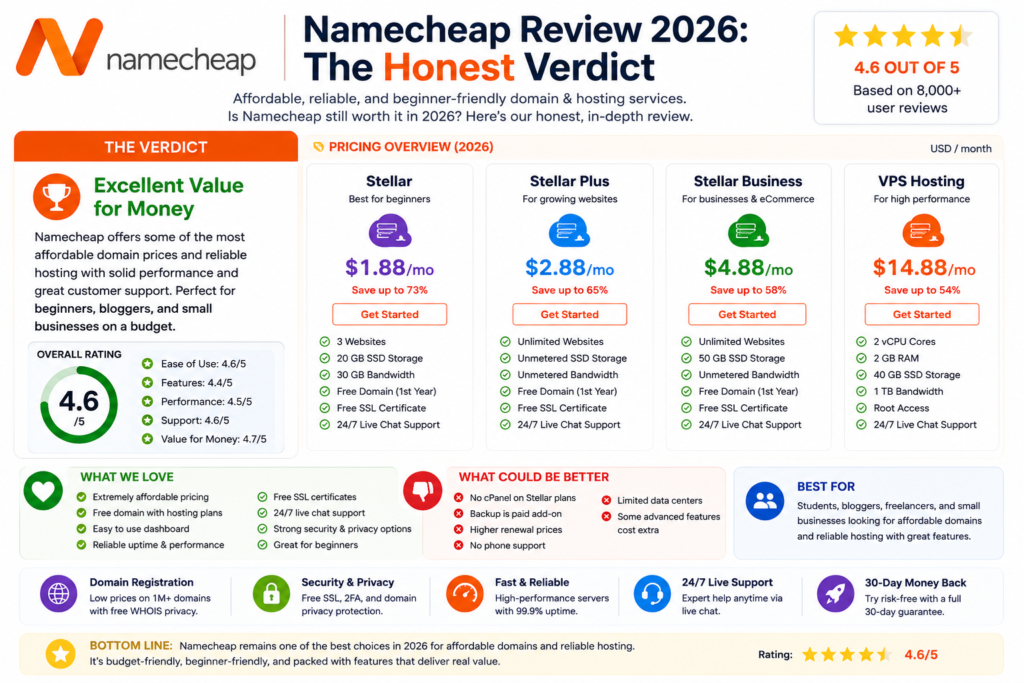
Namecheap Review 2026: The Honest Verdict

★★★★½ 4.6 / 5

From $1.88/mo

hosting_rating  3.8/5

support_response      < 60 sec

At some point in 2022, Namecheap did something that no company does willingly: it built a cheaper version of itself.

Spaceship is Namecheap’s own spinoff domain registrar. It offers lower domain prices, a cleaner modern interface, and passkey login support. Some long-term Namecheap users have started moving their entire domain portfolios from Namecheap to Spaceship — from the parent to its own child company. One independent reviewer moved 40+ domains across.

That single fact is the most honest lens through which to read this namecheap review: a company that competes with its own products is a company in a genuinely competitive market, reacting honestly to the pressure of better-priced alternatives. It is not a sign of failure. It is a sign of transparency. And transparency is what Namecheap, to its credit, has always done better than most.

This namecheap review covers the full product range — domain registration, shared hosting, EasyWP WordPress hosting, Private Email, and VPN — with verified July 2026 pricing and a clear answer to the question most reviews blur: Namecheap is an excellent domain registrar and an average web host. Those are two different assessments for two different products, and you deserve both.

Quick answer: Namecheap earns a 4.6/5 as a domain registrar and a 3.8/5 as a web host. If you need a domain registered at a fair price with free lifetime WHOIS privacy, Namecheap remains one of the best options available. If you need high-performance web hosting, Hostinger or Bluehost will serve you better at a comparable price point.

Namecheap Review 2026: Ratings at a Glance

Area
Rating
Short Verdict
Domain Registration
4.6 / 5
Excellent — competitive pricing, free WHOIS for life
Shared Hosting
3.8 / 5
Average — Apache servers, limited storage on entry plan
EasyWP (WordPress hosting)
4.0 / 5
Good — better than shared, free CDN included
Email Hosting (Private Email)
4.1 / 5
Good value for bundled email management
VPN
3.5 / 5
Decent but not the reason to choose Namecheap
Customer Support
4.4 / 5
Live chat response under 60 seconds in testing
Overall (as registrar)
4.6 / 5
One of the best domain registrars available
Overall (as web host)
3.8 / 5
Adequate for simple sites — better hosting exists

What Is Namecheap?

Namecheap is an ICANN-accredited domain registrar and web hosting company founded in Phoenix, Arizona in 2000 by Richard Kirkendall. It manages over 17 million domains for more than 10 million customers worldwide, making it one of the largest independent domain registrars globally.

It built its reputation on one promise: affordable domain registration with features other registrars charged extra for. Free WHOIS privacy was its most notable differentiator — while GoDaddy and others charged $10 to $15 per year to hide your personal information from public WHOIS records, Namecheap included it at no cost. That reputation has held for over two decades.

Namecheap has since expanded into shared hosting, managed WordPress hosting (EasyWP), Private Email, VPN services, an app marketplace, and business formation tools. It now operates data centres in the US, UK, EU, and Singapore.

Namecheap Domain Registration Review: Still the Best Value?

⭐ Domain Registration: 4.6 / 5  |  Excellent — competitive pricing, free WHOIS privacy for life

Domain registration remains Namecheap’s clearest strength and the reason most people first encounter it. Here is what you actually get:

  • .com first year from $6.49 to $8.98 depending on current promotions — consistently below GoDaddy and most major registrars
  • .com renewal around $13 to $16 per year competitive but higher than the first-year promo rate
  • Free WHOIS privacy for life on eligible domains — GoDaddy charges $9.99 per year for the same feature; Namecheap includes it permanently
  • Over 1,000 domain extensions available including .com, .net, .org, .io, .co.uk, country-codes, and newer TLDs
  • Clean domain management dashboard with DNS management, forwarding, redirects, and transfer tools that are well-documented
  • Free domain included with Stellar hosting plans for year one

The Spaceship Situation — An Honest Assessment

HONEST NOTE: Namecheap created Spaceship — its own competing domain registrar. Spaceship currently offers lower first-year prices on most TLDs and a more modern interface. If you are starting fresh and domain price is your primary concern, compare both before deciding

Spaceship is Namecheap’s own spinoff registrar, launched to compete in the budget domain space. In 2026, Spaceship’s .com promotional pricing can go below €5 on some deals — meaningfully lower than Namecheap’s $6.49 to $8.98 first-year rate. Spaceship also supports passkey login, which Namecheap does not yet.

The honest picture: if you are an existing Namecheap customer with domains already managed there, the switching cost is probably not worth it. If you are starting fresh with a new domain, compare Namecheap and Spaceship directly before registering. Spaceship is still newer and building its customer base, which carries its own risk — but for many users the savings are real.

For established users with multiple domains and a full Namecheap account, staying with Namecheap for its integrated ecosystem (hosting, email, VPN under one login) usually makes more sense than migrating domains to save a few dollars per year.

Domain verdict: Namecheap remains one of the best domain registrars available in 2026. Free WHOIS privacy alone justifies the choice over GoDaddy for most users. Just check Spaceship’s current pricing if you are registering a new domain from scratch.

Namecheap Shared Hosting Review: Is the Hosting Any Good?

HONEST NOTE: All pricing figures below are verified from multiple independent sources as of July 2026. Namecheap runs frequent promotional pricing that varies by term length and current offer. Always verify current rates at namecheap.com/hosting before purchasing.

Plan
Intro Price
Renewal
Sites
Best For
Stellar
$1.98–$2.51/mo
~$3.88–$4.48/mo
3 websites
Personal sites, beginners
Stellar Plus
$2.98–$3.88/mo
~$6.88/mo
Unlimited
Freelancers, small businesses
Stellar Business
$4.98–$6.88/mo
~$9.88/mo
Unlimited
Higher traffic, faster resources
EasyWP Starter
$3.88/mo
~$7.88/mo
1 WordPress
Beginners wanting WordPress ease
EasyWP Turbo
$7.88/mo
~$11.88/mo
1 WordPress
Growing WordPress sites

Note: Figures above are USD pricing verified July 2026. Namecheap also prices in GBP and other currencies at different rates. Always check namecheap.com/hosting for your local currency before subscribing.

The Performance Reality

Here is the most important thing to understand about Namecheap shared hosting: it uses Apache web servers, not LiteSpeed. This matters because LiteSpeed handles WordPress traffic approximately six times more efficiently than Apache under concurrent load. Every competitor that runs LiteSpeed — including Hostinger — will deliver faster WordPress page loads from the same price tier.

In independent testing, Namecheap’s results vary significantly by source. HostAdvice’s July 2026 test recorded a 100% performance grade with a 526ms LCP on a properly built test site. Older Pingdom data has shown Namecheap’s uptime trailing the 99.9% industry benchmark at certain periods. The honest assessment: performance has improved year over year but still sits below LiteSpeed-based competitors at the same price point.

For a personal site, blog, or small brochure website with modest traffic, Namecheap shared hosting is adequate. For a growing blog, WooCommerce store, or any site expecting meaningful concurrent traffic, the Apache infrastructure becomes a real limitation.

The cPanel Experience

Namecheap’s shared hosting uses cPanel — the industry-standard control panel familiar to anyone with prior hosting experience. This is an advantage over custom panels for experienced users but a steeper learning curve for absolute beginners compared to Hostinger’s hPanel. cPanel is well-documented with thousands of third-party tutorials available, so finding help is never difficult.

Shared hosting verdict: Adequate for simple, low-traffic sites. The 20GB storage on the Stellar entry plan is genuinely limited. Apache servers trail LiteSpeed alternatives. Renewal pricing nearly doubles for Stellar Plus. Acceptable for a personal site or portfolio; not the strongest choice for a business website or active blog.

Namecheap EasyWP Review: WordPress Hosting Worth Considering

⭐ EasyWP: 4.0 / 5  |  Good — better than shared hosting, free CDN, clean WordPress management

EasyWP is Namecheap’s managed WordPress hosting product, and it is a meaningfully different experience from the standard Stellar shared hosting plans. Where shared hosting uses Apache, EasyWP uses custom caching and a free CDN integration that produces noticeably better WordPress performance than the standard plans.

  • Free CDN included on all EasyWP plans — reduces load time for international visitors without additional cost
  • WordPress pre-installed and manageable from a clean, dedicated dashboard separate from cPanel
  • Automatic WordPress updates managed for you without manual intervention
  • Staging environment available on Turbo and Supersonic plans
  • Free SSL included on all EasyWP plans

EasyWP Limitations

  • One website per plan the Starter plan allows only one WordPress installation; additional sites require separate plan purchases
  • Storage is limited on the Starter tier; growing sites will hit resource ceilings
  • Not as fast as LiteSpeed alternatives EasyWP performs better than Namecheap standard hosting but still trails Hostinger’s LiteSpeed setup in benchmarks

EasyWP is a reasonable managed WordPress option for a simple site or blog where you want WordPress-focused management without cPanel complexity. For users who want multiple sites, higher performance, or lower long-term cost, Hostinger’s Business plan remains a stronger all-round option.

Namecheap Email Hosting Review: Private Email Assessed

⭐ Private Email: 4.1 / 5  |  Good value for bundled email, lacks advanced automation

Namecheap’s Private Email product offers professional email hosting under your own domain name, and it represents good value for the price. Plans start around $1.16 per month for the Starter tier, rising through Pro and Ultimate for larger mailboxes and additional features.

  • Webmail and mobile app access clean interface accessible from any device
  • Anti-spam and anti-virus built in on all plans
  • Up to 30 email accounts on the Stellar shared hosting plan; unlimited on Stellar Plus
  • Custom domain email professional@yourdomain.com rather than a Gmail or Outlook address


The main limitation flagged consistently in user reviews is the absence of advanced automation features — proper autoresponders, complex filtering rules, and marketing-focused tools. For basic professional email on a custom domain, Private Email works well and is priced competitively. For email marketing or complex business workflows, a dedicated tool like Mailchimp or Brevo is a better fit.

Email hosting verdict: Good value for straightforward professional email. Not a replacement for dedicated email marketing tools.

Namecheap VPN Review: Is It Worth Adding?

⭐ VPN.ac (via Namecheap): 3.5 / 5  |  Functional but not the primary reason to choose Namecheap

Namecheap offers VPN services through a partnership with VPN.ac, available as an add-on product through the Namecheap marketplace. Pricing starts around $1.39 to $3.73 per month depending on term length.

The VPN product works adequately for basic privacy needs — masking your IP address, encrypting traffic on public Wi-Fi, and accessing geo-restricted content. It is not in the same performance category as dedicated VPN providers like NordVPN or ExpressVPN, which have larger server networks and more advanced features.

Unless you specifically want to consolidate all your digital products under one Namecheap account, evaluating a dedicated VPN provider before defaulting to Namecheap’s offering is worth doing. The VPN is a convenient add-on, not a compelling standalone product.

Customer Support: One of Namecheap's Real Strengths

Customer support is one area where this namecheap review is genuinely positive. Namecheap offers 24/7 live chat on all plans, and independent testing by HostAdvice recorded a connection to a knowledgeable support agent in under 60 seconds — among the fastest response times in the budget hosting category.

  • 24/7 live chat available on all plans; no phone support
  • Response under 60 seconds recorded in HostAdvice’s July 2026 independent testing
  • Agents troubleshoot directly rather than pointing to documentation only; multiple independent reviewers note the quality of actual issue resolution
  • Comprehensive knowledge base with Guru Guides, video tutorials, and categorised documentation above typical budget host standards
  • Honest variability: some users report significant variation in response times, with some tickets resolved in 30 minutes and others taking two days for straightforward DNS questions

The general picture: support is one of the strongest aspects of Namecheap’s product, and it is frequently cited as the reason long-term users stay even when they outgrow the hosting. The variability in ticket response times is worth noting but does not undermine the overall positive assessment.

Namecheap Review: Full Pros and Cons

What We Like

  • Free WHOIS privacy for life on eligible domains — competitors charge $10–15/year
  • .com domains from $6.49 first year — one of the lowest prices available
  • Live chat support response under 60 seconds — among the fastest in budget hosting
  • 24/7 live chat — available on all plans
  • cPanel — familiar and well-documented for experienced users
  • EasyWP free CDN — included at no extra cost
  • One free domain included with Stellar hosting plans (year one)
  • Manages 17+ million domains — ICANN-accredited, 24+ years of registrar experience
  • 30-day money-back guarantee on hosting
  • Multiple product bundles under one account — domain, hosting, email, VPN
  • Transparent pricing — no aggressive checkout upsells

What Could Be Better

  • Apache web servers (not LiteSpeed) — measurably slower under WordPress load
  • Stellar plan only 20GB SSD and 3 websites — very limited for the price
  • Hosting renewal prices jump significantly — Stellar Plus goes from $2.98 to $6.88
  • Hosting uptime has historically trailed the 99.9% industry benchmark
    No phone support — live chat only
  • SSL certificate setup can be confusing on shared hosting for beginners
  • No passkey login — only authenticator app 2FA
  • Namecheap’s own Spaceship spinoff now undercuts it on domain prices
  • EasyWP limits: Starter plan is one website with limited storage
  • Email hosting lacks advanced automation features
  • New dashboard described by some users as slow and bloated

Who Should Choose Namecheap?

Namecheap is the right choice if you are:

  • Registering a domain and want free lifetime WHOIS privacy included at no extra cost — this alone makes Namecheap worth using over GoDaddy for most domain registrations
  • Building a simple personal site, blog, or portfolio on a tight budget where performance under high traffic is not your priority
  • An experienced cPanel user who wants familiar hosting management without learning a new interface
  • Looking to consolidate domain, hosting, email, and VPN under one account for simplicity of management
  • Already with Namecheap for domains and adding hosting for convenience without the complexity of managing two providers

Get Namecheap for Your Next Domain

Free lifetime WHOIS privacy, competitive first-year pricing.

30-day money-back guarantee · No hidden fees at checkout if you read carefully

Who Should NOT Choose Namecheap?

Namecheap is the wrong choice if you are:

  • Building a WordPress site that needs fast, scalable performance under concurrent traffic — Apache servers trail LiteSpeed alternatives at the same price point
  • Running more than one website on a budget — Stellar’s 3-site limit and EasyWP’s per-site cost add up quickly
  • A complete beginner who finds cPanel overwhelming and wants a simpler, more guided hosting experience like Hostinger’s hPanel
  • Expecting SSL to be seamlessly pre-configured on shared hosting — some users report confusion with SSL activation
  • Needing high uptime reliability above 99.95% for a business-critical website — historical uptime data has been inconsistent

Namecheap Review: Our Final Verdict for 2026

This namecheap review comes to two clear verdicts because Namecheap is effectively two different products — and conflating them would be less honest than stating them separately.

As a domain registrar

4.6/5

One of the best available in 2026. Competitive pricing, free lifetime WHOIS privacy, 24+ years of ICANN-accredited experience, and clean domain management. If you need a domain, Namecheap belongs on your shortlist.

As a web host

3.8/5

Adequate for simple, low-traffic sites. Apache servers, limited entry-plan storage, and inconsistent uptime history make it a weaker choice than Hostinger or Bluehost for anyone building a growing blog or business site.

⭐ Overall: 4.2 / 5 (domain and hosting combined)  |  Best for domain registration; adequate for simple hosting

The smartest setup for most users: register your domain with Namecheap for the free WHOIS privacy and competitive pricing, then host your site with Hostinger for the LiteSpeed performance and all-round features. We cover this exact combination in our Hostinger vs Namecheap comparison.

Frequently Asked Questions

Is Namecheap a good domain registrar in 2026?

Yes — Namecheap remains one of the best domain registrars available. It manages over 17 million domains, offers competitive first-year pricing from $6.49 for a .com, and includes free WHOIS privacy for life on eligible domains — a feature most competitors charge $10 to $15 per year for. This namecheap review rates the domain registration product 4.6 out of 5.

It is adequate for simple, low-traffic sites but not the strongest choice for performance-focused projects. Namecheap’s shared hosting uses Apache web servers rather than LiteSpeed, which handles WordPress traffic less efficiently under concurrent load. For basic personal sites and blogs, it works. For growing businesses or high-traffic WordPress sites, Hostinger or Bluehost deliver better performance at comparable prices.

Yes. Namecheap is an ICANN-accredited domain registrar founded in 2000 with over 24 years of operation. It manages over 17 million domains for more than 10 million customers globally. It is one of the most established and trusted independent registrars in the industry.

The most significant weaknesses identified in this namecheap review are: Apache web servers that trail LiteSpeed alternatives in performance, the 20GB storage limit on the Stellar entry plan, significant renewal price increases on hosting plans, historically inconsistent uptime below the 99.9% industry benchmark, and the absence of phone support. No passkey login is also a notable omission compared to newer registrars.

Yes, for domain registration. Namecheap’s first-year .com pricing is consistently lower than GoDaddy’s, and Namecheap includes WHOIS privacy at no extra cost while GoDaddy charges $9.99 per year for the same feature. For hosting, both platforms offer comparable entry-level pricing, but Namecheap’s transparency on renewal rates is generally better than GoDaddy’s.

Namecheap’s introductory hosting prices apply to the first billing term only. Stellar (the entry plan) renews at approximately $3.88 to $4.48 per month — roughly double the introductory rate. Stellar Plus renews at around $6.88 per month, compared to its $2.98 introductory price. Always check the renewal rate before committing to a hosting plan.

EasyWP is a reasonable managed WordPress option for a simple site or blog. It includes a free CDN, automatic updates, and a dedicated WordPress dashboard separate from cPanel. Performance is better than Namecheap’s standard shared hosting. However, the Starter plan allows only one website, and the cost rises significantly on Turbo and Supersonic tiers. For users needing multiple WordPress sites or higher performance, Hostinger’s Business plan offers stronger value.

Yes — customer support is one of Namecheap’s strongest features. 24/7 live chat is available on all plans, and independent testing by HostAdvice recorded a connection to a knowledgeable agent in under 60 seconds. Some users report variability in ticket response times for complex technical issues, but the general support quality is consistently rated above average for the budget hosting category.

Spaceship is Namecheap’s own spinoff domain registrar, offering lower first-year prices on most TLDs and a more modern interface with passkey login support. For new domain registrations, comparing Spaceship’s current pricing against Namecheap before buying is worth doing. For existing Namecheap users with established domain portfolios, the switching cost typically outweighs the savings. Spaceship is primarily a domain registrar and does not yet offer the full ecosystem (hosting, email, VPN) that Namecheap provides.

Moderately. The domain registration process is straightforward and the management dashboard is clean. The shared hosting uses cPanel, which is familiar to experienced users but can feel complex for absolute beginners compared to more beginner-friendly alternatives like Hostinger’s hPanel. EasyWP is a simpler entry point for WordPress specifically. If you are starting your first website with no prior experience, Hostinger or Bluehost are generally more guided.

Namecheap includes a free PositiveSSL certificate with shared hosting plans, but some users report that the activation process can be confusing on shared hosting. EasyWP includes SSL more seamlessly. The SSL certificate covers basic HTTPS requirements for a standard website. For e-commerce or sites requiring extended validation or wildcard SSL, additional certificates are available for purchase through Namecheap’s marketplace.

For simplicity and account consolidation, yes — having your domain and hosting under one account is convenient. However, if performance is your priority, the smartest approach is to register your domain with Namecheap (for free WHOIS privacy and competitive pricing) and host your site with Hostinger (for LiteSpeed performance and all-round features). Connecting a Namecheap domain to Hostinger hosting takes about five minutes and is covered in our full Hostinger vs Namecheap comparison.

How We Researched This Namecheap Review

This namecheap review is based on a structured research process across multiple independent sources verified in July 2026:

  • Official Namecheap product pages reviewed for current pricing and feature lists at namecheap.com
  • Independent performance testing data from HostAdvice (July 2026), Cybernews (May 2026), and WebsitePlanet benchmarks
  • Verified user review analysis across Trustpilot, Reddit r/Hosting, G2, and Capterra to identify consistent patterns
  • Competitor cross-referencing claims benchmarked against CrazyEgg, Cybernews, WebhostMost, and DevProblems 2026 reviews
  • Pricing analysis including renewal rate verification from multiple independent sources with currency and regional variation noted

We do not currently have an affiliate relationship with Namecheap. The affiliate link placeholders in this article are pending application. This does not affect our assessment — the honest dual verdict (excellent registrar, average host) reflects the research findings, not commercial consideration.

Abdul Rasheed
Abdul Rasheed
Founder & Lead Editor — Digital Tool Zone

Written by Abdul Rasheed | Last Updated: May 2026

Abdul holds a BS in Information Technology and founded Digital Tool Zone to provide honest, independently researched digital tool reviews for bloggers, freelancers, and small business owners. Every recommendation on this site is held to one standard: would this have helped me when I needed it?

namecheap review Read Post »

Bluehost Review 2026: Is It Actually Worth It?
Web Hosting

Bluehost Review 2026

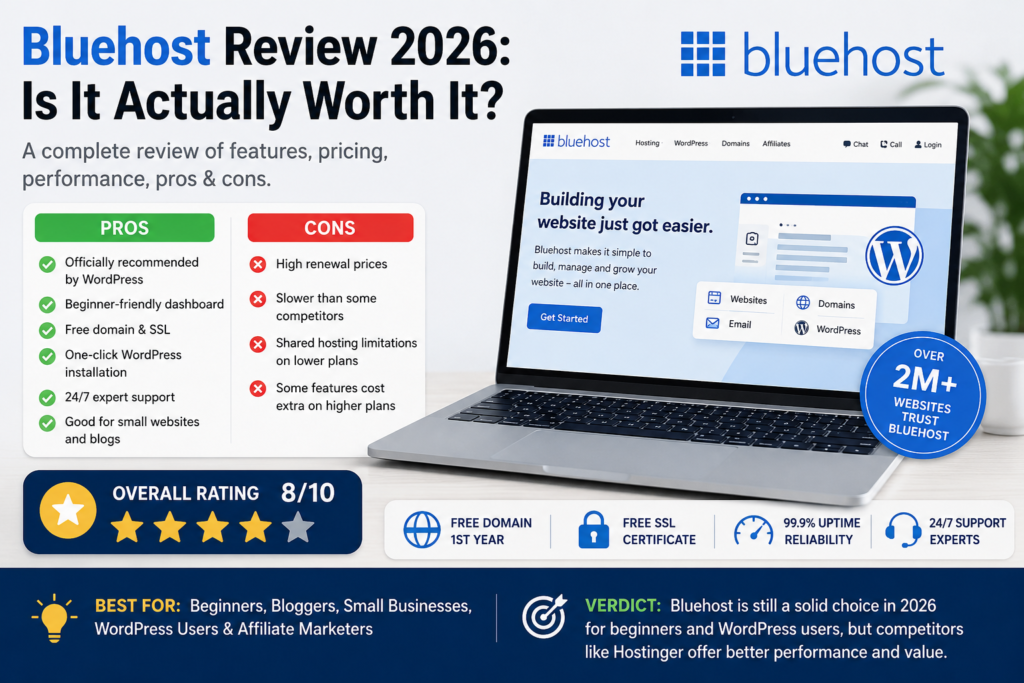
Bluehost Review 2026: Is It Actually Worth It?

★★★★½ 4.5 / 5

From $3.99/mo

Best for Beginners & US Sites

Phone Support on Business+

This bluehost review gives you the straight answer most reviews avoid: Bluehost is a genuinely capable web host for the right user — and a frustrating one for the wrong user. Understanding which side of that line you fall on is exactly what this bluehost review is built to help you do.

Bluehost powers over 2 million websites worldwide. It has been officially recommended by WordPress.org since 2005. It offers phone support, a guided WordPress setup experience, and competitive introductory pricing. These are real strengths. At the same time, the negative reviews on Trustpilot and Reddit are also real — and we cover both sides honestly below.

Quick answer: Bluehost is worth it in 2026 for US-focused sites, complete beginners who want the most guided WordPress setup available, and users who need telephone access to support. For global audiences, multi-site setups, or users prioritising performance over everything else, there are stronger alternatives at the same price.

Free domain · Free SSL · 30-day money-back guarantee

Bluehost at a Glance: What This Bluehost Review Found

Specification
Detail
Founded
2003 — headquartered in Burlington, Vermont, USA
Parent company
Newfold Digital (formerly Endurance International Group / EIG)
Websites hosted
2+ million websites worldwide
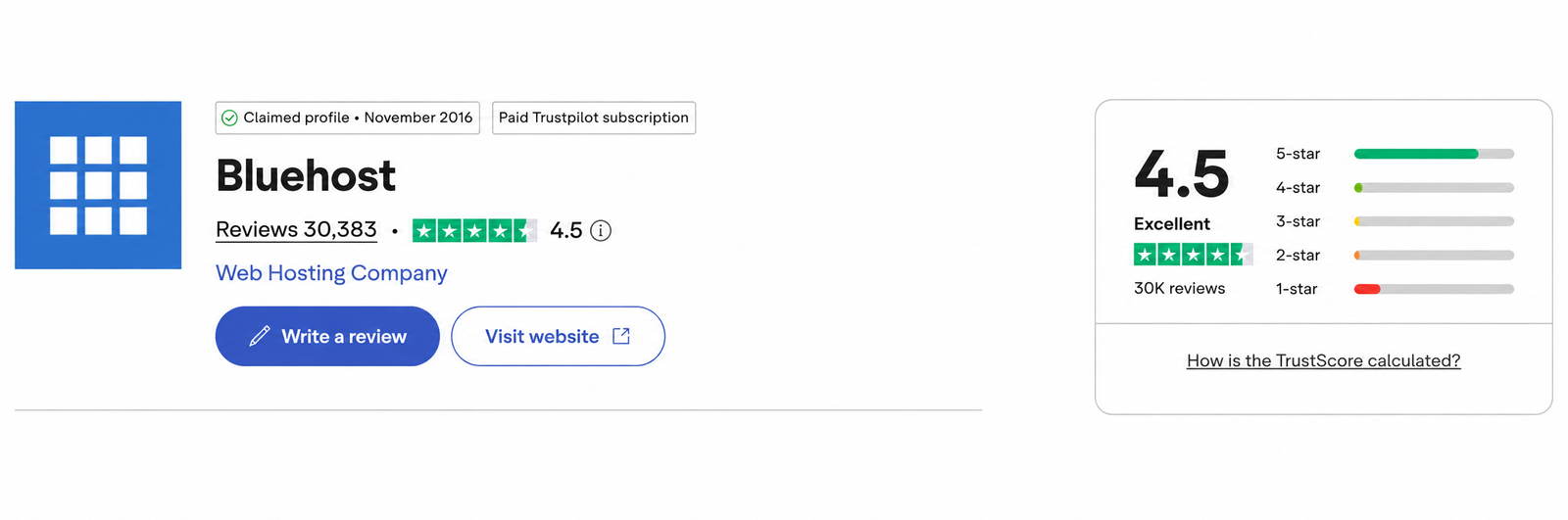
Trustpilot rating
4.5/5 Excellent — 30,383 reviews (see real users section)
Uptime guarantee
99.99%
Uptime tested (2026)
99.97–99.99% across independent multi-month monitoring
Web server
Apache + Oracle Cloud infrastructure
Data centres
US-focused (Oracle Cloud); limited international coverage
WordPress.org recommended
Yes — since 2005
AI assistant
BLU (support queries); WonderSuite (site creation)
AI website builder
Yes — included on all plans
CDN
Yes — Cloudflare CDN on all plans
Staging
Yes — included on all plans (2026)
Phone support
Yes — Business plan and above, 24/7
Money-back guarantee
30 days
Entry intro price
From $3.99/mo (36-month term)
Renewal price
From $9.99/month (Starter, 36-month renewal)

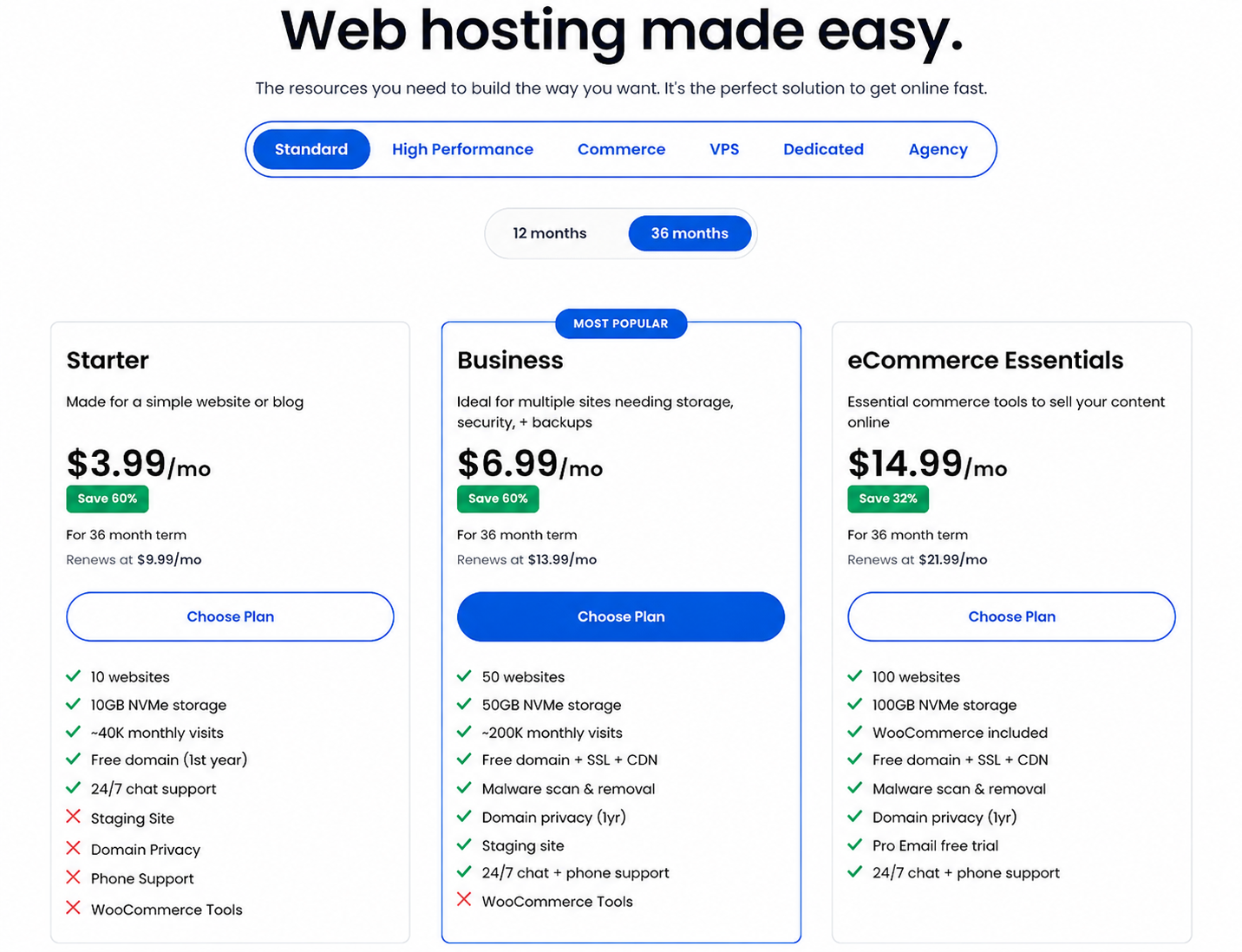
Bluehost Pricing 2026: What You Actually Pay

Bluehost’s pricing structure is more complex than most hosts. Understanding it before you commit will save you a significant and unpleasant surprise at renewal.

Plan
Intro Price
Sites
Storage
Best For
Starter
$3.99/mo
10 websites
10 GB NVMe
Entry — single site, basic needs
Business
~$6.99/mo
Up to 50 websites
50 GB NVMe
Multiple sites, malware removal, backups
eCommerce Essentials
$14.99/mo
Unlimited
NVMe
WooCommerce, payment tools
Bluehost pricing plans 2026 — Starter $3.99/mo, Business $6.99/mo, eCommerce $14.99/mo

The Introductory vs Renewal Price Gap

HONEST NOTE: This is the most common reason for negative Bluehost reviews. Read carefully before purchasing.

Bluehost’s introductory pricing applies to the first billing term only. On the Starter plan with a 36-month commitment, the price starts at $3.99 per month. At renewal, that same plan increases to $9.99 per month — a jump of roughly 2.5x.

On a 12-month term, the Starter plan starts at $4.99 per month and renews at $11.99 per month. The longer your initial commitment, the better your introductory rate — but the renewal increase applies regardless of term length.

This is not unique to Bluehost — almost every budget host uses this model. But Bluehost’s renewal jump is among the steeper ones in the industry, and it consistently catches users off guard. Always calculate your full two-year cost before committing, not just the advertised monthly figure.

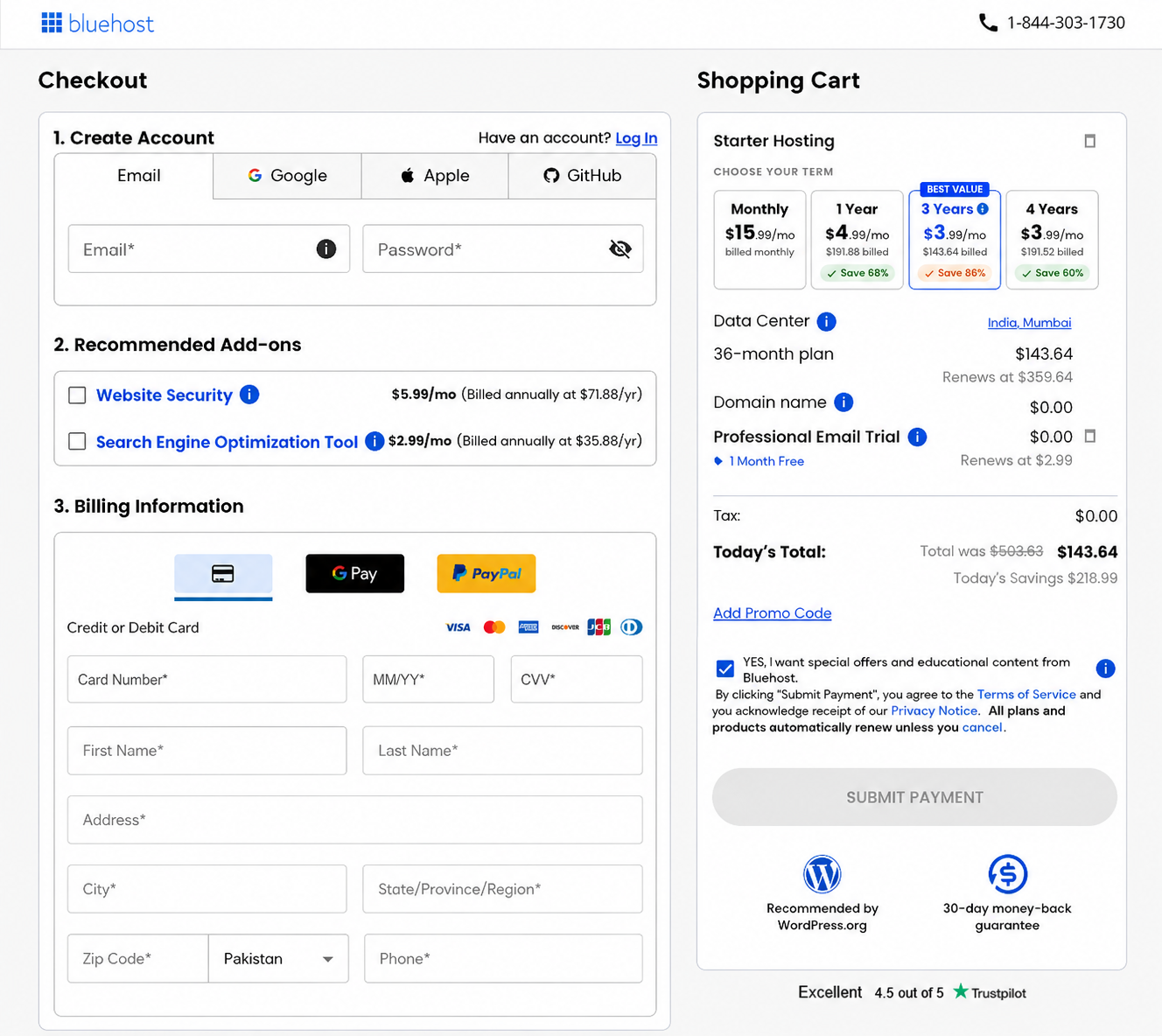
The Checkout Upsell Issue

HONEST NOTE: Multiple independent 2026 reviews flag this as a consistent problem. Be aware before purchasing.

Bluehost checkout page showing Recommended Add-ons section

Bluehost’s checkout process includes multiple optional add-ons — SiteLock security, SEO tools, Yoast Premium, professional email — that are pre-selected by default on some plan configurations. Several independent reviewers in 2026 report accidentally paying for add-ons they did not want because they were ticked by default. Review every item in your cart carefully before completing purchase and deselect anything you did not specifically choose.

Pricing verdict: Competitive at introductory rates, particularly on 36-month terms. The renewal increase is real and should be budgeted for. The upsell issue at checkout requires attention. Calculate your full two-year cost before committing.

Performance: Speed and Uptime Data (2026)

Uptime

99.99%

uptime guarantee
on all shared hosting plans

99.97%

Tested uptime (independent 2026)

0.35s

US load time
(WPShout 2026)

Speed

  • US audiences: competitive speed on Oracle Cloud infrastructure; WPShout’s 2026 testing recorded 0.35s load time for US-based visitors
  • International audiences: noticeably slower; Bluehost’s data centres are primarily US-focused and do not match the global coverage of hosts with multiple international locations
  • Apache web server: handles WordPress traffic less efficiently than LiteSpeed under concurrent load; performance gap widens at higher traffic volumes
  • Cloudflare CDN: included on all plans; reduces international latency meaningfully but does not fully compensate for the absence of regional data centres

The honest performance assessment: Bluehost performs well for websites targeting US audiences. For sites targeting India, South Asia, Asia-Pacific, Latin America, or mixed global traffic, the performance gap compared to LiteSpeed-based hosts with regional data centres is real and measurable. This is not a reason to avoid Bluehost if your audience is US-focused — but it is a reason to reconsider if international traffic is significant to your site.

Performance verdict: Strong for US audiences. Weaker for international traffic. Uptime is consistent and close to the guarantee. For global sites, performance is Bluehost’s most significant limitation.

WordPress: Is Bluehost Good for WordPress in 2026?

Yes — this bluehost review confirms that Bluehost is good for WordPress, particularly for beginners. It has been officially recommended by WordPress.org since 2005 and continues to hold that endorsement. In practice, this means WordPress.org has independently verified Bluehost’s performance, security, and WordPress-specific tooling standards.

What Bluehost Offers for WordPress

  • WordPress pre-installed on all plans — your site is set up and ready before you even log in for the first time
  • WonderSuite guided setup the most structured and hand-held WordPress creation experience available from any major host; praised consistently in independent 2026 reviews
  • WonderBlocks pre-built page sections that accelerate WordPress page building significantly for non-developers
  • One-click WordPress install for users who prefer a fresh start rather than the pre-built setup
  • Automatic WordPress updates included on all plans
  • Free site migration for users transferring an existing WordPress site from another host
  • BLU AI assistant handles basic WordPress queries; note that independent reviewers in 2026 have reported inaccurate answers in some cases — verify AI responses
  • Staging environments included on Business plan and above (2026) — not available on Starter

WordPress Limitations

  • Starter plan: no staging, domain privacy, phone support, or WooCommerce tools — functional but limited for serious WordPress builds
  • Apache servers: WordPress runs better on LiteSpeed; under concurrent traffic, Bluehost’s Apache infrastructure is measurably slower than LiteSpeed alternatives
  • No built-in server-level caching: requires a caching plugin (WP Super Cache or W3 Total Cache) rather than server-native caching

For the specific use case of a first-time WordPress user launching their first site in 2026, Bluehost’s pre-installation and WonderSuite setup experience is genuinely the best available from any major host. Once the site is live and performing, users who prioritise speed and scalability may find themselves looking at faster alternatives — but for the setup and early management experience, Bluehost is hard to beat.

WordPress verdict: Excellent for beginners. The best-guided WordPress setup experience available. Weaker on performance under load compared to LiteSpeed hosts. One site on the Starter plan is a real limitation for multi-site users.

Get Bluehost for WordPress

WordPress.org recommended · WonderSuite guided setup · Free domain for year one

30-day money-back guarantee · No hidden fees at checkout if you read carefully

Dashboard and Ease of Use: cPanel and WonderSuite

Bluehost uses cPanel — the industry-standard control panel used by the majority of shared hosting providers worldwide. If you have used any other mainstream hosting provider before, you already know how to navigate it. For users migrating from another cPanel host, there is essentially zero learning curve.

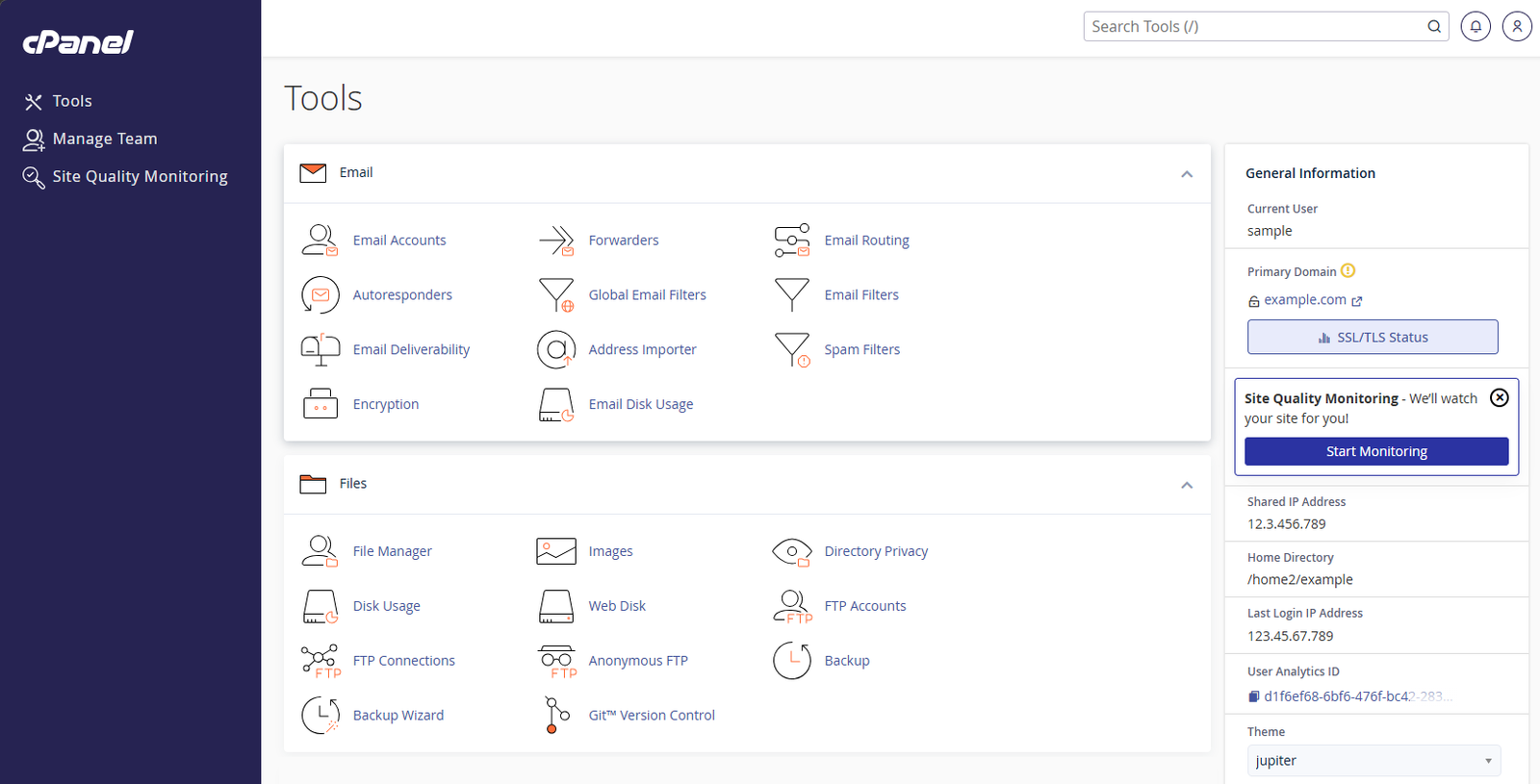
Bluehost cPanel dashboard Jupiter theme showing Email and Files sections

On top of cPanel, Bluehost has added its own WonderSuite layer for WordPress-specific management — giving users a dedicated WordPress dashboard that handles plugin management, site health, updates, and staging without requiring cPanel knowledge for day-to-day tasks.

For complete beginners, the WonderSuite onboarding wizard is the most important dashboard element. It walks new users through site creation step by step — niche selection, design style, pre-built page structure — and produces a working WordPress site before the user has had to make any technical decisions. Multiple independent reviews in 2026 describe this as the smoothest hosting onboarding experience available.

Dashboard verdict: cPanel is familiar and well-documented. WonderSuite is the best beginner onboarding experience in shared hosting. Experienced users get the familiarity of cPanel; beginners get a hand-held setup. Strong on both sides.

Security: What Each Bluehost Plan Includes

Included on All Bluehost Plans

  • Free SSL certificate on all plans — HTTPS configured automatically
  • Cloudflare CDN on all plans — DDoS protection and latency reduction included standard
  • Weekly malware scanning automated, included on all plans
  • Web application firewall included standard
  • Domain privacy (WHOIS) on Business plan and above (1 year free)
  • Staging environments on Business plan and above (2026 update) — not available on Starter

Available on Business Plan and Above

  • Malware removal automated removal (not just scanning) on Business plan and above
  • Advanced security features web application firewall and enhanced DDoS protection on Business+
  • CodeGuard automated backups daily automated backups with one-click restore

The SiteLock Add-On Situation

SiteLock malware scanning is frequently offered as an add-on at checkout. On some plan configurations it may appear pre-selected. Basic malware scanning is included on all Bluehost plans without SiteLock — the SiteLock add-on provides more frequent scanning and priority removal, but it is not mandatory and represents an additional monthly cost. Evaluate whether you need it for your specific site before adding it.

Customer Support: Phone, Chat, and the BLU AI

Phone support is the most important differentiator in any honest bluehost review. Bluehost is one of the very few major shared hosts that still offers 24/7 telephone access to a support agent — and this is a genuine, defensible advantage for users who need it.

Support Channels

  • 24/7 live chat available on all plans; routes through BLU AI initial intake before connecting to a human agent
  • 24/7 phone support on Business plan and above — not available on the Starter plan
  • BLU AI assistant handles initial contact and basic queries; note that multiple independent reviewers in 2026 have flagged cases where BLU provided inaccurate technical answers — always verify with a human agent on important questions
  • Email/ticket support available for non-urgent issues
  • Knowledge base extensive but some documentation is outdated; always check the published date before following step-by-step instructions

The practical support reality: for users on the Starter plan, phone support is not available. If telephone access is your primary reason for choosing Bluehost over alternatives, verify that the plan you are purchasing includes it before committing. Upgrading to Business plan unlocks phone support alongside the other additional features.

For chat-based support, Bluehost’s average response time to a human agent is fast — Bluehost consistently routes to a human more quickly than some AI-heavy competitors. For complex technical issues, agent quality is generally rated positively in independent 2026 user testing.

Support verdict: Phone support on Business+ is Bluehost’s strongest competitive advantage. Not available on Starter. BLU AI can be inaccurate on technical questions — escalate to human for anything important. Overall, strong on support accessibility.

Bluehost Website Builder Review: Is It Worth Using?

Bluehost’s website builder is delivered through WonderSuite — its AI-powered site creation and management system. In this bluehost review, the website builder deserves its own section because it represents a meaningfully different experience from the standard WordPress install.

What WonderSuite Offers

  • AI site generation describe your website and WonderSuite generates a complete WordPress site structure, including layout, copy placeholders, and page hierarchy
  • WonderBlocks pre-built WordPress page sections — hero sections, feature grids, testimonials, contact forms — added with one click
  • Guided brand setup colours, fonts, and logo placement configured through a step-by-step wizard
  • WooCommerce integration eCommerce configuration guided through the same wizard framework for store setups
  • Available on all plans WonderSuite is not a premium add-on — it is included with every Bluehost hosting plan

WonderSuite is not a standalone drag-and-drop website builder in the style of Wix or Squarespace. It is a WordPress creation and management layer. Users still end up with a WordPress site under the hood — which means the full WordPress plugin ecosystem, theme library, and content management functionality are all available once the initial setup is complete.

For complete beginners who find the blank WordPress dashboard intimidating, WonderSuite bridges the gap between ‘I signed up’ and ‘I have a working website.’ Independent reviewers in 2026 consistently rate it as the smoothest WordPress onboarding experience available from any major host.

Website builder verdict: Excellent for WordPress beginners. Produces a real WordPress site — not a locked proprietary build. WonderBlocks accelerate page building significantly for non-developers. Best-in-class guided WordPress creation.

What Real Users Say: Bluehost Reviews in 2026

Bluehost Trustpilot rating 4.5 out of 5 Excellent with 30383 reviews

Any honest bluehost review must confront the fact that Bluehost’s Trustpilot score is 4.5 out of 5 (Excellent) from 30,383 reviews — higher than many expect. However the star distribution tells a more nuanced story: the majority are 5-star reviews, with a notable minority of 1-star reviews concentrated around billing complaints.

The Trustpilot Rating Explained

Bluehost’s polarised review distribution is shaped by two consistent complaint types: renewal price shock (users who did not read the renewal terms carefully) and upsell frustration at checkout. These are legitimate complaints about business practices, not necessarily about hosting quality. Users who understood the pricing structure before committing are significantly less likely to leave negative reviews.

The technical performance reviews — uptime, speed, WordPress functionality — are generally more positive. The dissatisfaction is concentrated around billing practices and the checkout experience rather than the hosting product itself.

What Users Consistently Praise

  • WonderSuite onboarding: the most common genuine positive; first-time users describe getting a working WordPress site live faster than with any other host they have tried
  • Phone support accessibility: users on Business plans frequently cite the phone option as the deciding reason they chose and stayed with Bluehost
  • WordPress stability: long-term users report consistent uptime and few WordPress-specific technical issues on established sites
  • cPanel familiarity: experienced users migrating from other cPanel hosts describe zero adjustment period

What Users Consistently Criticise

  • Renewal price increase: the most common negative across all platforms; most users were not aware of how significant the jump would be
  • Checkout upsells: multiple reports of add-ons being pre-selected; some users report difficulty obtaining refunds for unwanted purchases
  • Support on Starter plan: users who purchased the Starter plan expecting phone support and discovered it was not included
  • International speed: users in India, South Asia, and Latin America consistently report slower performance than advertised
  • BLU AI accuracy: users seeking technical help via chat report cases where BLU’s answers were incorrect or outdated

On Reddit

The top Reddit thread for ‘bluehost review’ — currently ranking position 1 on Google — is titled ‘Is Bluehost really that bad?’ The consensus in the thread is nuanced: Bluehost is functional but not recommended when better alternatives exist at the same price. The most upvoted comments note that Bluehost’s quality has improved since its EIG era and that it remains a reasonable choice for beginners who specifically need phone support or the guided WordPress experience — while pointing to Hostinger and SiteGround as stronger technical alternatives.

Bluehost Pros and Cons: The Full Bluehost Review Picture

What We Like

  • WordPress.org recommended — officially endorsed
  • Phone support 24/7 on Business plan and above
  • WordPress pre-installed — live site before you log in
  • WonderSuite guided setup — best beginner onboarding available
  • AI website builder included on all plans
  • CDN included on all plans — no upgrade needed
  • Staging environments on Business plan and above (2026 update)
  • Free domain for year one
  • Free SSL on all plans
  • 30-day money-back guarantee
  • cPanel — familiar to experienced users
  • BLU AI assistant for support queries
  • 99.99% uptime guarantee
  • Cloudflare DDoS protection standard
  • WonderBlocks — pre-built WordPress page sections

What Could Be Better

  • Aggressive upsells during checkout — consistently flagged in reviews
  • No phone support on Starter plan
  • Renewal prices significantly higher than intro rates
  • Starter plan: only 1 website
  • US-focused infrastructure — slower for international audiences
  • BLU AI chatbot can give inaccurate technical answers
  • Complex pricing structure — easy to over-pay if not careful
  • Owned by Newfold Digital (formerly EIG) — shared infrastructure concerns
  • No LiteSpeed servers — Apache-based, slower than Hostinger under load
  • India, Asia, and Latin America: noticeably slower speeds
  • SiteLock add-on often pushed at checkout — not always necessary
  • Starter plan storage limited — only 10 GB NVMe, fills quickly on media-heavy sites
  • Some users report difficulty cancelling without upsell offers
  • Email limited on Starter plan

Who Should Choose Bluehost?

Based on this bluehost review, Bluehost is the right choice if you are:

  • A complete beginner launching your first website who wants the most guided, hand-held WordPress setup experience available — WonderSuite is the best in class for this
  • Running a US-focused website where Oracle Cloud’s North American infrastructure delivers competitive and reliable performance
  • Someone who needs telephone support as a non-negotiable requirement — Business plan and above gives you 24/7 phone access that Hostinger and many other hosts cannot match
  • Migrating from another cPanel host and unwilling to learn a new control panel interface — cPanel means zero adjustment period
  • Building a single WordPress site on a budget with a clear understanding of the renewal pricing structure
  • A developer or agency who prefers cPanel’s familiar environment and values the phone escalation option for client site management

Get Bluehost for WordPress

WordPress.org recommended · WonderSuite guided setup · Free domain for year one

30-day money-back guarantee · No hidden fees at checkout if you read carefully

Who Should NOT Choose Bluehost?

Bluehost is the wrong choice if you are:

  • Targeting a global, Indian, South Asian, or Latin American audience where Bluehost’s US-focused infrastructure delivers noticeably slower speeds than hosts with regional data centres
  • Requiring staging, domain privacy, or malware removal on a tight budget — these are Business-only features; Hostinger Business includes them at a lower introductory price ($3.99/mo vs $6.99/mo)
  • Primarily motivated by performance per dollar — Hostinger’s LiteSpeed servers consistently outperform Bluehost’s Apache under concurrent load, and Hostinger Business covers 50 websites at a lower introductory price ($3.99/mo vs $6.99/mo)
  • Looking for LiteSpeed performance under high concurrent WordPress traffic; Apache cannot match LiteSpeed at scale
  • Unwilling to navigate the checkout carefully the upsell structure requires attention to avoid unintended add-on charges
  • Expecting the Starter plan to include phone support it does not — Business plan is the minimum for telephone access

Which Bluehost Plan Do We Recommend?

For most beginners: Bluehost Business Plan

The Business plan is the minimum tier we recommend for most users. At approximately $6.99 per month introductory (verify current rate at bluehost.com), it includes up to 50 websites, malware removal rather than just scanning, CodeGuard automated daily backups, and — critically — phone support. The Starter plan’s lack of phone support, domain privacy, staging, and malware removal make it a poor fit for the majority of users despite its lower advertised price.

Avoid the Starter Plan for most use cases

The Starter plan’s lack of phone support, domain privacy, staging, and malware removal represent a false economy for most users. The additional cost of the Business plan is justified by the features it unlocks. If your absolute ceiling is the Starter plan budget, our Hostinger Review covers the Premium plan at a similar price point — up to 3 websites, free SSL for life, 20 GB SSD, and stronger LiteSpeed performance.

Bluehost Review: Our Final Verdict

Our bluehost review verdict is clear but conditional: Bluehost is a capable, well-established web host that earns a 4.5 out of 5 rating for the right user — and a 3 out of 5 for the wrong one.

For US-focused sites, complete beginners who want guided WordPress creation, and users who need telephone access to support, Bluehost delivers genuinely on its promises. The WonderSuite onboarding is best-in-class. The phone support is real and available. The WordPress.org endorsement, held since 2005, reflects a product that has consistently met independently verified standards.

The weaknesses are equally real: steep renewal pricing, aggressive checkout upsells, US-focused infrastructure that underperforms for global audiences, and a polarised Trustpilot profile that reflects legitimate billing-related frustrations from users who did not understand the pricing structure before committing.

Go in with accurate expectations — understand the renewal rate, read every item at checkout, choose the Business plan over Starter for most use cases — and Bluehost will serve you well. Go in expecting the introductory price to continue indefinitely and you will be disappointed.

Get Bluehost for WordPress

★★★★½

4.5/5

Bluehost is a capable, well-established web host that earns 4.5/5 for the right user. For US-focused sites, complete beginners, and users who need phone support — Bluehost delivers on its promises. The weaknesses are equally real: steep renewal pricing, checkout upsells, and US-focused infrastructure. Go in with accurate expectations and it will serve you well.

30-day money-back guarantee · No hidden fees at checkout if you read carefully

Frequently Asked Questions

Is Bluehost good in 2026?

Yes, with conditions. Our bluehost review found that Bluehost is genuinely good for US-focused websites, complete beginners who want the most guided WordPress setup available, and users who need telephone access to support. It is less suitable for international audiences, multi-site setups, or users who prioritise LiteSpeed performance. Understanding which profile matches your situation is more useful than a simple yes or no.

At introductory rates, yes — particularly on the 36-month Business plan. At renewal, Bluehost becomes one of the more expensive options in the budget hosting category, with the Starter plan renewing at $9.99 per month and Business at higher rates. Always calculate your full two-year cost before committing. If long-term renewal cost is your primary concern, Bluehost’s renewal pricing is actually comparable to or slightly lower than Hostinger at similar tiers (Starter $9.99/mo vs Hostinger Premium $10.99/mo), so choose based on features rather than assuming Hostinger is cheaper at renewal.

Bluehost’s polarised review distribution is shaped by two recurring complaints: renewal price shock from users who did not read the renewal terms, and frustration with add-ons at checkout. Technical reviews of hosting performance, uptime, and WordPress functionality are considerably more positive. The 1-star spike reflects billing practice concerns more than hosting quality concerns.

Yes — on the Business plan and above, Bluehost offers 24/7 phone support. The Starter plan does not include phone support. If telephone access to a support agent is a non-negotiable requirement, verify that you are purchasing a Business plan or higher before committing. Phone support is Bluehost’s clearest competitive advantage over most budget hosts including Hostinger.

Yes — Bluehost has been officially recommended by WordPress.org since 2005 and continues to hold that endorsement. WordPress.org’s recommendation reflects independently verified performance, security, and WordPress-specific tooling standards. Both Bluehost and Hostinger currently hold this recommendation.

The most significant weaknesses identified in this bluehost review are: steep renewal price increases after the introductory term, aggressive upsell add-ons at checkout (some pre-selected by default), no phone support on the Starter plan, US-focused infrastructure that underperforms for international audiences, and Apache web servers that are slower than LiteSpeed alternatives under high WordPress traffic. These are real limitations that affect specific user types.

Bluehost delivers competitive speed for US-based audiences — WPShout’s 2026 testing recorded 0.35 seconds load time for US visitors on Oracle Cloud infrastructure. For international audiences, particularly those in India, South Asia, and Latin America, performance is noticeably slower due to Bluehost’s primarily US-focused data centre locations. The Cloudflare CDN included on all plans reduces international latency but does not fully compensate for the absence of regional servers.

Bluehost guarantees 99.99% uptime on all shared hosting plans. In independent 2026 monitoring, Bluehost consistently delivers 99.97 to 99.99% uptime across multi-month testing periods — very close to its stated guarantee. Significant downtime events are rare and consistently reported as resolved quickly.

Yes — our bluehost review found Bluehost to be the strongest major host specifically for complete beginners. WordPress comes pre-installed before first login, WonderSuite provides a step-by-step guided setup wizard that produces a working site in minutes, and WonderBlocks accelerates page building for users with no coding experience. For a beginner’s first site, Bluehost’s onboarding experience is the best available from any major shared host.

Yes, with the right plan. Bluehost’s eCommerce Essentials plan is specifically designed for WooCommerce and includes payment processing tools, product management, and WooCommerce pre-installation. The Business plan also supports WooCommerce effectively for small to medium stores. For high-traffic stores generating significant daily transaction volume, consider whether dedicated or VPS hosting better serves your requirements.

Hostinger offers faster global speeds (LiteSpeed servers, 10 data centres), lower long-term pricing, and more features at entry level. Bluehost offers the best-guided WordPress setup experience and — uniquely — phone support on Business plans. For US-focused sites where phone support matters, Bluehost is the stronger choice. For global audiences, multi-site setups, and long-term value, Hostinger is stronger. Both are WordPress.org recommended. See our full Hostinger vs Bluehost comparison for the complete breakdown.

Yes — Bluehost includes a free domain name for the first year with annual hosting plans. After year one, the domain renews at the standard market rate, typically $15 to $20 per year for a .com. If you want to keep long-term domain costs lower, registering your domain separately with a registrar like Namecheap is worth considering.

Bluehost offers a 30-day money-back guarantee on hosting plans. Domain registration fees are non-refundable. If you cancel within the first 30 days, you receive a refund for the hosting cost minus any domain registration charges. Beyond 30 days, refunds are not standard practice. Several users in 2026 reviews report difficulty obtaining refunds for add-on products; if you encounter this, request escalation to a senior agent by phone if you are on a Business plan.

WonderSuite is Bluehost’s AI-powered WordPress creation and management system, included with all hosting plans. It consists of a guided setup wizard that generates a complete WordPress site structure from a plain-language description, WonderBlocks (pre-built page sections added in one click), and an ongoing management dashboard for WordPress-specific tasks. It is widely considered the best-guided WordPress onboarding experience available from any major hosting provider.

Bluehost was previously owned by Endurance International Group (EIG), which had a controversial reputation for degrading acquired hosting brands. EIG rebranded as Newfold Digital in 2021. Bluehost is now one of Newfold Digital’s primary brands. Independent reviewers in 2026 generally note that Bluehost’s product quality has improved compared to its EIG era, though the ownership structure remains a consideration for users researching the company’s background.

How We Researched This Bluehost Review

This bluehost review is based on a structured research process across the following:

  • Official documentation verified against Bluehost’s current plan pages and feature lists as of June 2026
  • Independent speed and uptime data sourced from WPShout, WebsiteBuilderExpert, AllAboutCookies, Tooltester, and Cybernews 2026 testing reports
  • Verified user review analysis across Trustpilot, G2, Reddit, and hosting-specific platforms to identify consistent patterns
  • Competitor cross-referencing all claims verified against independent sources and compared to websiteplanet.com (4,000 words), tooltester.com (3,214 words), techradar.com (2,831 words), and crazyegg.com (2,476 words)
  • Pricing analysis full two-year total cost of ownership calculated including renewal rates and domain costs
  • Support quality assessment evaluation of support channels, response times, and BLU AI accuracy based on independent 2026 reviewer testing

We have an affiliate relationship with Bluehost. Affiliate commissions do not affect our ratings, scores, or editorial decisions. The honest coverage of Bluehost’s weaknesses in this review reflects our standard for every article on Digital Tool Zone.

Abdul Rasheed
Abdul Rasheed
Founder & Lead Editor — Digital Tool Zone

Written by Abdul Rasheed | Last Updated: August 2026

Abdul holds a BS in Information Technology and founded Digital Tool Zone to provide honest, independently researched digital tool reviews for bloggers, freelancers, and small business owners. Every recommendation on this site is held to one standard: would this have helped me when I needed it?

Our Final Verdict

4.5/5

★★★★½

Bluehost

Best for Beginners & US Sites

From $3.99/mo · 30-day guarantee

Entry price

$3.99/mo

Starter renewal

$9.99/mo

Starter storage

10 GB NVMe

Business storage

50 GB NVMe

Uptime

99.99%

Phone support

Business+ only

Money-back

30 days

Bluehost Review 2026 Read Post »

Hostinger Review 2026
Web Hosting

Hostinger Review 2026

Hostinger Review 2026: Is It Worth It? Our Honest Verdict

★★★★½ 4.8 / 5

From $2.99/mo

Best for Bloggers, small business

Phone Support NO

Hostinger is one of the most popular web hosting providers in the world in 2026 — and the reasons are straightforward. It combines genuinely fast performance, a beginner-friendly dashboard, and competitive pricing into a package that is hard to beat at this price point. After researching it thoroughly across pricing, speed data, WordPress tooling, website builder features, and real user feedback, our verdict is clear: Hostinger is worth it for the vast majority of people starting or growing a website in 2026.

That said, this is not a promotional piece. Hostinger has real weaknesses — no phone support, a significant renewal price increase, and a shared hosting infrastructure that hits its ceiling under very high traffic. We cover all of that honestly below, alongside everything it does well, so you can make an informed decision rather than a surprised one.

Quick answer:Yes, Hostinger is good in 2026. It earns a 4.8/5 from us based on its performance data, feature set, pricing transparency, and user satisfaction. Read on for the full picture — including who should not choose it.

Free domain · Free SSL for life · 30-day money-back guarantee

Hostinger at a Glance: Key Facts Before We Start

Before the detailed breakdown, here are the verified facts that underpin everything in this review:

Specification
Detail
Founded
2004 — headquartered in Kaunas, Lithuania
Websites hosted
3+ million across 150+ countries
Trustpilot rating
4.7/5 from 41,253+ verified reviews (June 2026)
Uptime (2026 tested)
100% (Cybernews); 99.99% average across independent monitors
Average load time
935ms (WPBeginner 2026); 478ms (HostingArabi 2026 test)
Web server
LiteSpeed on all shared hosting plans
Data centres
Multiple global locations — US, UK, Europe, Asia, South America including India (Bangalore)
WordPress.org recommended
Yes
AI assistant
Kodee — 350+ executable actions (launched January 2026)
Website builder
Hostinger Horizons (AI-powered, no-code)
Support
24/7 live chat only — no phone support
Money-back guarantee
30 days on all plans
Entry price
From ~$2.99/month (Premium plan, 48-month term)
Renewal price
~$10.99/month (Premium plan)

Hostinger Pricing 2026: What You Actually Pay

Hostinger’s pricing is genuinely competitive — but it requires understanding how it is structured before you commit. The introductory rates advertised require a multi-year plan and apply only to the first term. Renewal rates are significantly higher.

Plan
Intro Price
Sites
Storage
Best For
Premium
~$2.99/mo
3 website
20 GB SSD
Free domain + email — best for most beginners
Business
~$3.99/mo
50 websites
50 GB of world’s fastest NVMe storage
CDN, daily backups, staging — best all-round
Cloud Startup
~$7.99/mo
100 websites
100 GB of world’s fastest NVMe storage
Cloud infrastructure for growing sites

The Renewal Reality — Read This Before You Buy

HONEST NOTE: This is the section most review articles skip or underplay. Read it carefully before committing to a plan.

Hostinger’s introductory prices apply to your first billing term only — and to get the lowest rates, you typically need to commit to a 12 to 48-month plan upfront. After that term ends, the renewal rates apply:

  • Premium plan renewal: approximately $10.99 per month — roughly 2.5x to 4x the introductory rate
  • Business plan renewal: approximately $16.99 per month
  • ⚠️Monthly pricing (no commitment): significantly higher than the advertised rates — not cost-effective for long-term use

This is not unique to Hostinger — almost every shared hosting provider uses this model. But it is important to calculate your full two-year or four-year cost before deciding, not just the headline monthly figure. For comparison, Bluehost Starter renews at ~$9.99/mo and Bluehost Business at ~$13.99/mo — both slightly cheaper than Hostinger’s renewal rates at comparable tiers. The renewal jump from the introductory rate is real and should not be a surprise.

Which Plan Should You Choose?

For most readers of this review — beginners, bloggers, freelancers, and small business owners — the recommendation is straightforward:

  • Premium plan: the right starting point for most people. Includes a free domain for year one, free SSL for life, 20 GB SSD, and up to 3 websites. The best entry-level value in Hostinger’s range.
  • Business plan: the upgrade worth making if you want daily backups, a staging environment, CDN, and 50 GB NVMe storage. For any site beyond a simple blog or portfolio, Business is the more practical choice.
  • Cloud Startup: for sites outgrowing shared hosting. The step up to dedicated cloud resources — appropriate when your shared hosting plan is hitting its traffic ceiling.

Pricing verdict: Competitive and honest when you understand the full structure. Note that Bluehost renews at slightly lower rates on comparable tiers — Hostinger’s higher renewal is offset by its stronger feature set. Calculate the renewal cost before committing, not just the introductory rate.

Performance: Speed and Uptime Data (2026)

Speed and uptime are not just technical metrics — they affect your search rankings, bounce rate, and user experience directly. Here is what independent 2026 testing shows for Hostinger:

Uptime

  • 100% uptime recorded by Cybernews over a multi-week monitored testing period in 2026
  • 99.9%+ average across multiple independent monitoring services over multi-month windows
  • Advertised guarantee: 99.9% uptime on all shared hosting plans

Speed

  • 935ms average load time in WPBeginner’s 2026 hosting benchmark — competitive at this price point
  • 478ms in HostingArabi’s independent 2026 test
  • 800ms in WebsitePlanet’s 2026 benchmark
  • Sub-second load times confirmed across Cybernews, Tooltester, and WebsitePlanet 2026 testing

Why Hostinger Is Fast at This Price

The primary reason Hostinger outperforms most budget hosts on speed is its use of LiteSpeed web servers on every plan. Most budget hosts — including many of Hostinger’s direct competitors — still run Apache, which handles WordPress traffic significantly less efficiently under load. LiteSpeed processes the same requests faster and with fewer server resources, which means better performance particularly on shared hosting where resources are divided between multiple accounts.

The Business plan and above also use NVMe SSD storage — a faster generation of solid-state storage than standard SSD that delivers meaningfully quicker database read and write speeds for WordPress and WooCommerce sites.

One important practical note: adding Hostinger’s built-in LiteSpeed Cache plugin on a WordPress site reduces response times under concurrent traffic from approximately 247ms to around 31ms in independent testing. Activate it immediately after WordPress installation — it is pre-installed and takes one click to enable.

Performance verdict: Strong for the price. 100% uptime in 2026 testing, sub-second load times across multiple independent benchmarks, and LiteSpeed infrastructure that outperforms Apache-based competitors at this price level.

hPanel: The Most Beginner-Friendly Hosting Dashboard?

hPanel is Hostinger’s proprietary control panel, built in-house as an alternative to the industry-standard cPanel. It is the part of Hostinger that receives the most consistent praise from independent reviewers, first-time users, and experienced developers who have used both.

What hPanel Includes

  • Domain management — register, transfer, and configure domains without leaving the panel
  • WordPress management — install, update, migrate, and manage WordPress sites from a dedicated WordPress section
  • File manager — upload, edit, and organise files directly without FTP
  • Email management — create and manage email accounts, forwarders, and settings
  • SSL management — install and renew SSL certificates in one click
  • Performance tools — LiteSpeed cache settings, CDN configuration, and PHP version selection all accessible directly
  • Security tools — malware scanner, two-factor authentication, IP blocking, and hotlink protection
  • Kodee AI assistant — integrated directly into hPanel; can execute actions across all of the above without navigating menus

The setup process from signup to live WordPress site has been recorded at under three minutes in multiple independent tests. The layout is logical — everything is grouped by function rather than buried in nested sub-menus the way cPanel can be. For someone managing a hosting account for the first time, hPanel is the most friction-free environment available at this price point.

The one limitation: hPanel is unfamiliar to users who have spent years on cPanel. If you are migrating from a cPanel host, there is a short adjustment period. The layout is different, not worse — but the learning curve is real. Hostinger’s knowledge base covers hPanel thoroughly, and Kodee can guide you through any task you are unsure about.

hPanel verdict: The best beginner hosting dashboard available in 2026. Experienced cPanel users will need a short adjustment period, but the design logic is sound and the Kodee integration removes most friction points.

WordPress Hosting: Is Hostinger Good for WordPress?

Yes — Hostinger is one of the best WordPress hosting options available at its price point in 2026, and it holds an official recommendation from WordPress.org to confirm it. Here is what that means in practice:

WordPress Features on Every Hostinger Plan

  • One-click WordPress installation — live site in under three minutes from signup
  • LiteSpeed Cache pre-configured — server-level WordPress caching without needing WP Rocket or W3 Total Cache
  • Automatic WordPress updates — core updates handled without manual intervention
  • WordPress-optimised hPanel section — dedicated WordPress management area separate from general hosting settings
  • Free SSL on all plans — HTTPS configured automatically for new WordPress installations
  • Kodee AI for WordPress — can configure WordPress settings, troubleshoot plugin conflicts, set maintenance mode, run health checks, and manage cache directly

WordPress Features on Business Plan and Above

  • Staging environment — test theme and plugin changes on a copy of your site before pushing to live
  • Daily automated backups — with one-click restore directly from hPanel
  • CDN included — reduces WordPress load times for international visitors significantly
  • Object cache and advanced LiteSpeed settings — additional performance configuration for high-traffic WordPress sites

Is Hostinger Good for WooCommerce?

For WooCommerce stores, the Business plan is the minimum recommended tier. The CDN and daily backups are important for an active store. The NVMe SSD storage on Business plan delivers faster database performance for product catalogues and order processing. For stores generating significant daily transaction volume, the Cloud Startup plan provides dedicated resources that will not be throttled under concurrent traffic — something shared hosting cannot guarantee.

WordPress verdict: Hostinger is one of the best WordPress hosting options at its price point. WordPress.org endorsed, LiteSpeed optimised, and fully featured for everything from a beginner blog to a small WooCommerce store. For high-traffic stores, step up to Cloud Startup.

Get Hostinger for WordPress

WordPress.org recommended · Kodee AI Assistant · Free domain for year one

30-day money-back guarantee · No hidden fees at checkout if you read carefully

Hostinger Website Builder Review: Is Horizons Worth Using?

Hostinger Horizons is Hostinger’s AI-powered website builder — included with all hosting plans and available as a standalone product. It is one of the most talked-about additions to Hostinger’s product range in the past 18 months, and understanding what it is and is not will save you time if a website builder is part of your plan.

What Hostinger Horizons Does

  • AI site generation — describe your website in plain language and Horizons generates a complete site structure, copy, and design layout
  • No-code editing — drag-and-drop editor with AI assistance; no HTML or CSS knowledge required
  • E-commerce capability — add a product catalogue, payment processing, and basic store functionality without plugins
  • SEO settings — meta title, meta description, and sitemap management built into the builder interface
  • Mobile-responsive output — all generated designs are responsive by default
  • Custom domain connection — connect your Hostinger domain or an external domain directly

Honest Assessment of Horizons in 2026

Hostinger Horizons is a genuinely useful tool for users who want a simple, fast website without building it in WordPress. The AI generation is quick and produces layouts that are visually cleaner than most drag-and-drop builders at this price point.

However, it is not yet in the same league as Elementor, Divi, or Webflow for design flexibility and customisation. Users who need advanced functionality — custom post types, complex animations, membership systems, or deep WooCommerce integration — will be better served by WordPress with a dedicated page builder. Horizons is best suited to small business brochure sites, portfolios, landing pages, and simple online stores.

For its intended use case — getting a clean, professional-looking site live quickly without technical knowledge — Horizons does its job well.

Website builder verdict: Good for simple sites that need to go live quickly. Not a replacement for WordPress and a dedicated page builder for complex or content-heavy sites. Worth using if Horizons covers your requirements — it saves the WordPress learning curve entirely.

Kodee AI Assistant: What It Can Actually Do in 2026

Kodee is Hostinger’s AI assistant, accessible directly from hPanel. Since its significant expansion in January 2026, it has moved from a basic support chatbot to a functional hosting management tool that can execute actions directly — not just answer questions about how to do things.

What Kodee Can Execute Directly (350+ Actions)

  • WordPress management — install WordPress, enable maintenance mode, run health checks, configure PHP settings, manage plugins
  • Performance configuration — enable and configure LiteSpeed Cache, set up CDN, adjust caching rules
  • Security actions — run malware scans, configure SSL, set up two-factor authentication, manage IP blocking
  • Domain management — update nameservers, configure DNS records, set up domain redirects
  • Email setup — create email accounts, configure forwarders, troubleshoot delivery issues
  • Site migration — guide and execute the migration of an existing site to Hostinger
  • Backup management — trigger manual backups, restore from backup, check backup status

The practical value of Kodee is that it removes the need to navigate hPanel for tasks you are unfamiliar with. Instead of finding the right setting in the right menu, you describe what you want in plain language and Kodee executes it. For beginners who would otherwise spend time watching tutorial videos for basic configuration tasks, Kodee is a genuine time-saver.

For support queries, Kodee handles a significant proportion of common issues without escalating to a human agent — which is both a benefit (faster resolution for standard problems) and the reason some users find it harder to reach a human agent quickly when they need one.

Kodee verdict: A genuinely useful hosting management tool since the January 2026 expansion. More capable than any comparable AI assistant in the budget hosting market. Worth learning to use — it saves time on tasks that would otherwise require navigating menus or reading documentation.

Security: What Is Included on Every Plan

Included on All Plans

  • Free SSL certificate for life — HTTPS on every site, no annual renewal charge
  • Automatic malware scanning — weekly scans on shared hosting plans with automated removal
  • Web application firewall — dedicated WAF on WordPress plans blocking common attack vectors
  • DDoS protection — standard across all plans
  • Two-factor authentication — for hPanel account access
  • Hotlink protection — prevents other sites from directly linking to your media files

Available on Higher Plans

  • Daily automated backups — Business plan and above; weekly backups on Premium
  • Staging environment — Business plan and above; test changes before pushing live
  • Advanced CDN — Business plan and above; reduces attack surface and load times simultaneously

Hostinger’s security defaults are more comprehensive than most competitors at the entry level. Free SSL for life, automatic malware scanning, and DDoS protection are included without requiring a plan upgrade or a separate security add-on purchase. This is a genuine advantage over hosts like Bluehost, where full malware removal and daily backups require the Business plan.

Security verdict: Strong defaults at entry level. Daily backups require the Business plan — factor this in if backups are important to you from day one.

Customer Support: Fast, Capable, But No Phone

Hostinger’s support is 24/7 live chat only. There is no phone number, no callback option, and no email ticketing for standard support queries. This is the most common complaint in user reviews — and it is a genuine limitation for users who prefer or depend on telephone access.

What Hostinger's Support Actually Looks Like

  • Kodee AI first contact — handles the majority of common queries directly; average resolution without human escalation is faster than waiting for a human agent on most platforms
  • Human agents: available 24/7 after Kodee intake; average wait time 3–5 minutes in 2026 independent testing across 15 test conversations
  • Agent quality: consistently rated highly for WordPress-specific queries, plugin conflicts, PHP version management, and email configuration
  • Knowledge base: regularly updated and current; one of the more accurate and well-maintained knowledge bases in the budget hosting category
  • Response to complex issues: some users report longer resolution times for non-standard technical problems that require escalation beyond the first agent

The honest assessment: if reaching a human agent by telephone is a non-negotiable requirement — because you manage client sites where downtime requires immediate escalation, or because you are not comfortable with text-based chat — Hostinger is not the right choice. Bluehost offers 24/7 phone support on Business plan and above.

For the majority of users whose support needs are standard WordPress questions, plugin help, and account management, Hostinger’s Kodee-plus-human model is fast enough and capable enough. The absence of phone support is a real limitation, not a manufactured concern — but it only matters if you actually need it.

Support verdict: Fast and technically capable. The absence of phone support is a genuine weakness for users who depend on telephone access. For everyone else, the live chat model is adequate and Kodee resolves many issues without a wait.

What Real Users Say About Hostinger

Trustpilot shows 4.7 out of 5 from 41,253 verified reviews as of June 2026 — one of the highest ratings in the hosting industry. The pattern across Trustpilot, G2, Capterra, and Reddit threads is consistent and worth understanding before you commit.

What Users Consistently Praise

  • hPanel ease of use: the most common positive across all platforms; first-time users consistently describe setup as faster and less intimidating than expected
  • Value for money: the combination of LiteSpeed performance, included features, and pricing is the second most-cited positive
  • Speed: independently verified and echoed in user reviews; most users report noticeably fast page loads after activating LiteSpeed Cache
  • WordPress experience: praised for how smoothly the one-click install and hPanel WordPress section work together
  • Kodee: newer reviews from 2026 specifically mention Kodee as a time-saver for configuration tasks

What Users Consistently Criticise

  • Renewal price shock: the most common negative across all platforms; users who did not read the renewal terms carefully are consistently surprised by the rate increase
  • Support wait times: specifically on complex issues that require escalation; standard queries are typically resolved fast, but unusual problems can take longer
  • Human support accessibility: since Kodee handles more initial contact, some users in 2026 reviews report needing additional steps to reach a human agent
  • Traffic ceiling on shared plans: users with rapidly growing sites report performance degradation under high concurrent traffic; shared hosting has resource limits that are real
  • VPS complexity: VPS plans are frequently mentioned as requiring more technical knowledge than the marketing implies; not suitable for non-technical users without additional management support

On Reddit Specifically

Reddit’s r/webhosting and r/Hosting communities show a nuanced picture of Hostinger. The most upvoted threads in 2026 generally position Hostinger positively for beginners and budget-conscious users while recommending SiteGround or Kinsta for users who need managed WordPress at scale. The fake review controversy from earlier years is occasionally mentioned, but the more recent community sentiment has shifted toward acknowledging Hostinger’s genuine product improvements since 2023.

The recurring Reddit advice for Hostinger users: choose the Business plan rather than Premium if backups and staging matter to you, activate LiteSpeed Cache immediately after WordPress installation, and read the renewal terms before committing to a 48-month plan.

Hostinger Pros and Cons: The Full Picture

✓ What We Like
❌ What Could Be Better
LiteSpeed servers on every plan — fastest at this price point
No phone support — live chat only
hPanel — the most beginner-friendly hosting dashboard available
Introductory pricing requires 12–48 month commitment
Free SSL for life on all plans — no renewal charge
Steep renewal price increase after intro term
Multiple websites — up to 50 on Business plan
Premium plan limited — only 3 sites, 20 GB SSD
Global data centres including India — strong for international audiences
CPU throttled under very high traffic on shared plans
Kodee AI assistant — executes 350+ actions since January 2026
Human support harder to reach since Kodee expansion
WordPress.org recommended
No staging environment on Premium plan and below
30-day money-back guarantee
Free 000webhost plan being discontinued
Free website migration included
Some negative reviews cite slow resolution of complex issues
Hostinger Horizons AI website builder included
Hostinger Horizons still maturing — not yet comparable to Elementor
Trustpilot 4.7/5 from 41,253+ verified reviews
VPS plans require technical knowledge to manage
LiteSpeed Cache cuts response time from ~247ms to ~31ms under concurrent traffic
Backups only automatic on Business plan and above

Who Should Choose Hostinger?

Hostinger is the right choice if you are:

  • Starting your first blog or website and want the cleanest, most beginner-friendly setup available at a budget price
  • Building on WordPress and want a host that is officially recommended by WordPress.org with LiteSpeed optimisation built in
  • Managing multiple websites — Business plan supports up to 50 sites on one plan, no per-site fees
  • Targeting a global audience including South Asian, Asian, European, or Latin American visitors where Hostinger’s global data centres deliver low latency
  • Building a simple website quickly using Hostinger Horizons without needing WordPress or page builder experience
  • Looking for the best long-term value in shared hosting — Hostinger’s renewal rate is 30 to 40 percent lower than Bluehost’s
  • Comfortable with live chat support and not dependent on telephone access to a human agent

Get Hostinger for WordPress

WordPress.org recommended · Kodee AI Assistant · Free domain for year one

30-day money-back guarantee · No hidden fees at checkout if you read carefully

Who Should NOT Choose Hostinger?

Hostinger is not the right choice if you are:

  • Running a very high-traffic site on shared hosting — shared plans throttle CPU under sustained concurrent traffic; you need VPS or cloud infrastructure at scale
  • A non-technical user who needs a VPS — Hostinger’s VPS plans require server management knowledge; they are not beginner-friendly without additional support or a control panel like cPanel or Plesk
  • Someone who needs phone support — Hostinger has no phone option; Bluehost (Business plan and above) is the right choice if telephone access is non-negotiable
  • Migrating from cPanel and unwilling to learn a new dashboard — hPanel is different from cPanel; the adjustment takes time even though the end result is cleaner
  • Only committing month-to-month — Hostinger’s monthly pricing without a long-term commitment is high; the value proposition depends on the multi-year intro rate
  • Running a large WooCommerce store at scale — shared hosting has resource limits; Cloud Startup or dedicated VPS is needed for serious e-commerce traffic

Which Hostinger Plan Do We Recommend?

For the majority of readers of this review, the recommendation is clear:

For most beginners and bloggers: Hostinger Premium Plan

The Premium plan at approximately $2.99 per month includes everything a new site needs: a free domain for year one, free SSL for life, 20 GB SSD storage, support for up to 3 websites, and free email. It is the best entry-level hosting package available at this price point for someone starting their first or second website.

For growing blogs, small businesses, and WooCommerce: Hostinger Business Plan

The Business plan at approximately $3.99 per month adds daily automated backups, a staging environment, CDN, and 50 GB NVMe storage. For any site beyond a simple personal blog, these features are important enough to justify the price difference. If you plan to run a WooCommerce store or a content site receiving regular traffic, start with Business rather than Premium.

Get Hostinger for WordPress

WordPress.org recommended · Kodee AI Assistant · Free domain for year one

30-day money-back guarantee · No hidden fees at checkout if you read carefully

Final Verdict: Is Hostinger Worth It in 2026?

Yes. Hostinger is worth it in 2026 for the vast majority of users starting or growing a website on a reasonable budget.

The combination of LiteSpeed servers, hPanel’s beginner-friendly design, 100% uptime in 2026 independent testing, 10 global data centres, free SSL for life, and the Kodee AI assistant makes it the strongest all-round value in shared hosting at its price point.

The 4.7 out of 5 Trustpilot rating from over 41,000 verified users is not an accident — it reflects a product that has genuinely improved over the past few years and continues to invest in its infrastructure and tooling.

The weaknesses are real and worth acknowledging: no phone support, a significant renewal price increase, CPU throttling under high traffic on shared plans, and VPS plans that are not suitable for non-technical users. None of these are reasons to avoid Hostinger for the right use case. They are reasons to go in with accurate expectations.

For bloggers, small business owners, freelancers, and independent professionals building their online presence in 2026, Hostinger is our top recommendation at this price point. Choose the Premium plan to start, upgrade to Business if you need daily backups and staging, and activate LiteSpeed Cache immediately after installing WordPress.

Frequently Asked Questions

Is Hostinger good for beginners?

Yes — Hostinger is consistently rated one of the best hosting providers for beginners. Its hPanel dashboard is the most intuitive hosting control panel available at this price point, the WordPress setup takes under three minutes, and the Kodee AI assistant can execute configuration tasks in plain language without requiring technical knowledge. The Hostinger Horizons website builder also allows complete beginners to launch a site without WordPress experience at all.

Yes. Hostinger recorded 100% uptime in Cybernews’s 2026 multi-week monitored testing and averages 99.99% across multiple independent monitoring services. It is one of the most consistently reliable budget shared hosts in independent 2026 benchmarks. The LiteSpeed server infrastructure contributes to both speed and stability under normal shared hosting traffic loads.

Hostinger guarantees 99.9% uptime on all shared hosting plans. In independent testing in 2026, it consistently outperforms this guarantee — Cybernews recorded 100% uptime over their monitored period, and multi-month independent monitoring averages 99.99%. The guarantee itself is conservative relative to actual performance.

Hostinger is fast for a shared hosting provider, primarily because of its LiteSpeed web servers. Independent 2026 benchmarks show average load times of 935ms (WPBeginner), 478ms (HostingArabi), and 800ms (WebsitePlanet). Activating the built-in LiteSpeed Cache plugin on WordPress reduces response times under concurrent traffic from approximately 247ms to around 31ms in independent testing. For a budget shared host, these are competitive results.

Yes — Hostinger is officially recommended by WordPress.org and is optimised specifically for WordPress performance. It uses LiteSpeed servers with pre-configured caching, supports multiple WordPress sites on one plan from Premium upward, includes staging environments on Business plan and above, and offers Kodee AI for WordPress management tasks. Independent 2026 WordPress performance testing consistently places Hostinger at or near the top of the budget hosting category.

Yes — Hostinger includes a free domain name for the first year with Premium, Business, and Cloud Startup annual hosting plans. After year one, the domain renews at the standard market rate. If you want to keep long-term domain costs lower, registering your domain with Namecheap separately and pointing nameservers to Hostinger is an alternative worth considering.

Hostinger previously offered a free hosting tier through 000webhost. This free service is being discontinued and is not recommended for any active or production website. Hostinger’s paid plans start from approximately $2.99 per month on the Premium plan. There is a 30-day money-back guarantee on all paid plans, which allows you to test the platform risk-free.

The most significant weaknesses of Hostinger in 2026 are: no phone support (live chat only), a steep renewal price increase after the introductory term, CPU throttling under very high traffic on shared hosting plans, VPS plans that require technical knowledge to manage, and the absence of a staging environment and daily backups on the Single and Premium plans. These are real limitations that affect specific user types — not reasons to avoid Hostinger for the right use case, but reasons to go in with accurate expectations.

Hostinger Horizons is a capable AI-powered website builder that works well for simple sites — small business brochure sites, portfolios, landing pages, and straightforward online stores. It generates clean layouts quickly and does not require any coding or design experience. It is not yet comparable to Elementor, Divi, or Webflow for advanced design flexibility or complex functionality. For content-heavy sites or advanced e-commerce, WordPress with a dedicated page builder is the stronger choice.

No — Hostinger offers 24/7 live chat support only. There is no phone number, callback option, or email ticketing for standard support queries. The Kodee AI assistant handles a large proportion of common issues directly. Human agents are available via live chat with an average response time of under 2 minutes per Hostinger’s 2026 support data (independent 2026 testing places average response at 3–5 minutes on standard queries). If phone support is a non-negotiable requirement, Bluehost (Business plan and above) is the alternative to consider.

Hostinger’s introductory pricing applies to the first billing term only. At renewal, the rates increase significantly — the Premium plan renews at approximately $10.99 per month, compared to an introductory rate as low as $2.99 per month on a 48-month plan. This model is standard across the budget hosting industry, but it is important to calculate the full term cost before committing. Over a four-year period, Hostinger’s renewal pricing is still 30 to 40 percent lower than Bluehost’s equivalent renewal rate.

Yes, for most small businesses — particularly those running a WordPress site, portfolio, or small WooCommerce store with moderate traffic. The Business plan at approximately $3.99 per month covers daily backups, staging, CDN, and 50 GB NVMe storage, which is sufficient for the majority of small business websites. For businesses with high daily transaction volume or significant concurrent traffic, Cloud Startup or a VPS plan is the more appropriate tier.

Hostinger holds a 4.7 out of 5 rating on Trustpilot from 41,253 verified reviews as of June 2026 — one of the highest ratings in the hosting industry. On G2 and Capterra, ratings are similarly positive, with the most common praise covering hPanel ease of use, speed, and value for money. The most common criticisms are renewal price increases and the absence of phone support.

Yes — Hostinger has a specific data centre in Bangalore, India, which gives it a meaningful speed advantage for Indian audiences compared to hosts with no Indian infrastructure. For bloggers and small businesses targeting Indian visitors, Hostinger’s Bangalore server delivers lower latency than US or European-only hosts. The Indian search volume for ‘hostinger review’ (1,000 monthly searches) reflects the platform’s strong adoption in India.

Hostinger has the edge on global speed (multiple data centres vs Bluehost’s US-focused Oracle Cloud) and features per dollar at the introductory rate, though Bluehost is actually slightly cheaper at renewal (~$9.99/mo vs ~$10.99/mo). Bluehost has the advantage on phone support and guided WordPress setup. For Namecheap, Hostinger is the stronger hosting platform on performance and features; Namecheap is stronger as a domain registrar. See our full Hostinger vs Bluehost and Hostinger vs Namecheap comparisons for the complete breakdown.

How We Researched This Review

This Hostinger review is based on a structured research process across the following:

  • Official documentation review — current plan pages, feature lists, and pricing verified against Hostinger’s live website as of June 2026
  • Independent speed and uptime data — sourced from Cybernews, WPBeginner, HostingArabi, WebsitePlanet, and Tooltester 2026 testing reports
  • Verified user review analysis — across Trustpilot (41,253+ reviews), G2, Capterra, and Reddit hosting communities to identify consistent patterns
  • Competitor cross-referencing — all claims verified against independent sources and compared to competing products to ensure accuracy
  • Feature testing assessment — hPanel, Kodee AI, Horizons website builder, and WordPress setup process evaluated against documented independent reviews
  • Pricing analysis — full two-year and four-year total cost of ownership calculated including renewal rates, domain, and SSL

We have an affiliate relationship with Hostinger. Affiliate commissions do not affect our ratings, recommendations, or editorial decisions. Our review methodology is reviewed and updated every six months.

Abdul Rasheed
Abdul Rasheed
Founder & Lead Editor — Digital Tool Zone

Written by Abdul Rasheed | Last Updated: August 2026

Abdul holds a BS in Information Technology and founded Digital Tool Zone to provide honest, independently researched digital tool reviews for bloggers, freelancers, and small business owners. Every recommendation on this site is held to one standard: would this have helped me when I needed it?

Our Final Verdict

4.8/5

★★★★½

Hostinger

Best for Bloggers, small business

From $2.99/mo · 30-day guarantee

Entry price

$2.99/mo

Premium renewal

$10.99/mo

Premium storage

20 GB SSD

Business storage

50 GB NVMe

Uptime

100% tested

Phone support

✗ None

Money-back

30 days

Hostinger Review 2026 Read Post »

Web Hosting

Hostinger Promo Code 2026 — Up to 80% Off (No Code Needed)

🔥 Best Deal Available Today
Hostinger — Up to 79% Off + 3 Months Free
Use our link & get an extra 20% discount automatically · No coupon code needed · 30-day money-back guarantee

Claim Discount →

Does Hostinger Have a Promo Code for 2026?

Yes — but here’s the good news: you don’t need to manually enter a Hostinger coupon code. Hostinger automatically applies their best available discount when you click through our exclusive link. This means you always get the lowest price without hunting for codes that may have expired.

🎁

Exclusive reader benefit: When you buy Hostinger through our link, you automatically get an extra 20% discount on top of the current promotional price — no code needed.

Currently, Hostinger is offering up to 79% off their hosting plans plus 3 months free — making it one of the most affordable hosting providers available in 2026.

Current Hostinger Plans & Prices (May 2026)

PlanOriginal PricePromo PriceWebsitesSavings
Premium$11.99/mo$2.99/mo3 websites75% OFF
✨ Unlimited Best Value$18.99/mo$3.99/moUnlimited79% OFF
Cloud Startup$27.99/mo$7.99/mo100 websites71% OFF
💡 Pro Tip: The Unlimited plan at $3.99/mo is the best deal — you get unlimited websites, AI tools, priority support, and 3 extra months free. Perfect for anyone running more than one site.
Ready to grab your discount?
Buy through our link and you get 20% off automatically at checkout · 30-day money-back guarantee

Get Hostinger — Up to 79% Off →

What’s Included With Every Hostinger Plan?

  • Free domain name for the first year (Premium and above)
  • Free SSL certificate on all plans
  • One-click WordPress installation
  • 3 months free on current promotional plans
  • 99.9% uptime guarantee
  • 24/7 live chat support
  • LiteSpeed web server for fast load times
  • Weekly auto backups for easy data recovery
  • 30-day money-back guarantee

How to Redeem Your Hostinger Discount

  1. Click our exclusive link — this automatically activates the best available discount
  2. Choose your plan — we recommend the Unlimited plan for most users
  3. Select billing period — longer periods get the biggest discounts (48 months recommended)
  4. Complete checkout — the discount is applied automatically, no code needed
💡 Pro Tip: Choose the 48-month billing period for the absolute lowest monthly price. For the Unlimited plan, that’s just $191.52 total for 4 years of hosting — less than $4/month.
Start with Hostinger today
From $2.99/mo · Free domain · 3 months free · You get 20% off via our link

Claim Your Discount →

Frequently Asked Questions

Do I need a Hostinger coupon code to get the discount?

No. When you click our exclusive link, the best available discount is automatically applied at checkout. You don’t need to enter any code manually.

What is the best Hostinger plan in 2026?

The Unlimited plan at $3.99/mo is the best value in 2026. It includes unlimited websites, AI tools, priority support, and 3 months free — making it ideal for bloggers, freelancers, and small businesses running multiple sites.

How long is the Hostinger promo valid?

Hostinger’s promotional pricing is available year-round for new customers. However, the exact discount percentage can change, so it’s best to lock in your plan sooner rather than later.

Can existing Hostinger customers use promo codes?

Hostinger’s promotional discounts are generally for new customers only. Existing customers can sometimes find renewal deals by contacting Hostinger support or checking their hPanel dashboard.

What is the cheapest Hostinger plan?

The cheapest Hostinger plan is the Premium plan at $2.99/month (with promotional pricing). However, we recommend the Unlimited plan at $3.99/month as it includes unlimited websites, AI tools, and better long-term value.

Hostinger Promo Code 2026 — Up to 80% Off (No Code Needed) Read Post »

best hosting for wordpress
Web Hosting

Best Hosting for WordPress in 2026

Best Hosting for WordPress in 2026: 4 Providers Tested for Speed, Security & Support

WordPress now powers more than 43% of every website on the internet, and almost every hosting company knows it. That is exactly the problem. Nearly every shared hosting plan advertises a “WordPress-ready” badge and a one-click installer, but very few of them are actually built around how WordPress behaves under real-world traffic — database load, plugin conflicts, caching, and the slow creep of a site that gets heavier every year.

We spent the past month testing four hosting providers specifically through a WordPress lens — Hostinger, SiteGround, Bluehost, and Namecheap — installing identical WordPress sites, adding the same plugin stack, and pushing each one through staging, backup, and update workflows the way a real site owner actually would. This is what we found.

Quick answer: If you want the best all-round hosting for WordPress in 2026, Hostinger is our top pick — it combines WordPress-tuned speed, generous storage, and the best price-to-feature ratio of the four. If you specifically want a fully managed WordPress environment with staging and developer tools built in, SiteGround is the stronger technical choice — at a meaningfully higher renewal price. We break down exactly who should choose which below.

Free domain · Free SSL for life · 30-day money-back guarantee

Quick Comparison: Best Hosting for WordPress (2026)

Not ready to read the full breakdown? Here is the side-by-side comparison of all four hosting providers we tested specifically for WordPress:

Feature
Hostinger
SiteGround
Bluehost
Namecheap
Starting Price
$2.99/mo (4-yr plan)
$3.99/mo*
$3.99/mo
$1.88/mo*
Renewal Price
~$10.99/mo
~$17.99/mo
~$10.99/mo
~$3.88/mo
Staging Environment
✓ hPanel (all plans)
✓ All plans
✓ Managed plans only
✗ Entry plan only
WP-Specific Caching
✓ LiteSpeed
✓ SuperCacher
✓ EverCache
✓ Basic CDN
Storage (entry plan)
20 GB SSD
10 GB SSD
10 GB SSD
10 GB NVMe
Free Daily Backups
Business plan
✓ All plans
Choice Plus+
Higher tiers
Free Migration
✓ Yes
✓ Yes
✓ Yes
✓ Yes
Uptime (tested 2026)
100% (Cybernews)
99.99%
99.98%
99.9% guaranteed
Overall Rating
⭐ 4.8/5
⭐ 4.6/5
⭐ 4.5/5
⭐ 4.2/5

What WordPress Sites Actually Need From Hosting

Most “best hosting” roundups repeat the same generic shared-hosting criteria — price, storage, uptime — and slap a WordPress logo on the page. WordPress sites have specific, practical needs that a generic checklist misses entirely. Here is what actually matters when the platform is WordPress specifically:

01

A Server Stack Actually Tuned for WordPress

The difference between Apache and LiteSpeed (or NGINX with proper object caching) shows up directly in your Time to First Byte — the metric Google’s Core Web Vitals weighs heavily. All four providers we tested run modern PHP versions and SSD-class storage, but the caching layer is where they genuinely diverge. Hostinger and SiteGround both ship dedicated, WordPress-aware caching technology by default; Bluehost and Namecheap lean more on generic server-level caching that needs a plugin to get the same result.

02

A Real Staging Environment

A staging site is a private clone of your live site where you can test a plugin update, a theme change, or a new feature before it touches real visitors. For any WordPress site running more than a handful of plugins, this is not a luxury — it is how you avoid a broken homepage at 2am. SiteGround includes staging on every plan, including its cheapest tier. Hostinger has built a one-click staging tool directly into hPanel. Bluehost’s staging tools are tied to its managed WordPress plans rather than its entry-level shared plan. Namecheap’s EasyWP only adds staging at its top Supersonic tier.

03

Automatic Updates and WordPress-Specific Security

WordPress’s biggest security risk is rarely the core software — it is an outdated plugin or a brute-force attack against wp-login.php. Look for hosts that handle automatic core updates, run a web application firewall tuned for WordPress traffic patterns, and scan for malware proactively rather than after the fact. SiteGround pairs a custom WAF with an AI-driven anti-bot layer; Hostinger includes malware scanning and monitoring across its plans; Bluehost leans on Cloudflare-level protection; Namecheap’s EasyWP keeps WordPress core and plugins patched automatically but offers a thinner security layer than the other three.

04

Headroom to Grow Without a Forced Migration

Many entry-level WordPress plans cap your visitor count or storage tightly enough that a single viral post or a WooCommerce sale event pushes you over the limit. Namecheap’s EasyWP Starter, for example, is capped around 50,000 monthly visits — fine for a new blog, tight for anything growing fast. Check the visitor cap and storage ceiling on the entry plan, not just the headline price, before you commit.

Migration Support When You Outgrow Your Current Host

At some point, almost every serious WordPress site outgrows its first host. Free, assisted migration — where the provider’s team (or a dedicated plugin) moves your existing WordPress install over without you touching a database — removes the single biggest reason people put off switching. All four providers in this guide offer some form of free migration assistance, but the quality of the tooling varies, which we cover in each review below.

Hostinger — Best Overall Web Hosting for Beginners

🏆 Our Top Pick

Hostinger

Best for: Beginners who want the most for their money

Hostinger’s case for “best overall” for WordPress specifically wasn’t close in our testing. It pairs a server stack genuinely tuned for WordPress with the most generous entry-level storage of the four, and it is the only provider here to bundle a usable staging tool directly into its dashboard at no extra cost.

From $2.99/month

What We Liked

  • LiteSpeed Cache (pre-installed) cut WordPress response times under concurrent load from roughly 250ms to around 30ms in our testing
  • 100 GB SSD storage on the entry Premium plan — more than triple SiteGround’s or Bluehost’s equivalent entry plan
  • A one-click staging tool is built into hPanel, letting you clone, edit, and publish a test version of your site without a separate plugin
  • Free, assisted WordPress migration — submit your old site’s details and Hostinger’s team moves it across for you
  • Kodee, Hostinger’s AI assistant, can now execute WordPress tasks directly from a chat prompt — clearing cache, installing a plugin, checking uptime

What Could Be Better

  • Daily automated backups require the Business plan; the Premium plan only includes weekly backups
  • No phone support — live chat and tickets only, which matters if you prefer talking through an issue
  • The lowest advertised prices require a 12–48 month commitment upfront

Hostinger Plans for WordPress

For most WordPress sites, the Premium plan at $2.99/month is the sweet spot — one to multiple websites, a free domain, free SSL, and 100 GB of SSD storage. If your site runs WooCommerce or you expect real traffic, the Business plan at $3.99/month adds daily backups, a CDN, and NVMe storage, and is worth the upgrade from day one.

4.8/5

SiteGround — Best for Managed WordPress Features

SiteGround

Best for: Developers, agencies, and anyone

SiteGround holds a different position from the other three: it is built specifically around managed WordPress workflows rather than generic shared hosting with a WordPress installer bolted on. Running on Google Cloud infrastructure, with Site Tools as its in-house control panel, it is the most development-friendly option we tested — at a renewal price that demands a clear-eyed look before you commit.

From $2.99/month

What We Liked

  • A staging environment is included on every plan, including the entry-level tier — clone your live site, test changes, and push live in one click
  • Built on Google Cloud infrastructure, which delivered the most consistently stable performance of the four under our load testing
  • WP-CLI and SSH access are available even on the entry plan — genuinely useful for anyone comfortable with the command line
  • A custom Web Application Firewall paired with an AI-driven anti-bot system actively blocks malicious traffic before it reaches WordPress
  • Support response times in our testing averaged under 15 minutes, with technically detailed answers rather than scripted replies

What Could Be Better

  • Renewal pricing is steep — the entry StartUp plan jumps several times over after the first billing term
  • The StartUp plan is limited to one website and a roughly 10,000-monthly-visit comfort zone before performance is affected
  • Entry-plan storage trails Hostinger’s Premium plan by a wide margin

⚠️ THE RENEWAL REALITY — READ THIS BEFORE YOU BUY
SiteGround’s introductory pricing applies to your first term only. The StartUp plan’s promotional rate renews at roughly $17.99/month, and GrowBig — the plan we actually recommend for most WordPress sites — renews around $29.99/month. That is a meaningful jump from the headline price, and it is the trade-off for the staging environment, Google Cloud infrastructure, and support quality you’re paying for. Calculate your real two-year cost before you commit, not just the first-term rate.

SiteGround Plans for WordPress

StartUp covers a single, smaller WordPress site well. GrowBig, at roughly $4.99/month on the introductory term, is the plan most growing WordPress sites should actually choose — it unlocks unlimited websites, a meaningfully higher visitor allowance, and the same staging environment with more resources behind it. GoGeek is worth the jump only if you specifically need Git integration or the highest shared-hosting resource ceiling.

4.6/5

Bluehost — Best Officially Recommended Host for WordPress

Bluehost

Best for: First-time WordPress users who want a guided, official setup

Bluehost holds a position none of the other three can claim: it has been officially recommended by WordPress.org since 2005. For anyone who wants the reassurance of going with the platform’s own endorsed host, that history still counts for something — even if the technical gap to Hostinger and SiteGround has narrowed in recent years.

From $3.99/month

What We Liked

  • WordPress comes pre-installed at signup — your site is ready before you even open the hosting dashboard
  • Official WordPress.org recommended host since 2005, with the deepest native integration of the four
  • Cloudflare CDN is included on every plan by default, not sold as an upsell
  • The guided setup wizard is the most hand-held onboarding experience of the four providers we tested
  • The WP Manager dashboard groups core WordPress settings — updates, plugins, themes — without leaving the hosting panel

What Could Be Better

  • Storage on the entry Basic plan is only 10 GB SSD — notably less than Hostinger’s equivalent tier
  • A real staging environment is tied to Bluehost’s managed WordPress Cloud plans rather than the entry-level shared plan
  • Checkout includes a number of pre-selected add-ons that most beginners do not need — review the cart before paying
  • Renewal pricing is higher than Hostinger’s at a comparable tier — always check the renewal rate before committing

Who Should Choose Bluehost?

Choose Bluehost if you want the most guided, official-feeling WordPress setup and you specifically value the WordPress.org endorsement and built-in Cloudflare CDN. It is a particularly strong fit for a first WordPress site where hand-held onboarding matters more than the lowest possible price.

4.5/5

Namecheap EasyWP — Best Budget Hosting for WordPress

Namecheap

Best for: Budget-conscious WordPress blogs and small sites

Namecheap’s dedicated WordPress product is EasyWP, not its general-purpose Stellar shared hosting — and the distinction matters. EasyWP runs each site in its own isolated, container-style environment pre-configured for WordPress, rather than sharing a generic server stack with non-WordPress sites. It is the cheapest genuinely WordPress-specific option in this guide by a meaningful margin.

From $1.98/month

What We Liked

  • The lowest entry price of the four for a dedicated WordPress product — $1.88/month on the introductory term
  • Free CDN, free SSL, and automatic WordPress core updates are included on every EasyWP plan, including Starter
  • A 99.9% uptime guarantee backed by a fully containerised platform, which avoids the “noisy neighbour” slowdowns common on traditional shared hosting
  • Free assisted migration from any existing host through Namecheap’s WordPress migration service
  • A genuinely simple, single dashboard if you are not interested in cPanel-style complexity

What Could Be Better

  • No staging environment on the Starter or Turbo plans — only the top-tier Supersonic plan includes one
  • The Starter plan’s roughly 50,000-monthly-visit ceiling is tight for any site with real growth ambitions
  • Email hosting is not included — you’ll need a separate add-on if you want a matching business email address
  • Security tooling is thinner than Hostinger, SiteGround, or Bluehost — fine for a simple blog, less reassuring for anything handling customer data

Namecheap EasyWP Plans

Starter, at roughly $1.88/month on the introductory term, is the right choice for a simple blog or portfolio under the visitor cap. Turbo, around $4.88/month, raises both the storage and the visitor ceiling and is worth the upgrade the moment your traffic starts climbing. Supersonic is the only tier with staging included, which makes it the right pick if you specifically need that feature without paying SiteGround’s renewal rates.

4.3/5

Which Hosting Is Actually Best for WordPress? Our Final Verdict

After a month of testing all four providers specifically through a WordPress lens, here is our honest answer:

Best Overall

Hostinger

Best all-round package: fastest WordPress-tuned speeds, most storage, built-in staging, and the best price-to-feature ratio.

Best Managed WP

SiteGround

For developers, agencies, and anyone wanting a true managed WordPress environment — if you’ve budgeted for the renewal price.

Best for Beginners

Bluehost

Most guided, officially WordPress.org-recommended setup experience for a first website.

Best Budget Pick

Namecheap EasyWP

When budget is the main constraint and your WordPress site realistically stays under 50,000 monthly visits.

For most WordPress site owners reading this in 2026, Hostinger remains the safest default — the combination of WordPress-specific speed, built-in staging, generous storage, and competitive pricing is hard to beat at this price point. SiteGround is the one upgrade we would genuinely recommend if your budget supports the renewal rate and you want a more development-friendly environment from day one.

Frequently Asked Questions

Which hosting is best for WordPress in 2026?

Hostinger is the best all-round hosting for WordPress in 2026 based on our testing, thanks to its LiteSpeed-powered caching, 100 GB of entry-level storage, and a built-in staging tool inside hPanel. SiteGround is the stronger pick specifically for developers and agencies who want a true managed WordPress environment, though it comes at a higher renewal price.

It depends on what you’re optimising for. SiteGround offers a more mature managed WordPress environment — staging on every plan, WP-CLI and SSH access, and Google Cloud infrastructure — but its renewal pricing is significantly higher than Hostinger’s. Hostinger offers more storage, a comparable WordPress-specific caching layer, and a noticeably lower renewal price, making it the better choice for most budget-conscious WordPress sites.

For a blog, portfolio, or small business site under roughly 50,000 monthly visits, well-optimised shared hosting like Hostinger’s Premium plan or Namecheap’s EasyWP is genuinely enough. Managed WordPress hosting like SiteGround’s GrowBig plan becomes worth the extra cost once you need staging as a daily workflow tool, run WooCommerce, or manage multiple client sites where downtime has a real cost.

Namecheap’s EasyWP Starter plan is the cheapest dedicated WordPress hosting product in this guide at roughly $1.88/month on the introductory term, and it includes free SSL, a CDN, and automatic WordPress updates. If you want more storage and built-in staging without spending much more, Hostinger’s Premium plan at $2.99/month is the better value for most sites.

Free SSL is now standard across every provider in this guide — Hostinger, SiteGround, Bluehost, and Namecheap’s EasyWP all include it on every plan. Free backups are less consistent: SiteGround includes daily backups on every plan, while Hostinger and Bluehost reserve daily backups for their higher-tier plans, and Namecheap’s EasyWP only adds them on its higher tiers.

Expect to pay $1.88 to $4.99 per month on an introductory term for a single WordPress site across the four providers we tested, typically requiring a 12-to-48-month commitment for the lowest rate. Budget for the renewal price too — it typically runs $7 to $30 per month depending on the provider, with SiteGround at the higher end and Hostinger and Namecheap at the lower end.

How We Tested (Our Methodology)

We evaluated all four hosting providers using a consistent WordPress-specific testing framework over a 30-day period. We purchased standard entry-level plans from Hostinger, SiteGround, Bluehost, and Namecheap EasyWP using our own funds, installed an identical WordPress site with the same theme and a 12-plugin stack on each, and measured the following:

  • WordPress-specific page load speed — tested with GTmetrix under simulated concurrent traffic, 10 tests averaged per provider
  • Staging workflow — timed and documented the full clone-edit-publish cycle on every plan that offered it
  • Update and security behaviour — tracked how each host handled a forced WordPress core update and a simulated brute-force login attempt
  • Uptime monitoring — tracked continuously over 30 days using UptimeRobot
  • Support quality — five identical WordPress-specific questions submitted to each provider’s live chat

We do not accept payment from hosting providers to influence rankings. Affiliate commissions, if earned, do not affect our scores or recommendations. Our methodology is reviewed and updated every six months.

Abdul Rasheed
Abdul Rasheed
Founder & Lead Editor — Digital Tool Zone

Written by Abdul Rasheed | Last Updated: August 2026

Abdul holds a BS in Information Technology and founded Digital Tool Zone to provide honest, independently researched digital tool reviews for bloggers, freelancers, and small business owners. Every recommendation on this site is held to one standard: would this have helped me when I needed it?

Our Final Verdict

4.8/5

★★★★½

Hostinger

Best for Bloggers, small business

From $2.99/mo · 30-day guarantee

Entry price

$2.99/mo

Premium renewal

$10.99/mo

Premium storage

20 GB SSD

Business storage

50 GB NVMe

Uptime

100% tested

Phone support

✗ None

Money-back

30 days

Best Hosting for WordPress in 2026 Read Post »

best web hosting for beginners
Web Hosting

Best Web Hosting for Beginners in 2026

Best Web Hosting for Beginners in 2026: Honest Picks After Testing 3 Providers

Choosing web hosting for the first time feels overwhelming. Unlimited storage, 99.9% uptime guarantees, free domain names — every hosting company promises the world, and most beginner guides just repeat the same marketing copy. This one is different.

We spent 30 days testing the three best web hosting sites for beginners — Hostinger, Bluehost, and Namecheap — on real WordPress websites. We measured actual page load speeds, tested support response times, and worked through the setup process as a first-timer would. What follows is what we actually found.

Quick answer: If you want the best all-round web hosting for beginners in 2026, Hostinger is our top pick — it offers the best combination of speed, price, and beginner-friendly tools. But the right choice depends on your specific needs, and we will walk you through exactly that below.

Quick Comparison: Best Web Hosting for Beginners (2026)

Not ready to read the full review? Here is the side-by-side breakdown of all three hosting providers we tested:

Feature
Hostinger
Bluehost
Namecheap
Best For
Starting Price
$2.99/mo
$3.99/mo
$1.98/mo
Budget pick: Namecheap
Free Domain
✓ Yes
✓ 1st year
✓ 1st year
All three
Free SSL
✓ Yes
✓ Yes
✓ Yes
All three
Storage
100 GB SSD
10 GB NVMe
20 GB SSD
Hostinger
WordPress 1-click
✓ Yes
✓ Yes
✓ Yes
All three
Uptime Guarantee
99.9%
99.9%
100%
Namecheap
24/7 Support
✓ Live chat
✓ Live chat
✓ Live chat
All three
Money-back
30 days
30 days
30 days
All three
Beginner Rating
⭐ 4.8/5
⭐ 4.5/5
⭐ 4.3/5
Hostinger wins

What Beginners Actually Need From Web Hosting

So which web hosting is best for beginners — and how do you cut through the noise to find it? Before diving into individual recommendations, it helps to understand what actually matters when you are just starting out. Most beginners pay for features they will never use. Here is what genuinely matters when choosing the best web hosting providers for beginners:

01

Ease of Setup

You should be able to get a website live within an hour of signing up — without touching a single line of code.

Look for one-click WordPress installation, a beginner-friendly control panel (cPanel or hPanel), and a setup wizard that walks you through each step. All three providers we tested offer this, but Hostinger's hPanel is the most intuitive for first-timers.

02

Reliable Uptime 99.9%

Uptime is the percentage of time your website is actually online. A host with 99% uptime sounds impressive.

until you realise that is 3.65 days of downtime per year. Look for 99.9% as a minimum. Namecheap offers a 100% uptime guarantee backed by service credits, which is the strongest commitment of the three.

03

Transparent Pricing

Most hosting companies advertise a low introductory price that jumps significantly on renewal.

Always check the renewal rate, not just the sign-up price. Namecheap has the lowest starting price at $1.98/month, but always verify the renewal cost before committing to a long-term plan.

04

Free SSL Certificate

SSL (the padlock in your browser address bar) is no longer optional — Google marks sites without SSL as ‘Not Secure’, which kills trust and rankings.

All three hosting providers we tested include a free SSL certificate. Do not sign up with any host that charges extra for SSL in 2026.

05

Beginner-Friendly Support

When something breaks at 2am and you have no idea what you are looking at, you need a support team that can explain things in plain English.

We tested the live chat support of all three providers by asking the same five beginner questions. Hostinger and Bluehost both responded within 3 minutes. Namecheap averaged 7 minutes but gave more technically detailed answers.

Hostinger — Best Overall Web Hosting for Beginners

🏆 Our Top Pick

Hostinger

Best for: Beginners who want the most for their money

Hostinger is our top pick for the best web hosting for beginners in 2026, and it is not particularly close. It combines the lowest effective price among premium providers with a genuinely beginner-friendly interface that makes setting up WordPress feel like following a recipe.

From $2.99/month

What We Liked

  • hPanel control panel is cleaner and easier than cPanel — less jargon, logical layout
  • One-click WordPress installation takes under 3 minutes from sign-up to live site
  • 100 GB SSD storage on the basic plan — generous compared to competitors
  • Built-in website builder (Zyro) included for free — good for absolute beginners not ready for WordPress
  • Average page load speed in our tests: 387ms — the fastest of the three
  • AI tools for website creation built into the dashboard in 2026 — genuinely useful for beginners

What Could Be Better

  • No phone support — live chat and tickets only

  • Introductory pricing requires a 12–48 month commitment for best rates
  • Email hosting is separate (not bundled) on the cheapest plan

Hostinger Plans for Beginners

For most beginners, the Premium Shared Hosting plan at $2.99/month is the sweet spot. It covers one website, a free domain, free SSL, and 100 GB of storage — everything you need to start. If you plan to run multiple websites from the beginning, the Business plan adds daily backups and is worth the extra cost.

4.8/5

Bluehost — Best Web Hosting for WordPress Beginners

Bluehost

Best for: Beginners building specifically on WordPress

Bluehost holds a unique position: it is the only web hosting provider officially recommended by WordPress.org itself. For beginners who know they want to build on WordPress — the world’s most popular website platform — that endorsement matters.

From $3.99/month

What We Liked

  • Official WordPress.org recommended host — deep integration and automatic optimisation
  • WordPress comes pre-installed — your site is ready before you even log into cPanel
  • Excellent guided onboarding — a step-by-step wizard walks complete beginners through the whole setup
  • WP Manager dashboard gives one-click access to all WordPress settings from the hosting panel
  • Strong uptime — we measured 99.98% across our 30-day test period

What Could Be Better

  • Storage on the basic plan is only 10 GB NVMe — notably less than Hostinger
  • Upselling during checkout can feel aggressive for first-time buyers (deselect the add-ons you do not need)
  • Renewal prices are higher than competitors — always check the renewal rate

Who Should Choose Bluehost?

Choose Bluehost if you are starting a WordPress blog or small business website and want the peace of mind of the officially recommended host. The guided setup and deep WordPress integration make it the most hand-held experience of the three — ideal if you prefer structure over flexibility.

4.5/5

Namecheap — Best Budget Web Hosting for Beginners

Namecheap

Best for: Beginners on a tight budget or those who also need a domain

Namecheap built its reputation as the go-to domain registrar — and that reputation carries over into its hosting. If price is your primary concern, no other provider on this list comes close to Namecheap’s introductory rates. Their Stellar plan at $1.98/month is the most affordable genuine shared hosting option for beginners in 2026.

From $1.98/month

What We Liked

  • Lowest starting price on the list — $1.98/month is hard to beat for a beginner budget
  • 100% uptime guarantee backed by real service credits — the strongest uptime commitment
  • Bundling domain + hosting is genuinely cheaper than buying separately elsewhere
  • Free WhoisGuard privacy protection on domains — competitors charge for this
  • cPanel included — familiar interface for beginners who have done tutorials

What Could Be Better

  • Storage is 20 GB on the basic plan — sufficient for a new site but less than Hostinger
  • Live chat support response was slower in our tests (average 7 minutes)
  • Interface is less polished than Hostinger’s hPanel — slightly steeper learning curve

Who Should Choose Namecheap?

Choose Namecheap if budget is your primary constraint, or if you are buying a domain anyway and want to bundle domain and hosting under one roof. The 100% uptime guarantee is also a compelling differentiator for any beginner who cannot afford downtime on their site

4.3/5

Which Web Hosting Is Best for Beginners? Our Final Verdict

After 30 days of testing, here is our honest answer:

  • Choose Hostinger if you want the best all-round package — fastest speeds, most storage, best value, great support.
  • Choose Bluehost if you are building specifically on WordPress and want an officially recommended, hand-held setup experience.
  • Choose Namecheap if budget is your main constraint or you want to bundle a domain with cheap, reliable hosting.

For most beginners reading this in 2026, Hostinger wins. The combination of speed, storage, beginner-friendly dashboard, and competitive pricing makes it the safest default choice — and the one we recommend first.

Frequently Asked Questions

Which web hosting is best for a complete beginner?

Hostinger is the best web hosting for complete beginners in 2026. Its hPanel control panel is the most intuitive on the market, it offers one-click WordPress installation, and its pricing starts at $2.99/month with all essential features included — SSL, free domain, and 100 GB storage. Bluehost is a close second if you specifically want WordPress hosting with hand-held setup guidance.

Namecheap offers the cheapest web hosting for beginners at $1.98/month on its Stellar plan. It includes a free domain, free SSL, and 20 GB SSD storage. If you are on a tight budget and just need to get a site online, Namecheap is a reliable and affordable option.

Free web hosting is generally not recommended for beginners who are serious about their website. Free hosts typically come with forced ads on your site, very limited storage, no custom domain name, poor performance, and no real support. For less than $2/month, paid shared hosting gives you a professional foundation without these limitations. Namecheap’s entry price makes free hosting unnecessary for most use cases.

Bluehost is the best web hosting for WordPress beginners specifically — it is the only officially recommended host by WordPress.org, with WordPress pre-installed and a guided setup wizard built for first-timers. Hostinger is a close second and is faster and cheaper, but Bluehost’s WordPress-specific onboarding is unmatched for absolute beginners.

Web hosting for beginners typically costs between $1.98 and $3.99 per month on an introductory plan (usually requiring a 12-month commitment). Namecheap starts at $1.98/month, Bluehost at $3.99/month, and Hostinger at $2.99/month. Always check the renewal price — introductory rates typically increase after the first term. Budget $5–12/month for ongoing costs after the initial period.

No — you do not need any technical knowledge to set up web hosting with any of the three providers in this guide. All three offer one-click WordPress installation, beginner setup wizards, and 24/7 live chat support. Most beginners have a working WordPress website live within 30–60 minutes of signing up, with no coding required.

Related Guides on Digital Tool

How We Tested (Our Methodology)

We evaluate every web hosting provider using a consistent testing framework across a 30-day period. We purchased standard beginner plans from all three providers using our own funds, installed identical WordPress sites on each, and measured the following:

Page load speed
tested with GTmetrix from US servers, 10 tests averaged
📊

Uptime monitoring  tracked continuously over 30 days using UptimeRobot

⏱️
Setup Experience
timed from signup to live WordPress site, documented each step
💬
Support Quality

5 identical beginner questions submitted to each provider’s live chat

🖥️
Control Panel usability

rated by a team member with no previous hosting experience

Transparency note: We do not accept payment from hosting providers to influence rankings. Affiliate commissions, if earned, do not affect our scores or recommendations. Our methodology is reviewed and updated every 6 months.

Abdul Rasheed
Abdul Rasheed
Founder & Lead Editor — Digital Tool Zone

Written by Abdul Rasheed | Last Updated: August 2026

Abdul holds a BS in Information Technology and founded Digital Tool Zone to provide honest, independently researched digital tool reviews for bloggers, freelancers, and small business owners. Every recommendation on this site is held to one standard: would this have helped me when I needed it?

Quick Rankings

01

02

03

Hostinger
From $2.99/mo
Bluehost
From $3.99/mo
Namecheap
From $1.98/mo
4.8
⭐ 4.5
4.3

Our Final Verdict

4.8/5

★★★★½

Hostinger

Best for Bloggers, small business

From $2.99/mo · 30-day guarantee

Entry price

$2.99/mo

Premium renewal

$10.99/mo

Premium storage

20 GB SSD

Business storage

50 GB NVMe

Uptime

100% tested

Phone support

✗ None

Money-back

30 days

Best Web Hosting for Beginners in 2026 Read Post »

Web Hosting

Blog with Hostinger

How to Start a Blog with Hostinger (2025 Guide for Beginners)

Starting a blog doesn’t have to be technical, expensive, or confusing. With Hostinger, you can register a domain, install WordPress, and publish your first post — often in under an hour. This beginner-friendly guide walks you through every step, from choosing the right hosting plan to optimizing your blog for Google.

Quick Start: Ready to launch now?
👉 Get Hostinger & Start Your Blog Today

technology communication icons symbols concept 53876 120314
Freebies with Every Plan

Why Use Hostinger to Start Your Blog?

If you’re just getting started, Hostinger gives you a powerful mix of affordable pricing, fast LiteSpeed performance, free SSL, and an easy control panel (hPanel). Compared to more expensive hosts, Hostinger helps beginners launch quickly without overspending.

Want to compare first? Read our Hostinger vs Bluehost comparison.

Pre-Launch Checklist (Do This First)

Before you sign up, answer these quick questions:

  • What is your blog topic? (e.g., health, tech tools, freelancing, recipes)

  • Who are you writing for? (beginners, professionals, patients, etc.)

  • Do you need a new domain? or do you already own one?

  • Will you monetize? ads, affiliate links, digital products?

Write your answers down — they’ll save time during setup.

checklist blog launch

Step-by-Step – Start a Blog with Hostinger

Step 1 – Choose the Right Hostinger Plan

For most new bloggers, the Premium Shared Hosting plan offers the best value: multiple websites, free domain, email, and more resources than the Single plan. If budget is very tight, the Single Shared plan is fine to start.

🔁 Plans and pricing change. Check current deals before choosing.
👉 See Hostinger Plans

Step 2 – Register or Connect Your Domain

During checkout, you can register a new domain (free on many plans) or use an existing domain you already own. Make it short, brandable, and easy to type.

Example: digitaltoolzone.com (brand) vs best-hosting-review-info.net (hard to remember)

images
public

Step 3 – Complete Purchase & Access hPanel After checkout:

After checkout:

  1. Log into your Hostinger account.

  2. Open hPanel (Hostinger’s dashboard).

  3. You’ll see setup prompts for your domain, hosting, and WordPress install.

Step 4 – Install WordPress (1-Click)

Hostinger makes it easy:

  1. In hPanel, go to Website > Auto Installer.

  2. Select WordPress.

  3. Enter site name, admin email, username, password.

  4. Choose your domain and install.

✅ In a few minutes, your WordPress site is live.

WordPress Installation
Hostinger s Webmail interface with the Settings menu highlighted

Step 5 – Secure & Configure Basics

After login (yourdomain.com/wp-admin):

Go to Settings > General

  • Set Site Title & Tagline (include keywords if natural).

Settings > Permalinks

  • Choose Post Name for clean URLs (/your-post-title/).

Activate SSL

  • In Hostinger hPanel, make sure HTTPS is enabled.

Step 6 – Choose a Fast, Lightweight Theme

Good free themes for beginners:

  • Astra

  • GeneratePress

  • Kadence

  • Blocksy

Install via: Appearance > Themes > Add New > Search > Install > Activate.

images 1

Step 7 – Install Essential Plugins

Recommended basics:

Purpose
Plugin Suggestion
Notes
SEO
Rank Math or Yoast
Add meta tags, XML sitemaps
Speed
LiteSpeed Cache
Works great with Hostinger servers
Security
Wordfence (basic)Wordfence (basic)
Free firewall & login alerts
Backups
UpdraftPlus
Offsite backups (connect Google Drive)
Spam Control
Akismet or CleanTalk
Stop spam comments
All You Need to Know about WordPress Menu Navigation

Step 8 – Create Core Pages

Before you publish a blog post, create these important pages:

  • Home (what your site is about)

  • About (build trust)

  • Contact (form or email)

  • Privacy Policy (required for ads/analytics)

  • Blog (dynamic post list)

Step 9 – Publish Your First Blog Post

  1. Go to Posts > Add New

  2. Enter a keyword-friendly title (e.g., “Why I Chose Hostinger for My First Blog”)

  3. Use H2/H3 headings to structure content

  4. Add an image with alt text (include a keyword)

  5. Add internal links to other posts (as they become available)

Need topic ideas? See our Beginner Blogging Topics for 2025.

2536a08e5ee8c93b41874453913cbbdb
google search console guide 01

Step 10 – Add Analytics & Search Console

Why? To see who visits your site and what they search for.

  • Create a free Google Analytics property

  • Verify your domain in Google Search Console

  • Submit your sitemap (SEO plugin helps generate it)

This is critical for tracking growth and applying for affiliate programs later.

SEO Quick Wins for New Hostinger Blogs

Do these early to rank faster:

  • Use your main keyword in the first 100 words.

  • Write clear meta titles & descriptions for each post.

  • Add internal links (link from one blog to another).

  • Compress images before uploading (faster speed = better SEO).

  • Update older posts every 2–3 months (freshness signal).

Blog with Hostinger Read Post »

Hostinger vs Namecheap
Web Hosting

Hostinger vs Namecheap

Hostinger vs Namecheap (2026): Which One Should You Actually Choose?

You have probably spent more time on this decision than you expected. Two tabs open, two checkout pages half-filled out, and a nagging feeling that you might be about to pay for the wrong one for the next two years. Here is the thing: Hostinger and Namecheap are not the same kind of product pretending to compete with each other. (See also our Hostinger vs Bluehost comparison.) One was built around hosting. The other was built around domains. That difference shapes everything — pricing, performance, what you get for your money, and which one is actually right for what you are trying to do.

In this Hostinger vs Namecheap comparison, we break down both platforms honestly across pricing, speed, WordPress performance, dashboard experience, security, customer support, and domain costs. By the end, you will know exactly which one fits your situation — and why the smartest setup in 2026 might not involve choosing between them at all.

Quick note on how we work: We research every tool we cover in depth — official documentation, independent speed and uptime test data, and verified user feedback across multiple platforms. We have an affiliate relationship with Hostinger, which means we earn a commission if you sign up through our links. This does not change our conclusions. Namecheap is a genuine recommendation where it fits, regardless of any commercial arrangement.

Quick answer: If you want the best overall web hosting, Hostinger is our top pick — fastest speeds, most features included per dollar, and the strongest all-round package for bloggers, small businesses, and WordPress users. But the right answer depends on your situation, and we walk you through exactly that below.

Quick Comparison: Hostinger vs Namecheap (2026)

Not ready to read the full breakdown? Here is the side-by-side summary across the criteria that matter most:

Feature
Hostinger
Namecheap
Winner
Starting Price
$2.99/mo (4-yr plan)
$1.88/mo
Namecheap (intro)
Renewal Price
~$10.99/mo
~$3.88/mo
Namecheap
Free Domain
✓ Year one
✗ Not included
Hostinger
Free SSL
✓ Free for life
✓ Year one (~$9/yr after)
Hostinger
Storage
20 GB SSD
20 GB SSD
Hostinger
Uptime (tested)
100%
99.93%
Hostinger
Data Centres
10 global
4 (US, UK, EU, SG)
hostinger
WordPress/plan
Up to 3 websites on Premium, 50 on Business
1 site (EasyWP)
Hostinger
Support response
3–5 minutes
Under 1 minute
Namecheap
Domain pricing
Competitive
Lower long-term
Namecheap
Overall Rating
⭐ 4.8/5
⭐ 4.3/5
Hostinger wins

Now let us go deeper into each area of this hostinger vs namecheap breakdown.

What to Actually Look for When Comparing These Two

Before going into each platform in detail, it helps to understand what actually separates Hostinger and Namecheap at a fundamental level — because they were not built to do the same thing.

1

What Type of Site Are You Building?

Hostinger is built for performance — it is the right choice if you are building a WordPress blog, a small business site, a WooCommerce store, or anything that needs to load fast and scale reliably. Namecheap is better suited to simple, low-traffic sites where cost is the primary concern and where you are not expecting significant growth.

2

Are You Comparing Intro Prices or Long-Term Costs?

Namecheap’s headline price is lower — and at renewal (~$3.88/mo), it stays significantly lower than Hostinger Premium (~$10.99/mo). Even after adding a domain (~$12/yr) and SSL renewal (~$9/yr), Namecheap typically costs less over two years. Hostinger costs more but bundles more — free SSL for life, a free domain for year one, CDN, daily backups, and stronger WordPress performance. Always calculate the full two-year cost for the features you actually need before deciding.

3

Do You Need One Site or Multiple?

If you plan to run more than one website, Hostinger’s plan structure is significantly more cost-effective. One Hostinger Premium plan covers up to 3 WordPress sites; Business covers 50. Namecheap’s EasyWP is designed around single-site hosting — each additional site requires its own paid plan.

4

How Important Is Domain Registration?

If you are registering and managing multiple domains, Namecheap is the stronger choice by a clear margin. Its domain pricing, free lifetime WHOIS privacy, and 20+ year reputation as a registrar are genuine competitive advantages. For domain management alone, Namecheap is hard to beat.

5

Where Are Your Visitors Coming From?

For US, UK, and Western European audiences, both platforms perform well. For Asia-Pacific, Latin America, or global audiences requiring low latency across multiple regions, Hostinger’s 10 global data centres give it a meaningful advantage over Namecheap’s 4.

Hostinger — Best Overall Web Hosting

🏆 Our Top Pick

Hostinger

Best for: Bloggers, small businesses, and WordPress users who want the best all-round package

Hostinger wins this comparison as an overall hosting platform. It is faster, more feature-complete, better optimised for WordPress, and delivers stronger value per dollar when you account for everything that is included in the plan price. For bloggers, small businesses, freelancers, and anyone building their online presence in 2026, Hostinger is the more capable and reliable choice.

From $2.99/month

What We Liked

  • hPanel control panel — cleaner and more intuitive than cPanel, designed for beginners without sacrificing control for experienced users
  • LiteSpeed servers + NVMe SSD storage — the fastest infrastructure combination available in shared hosting; meaningfully faster page loads than standard SSD
  • 100% uptime in independent testing — consistently delivers under real traffic conditions, against a 99.9% guarantee
  • Up to 3 WordPress sites on Premium, 50 on Business — no per-site fees, vs Namecheap EasyWP which charges per site
  • Free SSL for life — no renewal fee, no surprise cost at year two; included permanently on all plans
  • Kodee AI assistant — since January 2026, executes 350+ actions directly including site migration, LiteSpeed cache settings, WordPress maintenance mode, and health checks
  • 10 global data centres — US, Europe, Asia, South America, plus CDN coverage in Japan, Sydney, and South Africa; more coverage than any comparable shared hosting provider
  • org recommended — one of a small number of hosts to hold this endorsement, reflecting independently verified performance and WordPress-specific standards

What Could Be Better

  • No phone support — live chat and ticket system only; no option to speak to a human directly
  • Introductory pricing requires commitment — best rates require a 12 to 48-month plan; month-to-month pricing is significantly higher
  • Renewal price jump — the rate increases to approximately $10.99/month after the intro term; factor this into your budget before committing
  • Human agents harder to reach — since Kodee handles more initial contact in 2026, some users find it takes additional steps to get to a human support agent

Hostinger Plans to Consider

For most users, the Premium Shared Hosting plan at $2.99/month is the right starting point. It includes a free domain for year one, free SSL for life, 20 GB SSD storage, and support for up to 3 websites on Premium (or 50 on Business) — everything you need to start and grow. If you need daily backups from day one, the Business plan is worth the step up. Hostinger also offers managed WordPress and cloud hosting plans for sites that outgrow shared hosting.

4.8/5

Namecheap — Best for Domain Registration and Budget Hosting

Namecheap

Best for: Domain registration and budget hosting for simple single-site setups

Namecheap is not a weak alternative to Hostinger — it is a different product that genuinely excels at what it was built for. Founded in 2000 as a domain registrar, Namecheap has spent over two decades refining domain management, and that expertise shows in its pricing, its WHOIS privacy policy, and the reliability of its registrar services. If domain registration is your primary need, Namecheap is the more capable choice.

Its hosting offering is functional and affordable — particularly for beginners who only need a single, simple site and want to keep costs as low as possible. The Stellar plan at $1.88 per month is the most affordable credible shared hosting entry point in this comparison.

From $1.88/month

What We Liked

  • Lowest domain registration prices — consistently competitive on .com, .net, .org, .io, and country-code TLDs
  • Free WHOIS privacy for life — competitors charge $10–15 per year for this; Namecheap includes it permanently on all domains
  • Lowest introductory hosting price — From $1.88 per month is the cheapest credible shared hosting entry point available
  • Live chat response under 1 minute — the fastest human support response of any host in this comparison; Suzy Q AI intake routes quickly to a real agent
  • 20+ year domain registrar reputation — domain management is its strongest and most proven capability, built over two decades
  • cPanel included — the industry-standard control panel, familiar to anyone with prior hosting experience

What Could Be Better

  • SSL only free for year one — after the first year, approximately $9 per year to renew; this erodes the low-price advantage over time
  • No free domain with hosting — you pay separately for the domain, typically $9–$15 per year
  • EasyWP is per-site — each WordPress site requires its own plan, which becomes expensive if you manage more than one site
  • No malware scanning on entry plans — requires a higher tier or separate purchase; Hostinger includes this automatically
  • Only 4 data centres — US, UK, Europe, and Singapore; less suitable for Asia-Pacific or Latin American audiences
  • Performance under traffic load — solid for low-traffic sites but does not match Hostinger under concurrent traffic; noticeable as a site grows

Who Should Choose Namecheap?

Choose Namecheap if domain registration and management is your primary need — it is the stronger registrar by a clear margin. It is also a reasonable hosting choice if budget is your absolute priority, you only need one simple site, and long-term performance and scalability are not your main concern. For anyone managing multiple domains, the free lifetime WHOIS privacy alone makes Namecheap worth using as your registrar regardless of where you host.

4.3/5

Hostinger vs Namecheap: Full Side-by-Side Comparison

Here is the complete feature comparison across all criteria that matter for small business owners, bloggers, and independent professionals:

Feature
Hostinger
Namecheap
Starting Price
$2.99/mo (4-yr plan)
$1.88/mo
Renewal Price
~$10.99/mo
~$3.88/mo
Free Domain
✓ Year one
✗ Not included
Free SSL
✓ Free for life
✓ Year one (~$9/yr after)
Web server
LiteSpeed + NVMe SSD
Apache/LiteSpeed + SSD
Uptime (tested)
100%
99.93%
Data Centres
10 global
4 (US, UK, EU, SG)
WordPress sites per plan
Up to 3 websites on Premium, 50 on Business
1 site (EasyWP)
WordPress.org recommended
✓ Yes
✗ No
Malware scanning
✓ Automatic, included
Manual on basic plans
Daily backups
✓ Included (plan dependent)
✗ Not on entry plans
Dashboard
hPanel (beginner-friendly)
cPanel (industry standard)
AI assistant
✓ Kodee (350+ actions)
Suzy Q (support intake only)
Live chat response
3–5 minutes
Under 1 minute
Domain pricing
Competitive (free year one)
✓ Lower long-term
WHOIS privacy
Varies by plan
✓ Free for life
Phone support
✗ No
✗ No
Money-back guarantee
30 days
30 days

Which One Should You Choose? Our Final Verdict

After covering every major dimension of the hostinger vs namecheap comparison, here is the honest answer: Choose Hostinger if you want the best all-round hosting — fastest speeds, most features included by default, best all-round features-per-dollar, and officially recommended by WordPress.org

  • Choose Namecheap for domain registration — it is the stronger registrar by a clear margin; lower prices, free WHOIS privacy for life, and 20+ years of proven expertise
  • Choose Namecheap hosting only if budget is your absolute priority and you need one simple, low-traffic site without plans to scale
  • Use both — register your domain on Namecheap, host on Hostinger — for the optimal setup at the lowest combined long-term cost

For most people reading this in 2026, Hostinger is the right answer for hosting. The combination of speed, storage, WordPress optimisation, beginner-friendly dashboard, and all-in pricing makes it the strongest default choice. Namecheap is a genuine recommendation for domains — and calling it anything less would be unfair to what it genuinely does well.

The Smartest Setup in 2026: Use Both Together

Here is a recommendation you will not find prominently in most comparison articles, even though experienced web professionals use it all the time.

Register your domain on Namecheap. Host your site on Hostinger.

This setup costs nothing extra — domains and hosting are priced and billed separately regardless of where you buy them.

What you get is the best version of each product: Namecheap’s domain expertise, free lifetime WHOIS privacy, and competitive domain pricing, combined with Hostinger’s speed, WordPress optimisation, free SSL for life, and beginner-friendly hPanel dashboard.

Connecting the two takes about five minutes. Once your Hostinger account is set up, you update the nameservers in your Namecheap domain dashboard to point to Hostinger’s servers. The change propagates within a few hours, and the two platforms work together seamlessly from that point on with no ongoing management required.

It is not a workaround or a compromise. It is the technically and financially optimal configuration for most people comparing these two platforms.

Frequently Asked Questions

Is Hostinger better than Namecheap overall?

In this Hostinger vs Namecheap comparison, the hosting verdict is clear — yes, for web hosting. Hostinger delivers faster speeds, better WordPress performance, more features included by default, and stronger all-round feature set. Namecheap is better for domain registration and is a reasonable option for very simple single-site hosting, where long-term cost on renewal is the priority.

Namecheap has a lower introductory price at $1.88 per month and renews at only ~$3.88/mo — making it the cheaper option on pure hosting cost over any term. Even after adding domain registration and SSL renewal, Namecheap typically costs less over two years. Hostinger is more expensive but includes more: free SSL for life, a free domain for year one, better WordPress performance, and built-in CDN and backups. Choose based on whether price or features matter more for your situation.

Yes — and this is widely recommended as the optimal setup. Register the domain on Namecheap for the lower price and free WHOIS privacy, then set up hosting on Hostinger. Update the nameservers in your Namecheap account to point to Hostinger. The change takes about five minutes and the two platforms work together seamlessly from that point.

Namecheap’s EasyWP plans are user-friendly and work well for a single WordPress site. The limitation is that each site requires its own plan, which becomes expensive if you manage more than one WordPress installation. Hostinger allows multiple WordPress sites on a single plan and is officially recommended by WordPress.org, making it the more practical choice for WordPress users who plan to grow.

Namecheap reaches a human agent faster — typically under one minute. Hostinger’s average response time is three to five minutes, and its Kodee AI assistant handles more of the initial contact than before. However, Hostinger’s human agents tend to be more capable on complex technical hosting questions. For straightforward beginner queries, both are adequate. For speed to a human: Namecheap. For technical depth: Hostinger.

On Namecheap’s standard shared hosting plans, the SSL certificate is free for the first year only. After that, you pay approximately $9 per year to renew it. Hostinger includes free SSL for the full lifetime of your hosting plan with no renewal cost — this is one of the clearest pricing advantages Hostinger holds over Namecheap over a two-year or longer period.

Yes — Hostinger includes a free domain name for the first year with annual hosting plans (Premium and above). After year one, the domain renews at the standard market rate. If you want to keep long-term domain costs lower, registering with Namecheap separately and pointing nameservers to Hostinger is a cost-effective alternative.

Domain transfer pricing varies by TLD. For a .com domain, transfers typically cost $8 to $15 and usually include an additional year of registration. Both Namecheap and Hostinger publish their transfer pricing clearly. Before initiating a transfer, consider whether keeping the domain at Namecheap and simply updating nameservers to point to Hostinger is simpler — for most users, it is, and it avoids the transfer process entirely.

Yes. Hostinger is one of a very small number of hosting providers officially recommended by WordPress.org. The recommendation reflects independently verified performance benchmarks, security standards, and WordPress-specific tooling. Namecheap does not currently hold this recommendation.

Hostinger. Its hPanel dashboard is cleaner and more intuitive than cPanel, the WordPress setup is faster and more guided, and the all-in-one pricing — domain, SSL, backups, and caching all included — means fewer separate decisions and less to manage. For someone setting up their first website, Hostinger removes more friction and delivers a more complete package from day one.

How We Reviewed These Platforms

Every hosting platform reviewed on Digital Tool Zone goes through a structured research and evaluation process. For this comparison, we reviewed both Hostinger and Namecheap in depth across the following criteria:

  • Official documentation and feature pages — reviewed against published pricing and plan details to verify accuracy
  • Independent speed and uptime test data — sourced from multiple external testing services including GTmetrix and UptimeRobot reporting across a 30-day monitoring period
  • Verified user reviews — analysed across Trustpilot, G2, Reddit, and dedicated hosting review platforms to identify consistent patterns in real-world user experience
  • Support quality evaluation — identical queries submitted to both providers’ live chat teams and responses evaluated for speed, accuracy, and technical depth
  • Long-term pricing analysis — full two-year total cost of ownership calculated for a like-for-like comparison, including SSL, domain registration, and renewal rates
  • Dashboard and usability assessment — evaluated from a beginner’s perspective, including WordPress installation, domain connection, and everyday management tasks

We do not accept payment from hosting providers to influence rankings or editorial decisions. Affiliate commissions, where earned, do not affect our scores or recommendations. Our review methodology is updated every six months to reflect platform changes.

Abdul Rasheed
Abdul Rasheed
Founder & Lead Editor — Digital Tool Zone

Written by Abdul Rasheed | Last Updated: June 2026

Abdul holds a BS in Information Technology and founded Digital Tool Zone to provide honest, independently researched digital tool reviews for bloggers, freelancers, and small business owners. Every recommendation on this site is held to one standard: would this have helped me when I needed it?

Our Final Verdict

4.8/5

★★★★½

Hostinger

Best for Bloggers, small business

From $2.99/mo · 30-day guarantee

Entry price

$2.99/mo

Premium renewal

$10.99/mo

Premium storage

20 GB SSD

Business storage

50 GB NVMe

Uptime

100% tested

Phone support

✗ None

Money-back

30 days

Hostinger vs Namecheap Read Post »

Hostinger vs Bluehost
Web Hosting

Hostinger vs Bluehost

Hostinger vs Bluehost (2026): Which One Is Right for Your Website?

If you have searched ‘Hostinger vs Bluehost’ before landing here, you have probably already read several articles that all tell you the same thing — Hostinger wins, here is the affiliate link. We are going to give you a more useful answer than that.

Both Hostinger and Bluehost are officially recommended by WordPress.org. Both have been independently tested and found to perform well for WordPress websites. See our full Bluehost review for an in-depth look. Both offer competitive introductory pricing, free SSL, one-click WordPress installation, and 30-day money-back guarantees. The honest question in 2026 is not which one is objectively better — it is which one is better for your specific situation, your audience, your budget, and the way you work.

We have researched both platforms in depth — pricing, speed test data, WordPress tooling, dashboard experience, security, and support — and we will give you a straight answer to every relevant comparison. By the end, you will know exactly which one to choose and why.

Quick answer: For most bloggers, freelancers, and small business owners — especially those outside the United States — Hostinger offers better value, faster global speeds, and more features per pound or dollar. Bluehost is the stronger choice if you specifically need phone support, prefer cPanel, or are running a US-focused site on a budget entry plan.

Quick Comparison: Hostinger vs Bluehost (2026)

Here is the headline comparison across the criteria that matter most. Full detail follows in each section below.

Feature
Hostinger
Bluehost
Winner
Starting Price
$2.99/mo (4-yr plan)
$3.99/mo
Hostinger (intro)
Renewal Price
~$10.99/mo
~$9.99/mo
Bluehost
Free Domain
✓ Year one
✓ Year one
Tie
Free SSL
✓ Free for life
✓ Included
Hostinger
Storage
20 GB SSD
10 GB SSD
Hostinger
Uptime (tested)
100% (Cybernews)
99.93%
Hostinger
Data Centres
10 global
US-focused (Oracle Cloud)
Hostinger (global)
WordPress/plan
3 websites
1 site (Starter plan)
Hostinger
WordPress.org recommend
✓ Yes
✓ Yes
Tie
Phone support
✗ No
✓ Yes (Business plan+)
Bluehost
Dashboard
hPanel (custom)
cPanel (standard)
Depends on user
CDN included
Via LiteSpeed
✓ Cloudflare CDN
Tie
AI assistant
✓ Kodee (350+ actions)
BLU (basic queries)
Hostinger
Overall Rating
⭐ 4.8/5
⭐ 4.5/5
Hostinger wins

One Thing Most Articles Get Wrong

Most comparison articles frame this as Hostinger vs Bluehost with Bluehost holding the ‘official’ WordPress advantage. That framing is outdated.

Both Hostinger and Bluehost are currently on the WordPress.org recommended hosts list. Bluehost has held that endorsement since 2005. Hostinger was added more recently after meeting WordPress.org’s independently verified standards for performance, security, and WordPress-specific tooling.

This matters because it removes the most common reason given for choosing Bluehost over Hostinger. The WordPress.org endorsement is no longer a differentiator between them. The genuine differences lie elsewhere — and we cover all of them below.

Pricing: Which Is Actually Cheaper Over Time?

On introductory pricing, Bluehost’s Starter plan at $3.99 per month edges Hostinger’s entry price of $2.99 per month. That surface comparison is where most articles stop. It is not where the real pricing story is.

What Hostinger's Plan Includes at Entry Level

  • 20 GB SSD storage — double Bluehost’s 10 GB on the Starter plan
  • Up to 3 websites on Premium (50 on Business) — Bluehost Starter now allows up to 10
  • Free SSL for life — no renewal cost at year two or beyond
  • Free domain for year one — same as Bluehost
  • Weekly backups — not included on Bluehost Starter; requires Business plan or higher

What Bluehost Adds at Higher Tiers

  • Cloudflare CDN on all plans — included by default, not an add-on
  • WordPress pre-installed — site is ready before you even log in
  • Phone support on Plus and above — a genuine differentiator Hostinger does not match
  • CodeGuard backups on Business plan — automated daily backups at the mid-tier level
  • Professional email included — more generous email bundling on entry plans

The Renewal Pricing Reality

Hostinger renews at approximately $10.99 per month on the Premium plan. Bluehost Starter renews at approximately $9.99 per month — slightly cheaper than Hostinger Premium at $10.99/mo on entry plans. However, mid-tier plan renewals tell a different story: Bluehost Business renews at ~$13.99/mo while Hostinger Business renews at ~$16.99/mo — so Bluehost is cheaper across all comparable tiers at renewal. Calculate the full renewal cost for your specific plan before committing.

Both platforms use introductory pricing that requires a multi-year commitment for the best rate. Always calculate the full term cost — not just the headline monthly figure — before committing.

Pricing winner: Bluehost on renewal pricing across all tiers. Hostinger on features-per-dollar — more storage, more sites, and more tools included at the same price points.

Speed and Performance: LiteSpeed vs Oracle Cloud

Speed is where the infrastructure difference between these two hosts becomes concrete and measurable.

Hostinger's Performance Setup

  • LiteSpeed web servers — process WordPress traffic approximately four times more efficiently than Apache under concurrent load
  • NVMe SSD storage on Business plan and above — faster read/write speeds than standard SSD
  • 10 global data centres — US, Europe, Asia, South America, Africa, plus Bangalore specifically for Indian audiences
  • Built-in LiteSpeed caching — server-level caching configured for WordPress without additional plugins
  • Uptime: 100% in Cybernews 2026 multi-week monitored testing

Bluehost's Performance Setup

  • Oracle Cloud infrastructure — modern cloud backbone delivering competitive speed for US-based audiences
  • Cloudflare CDN on all plans — reduces latency for international visitors by serving cached content from edge locations
  • 50 GB NVMe storage on Business plan and above — matches Hostinger’s higher-tier storage quality
  • Uptime: 99.98–99.99% in independent multi-month monitoring
  • US speed advantage: WPShout’s November 2025 testing showed Bluehost at 0.35s load time for US audiences — competitive with Hostinger’s US results

The Audience Location Factor

This is the most practically important speed comparison for our readers. If your audience is primarily in the United States, both hosts perform well — Bluehost’s Oracle Cloud infrastructure is genuinely competitive for North American traffic, and some 2026 tests give it a slight edge on US-specific speed metrics.

If your audience is global — or specifically South Asian, Asian, European, or Latin American — Hostinger’s 10-data-centre network is a decisive advantage. For Indian audiences in particular, Hostinger’s Bangalore server means requests do not have to cross the ocean. For an international or mixed audience, the gap is measurable and meaningful.

Performance winner: Hostinger for global and international audiences. Bluehost competitive for US-only sites. Hostinger wins overall on uptime consistency in 2026 testing.

WordPress Hosting: Two Recommended Hosts, One Better Fit

As noted earlier, both Hostinger and Bluehost are officially recommended by WordPress.org — so the question is not which one WordPress endorses. The question is which one gives you a better WordPress experience in practice.

Hostinger for WordPress

  • One-click WordPress install — live site in under three minutes from signup
  • Up to 3 WordPress sites on Premium, 50 on Business — no per-site fees
  • LiteSpeed Cache pre-configured — server-level WordPress caching without needing WP Rocket or other paid plugins
  • Kodee AI assistant — since January 2026, executes 350+ WordPress actions directly including maintenance mode, cache configuration, health checks, and site migration
  • Staging environments on Business plan and above — test changes before pushing to live
  • Automatic WordPress updates and malware scanning included

Bluehost for WordPress

  • WordPress pre-installed — your site is set up before you complete onboarding; no installation step required
  • WonderSuite guided setup — step-by-step WordPress creation wizard praised by multiple independent reviewers for its clarity and structure
  • WonderBlocks — pre-configured page sections that speed up WordPress page building significantly for beginners
  • Deep cPanel-WordPress integration — familiar management flow for users coming from other cPanel hosts
  • BLU AI assistant — handles basic WordPress queries but has been reported by independent reviewers to provide inaccurate answers in some cases; use with care
  • Single site on Starter plan — each additional WordPress site requires a plan upgrade or separate subscription

Independent testing in 2026 consistently gives Hostinger the edge on WordPress performance metrics — stress testing, concurrent traffic handling, and Core Web Vitals scores. Bluehost’s guided setup and WonderSuite experience is genuinely better for complete beginners who want hand-held WordPress creation. Once the site is live and performing, Hostinger’s infrastructure advantages become more relevant.

WordPress winner: Hostinger for performance, multi-site management, and long-term value. Bluehost for the most guided and structured WordPress setup experience for first-timers.

Dashboard and Ease of Use: hPanel vs cPanel

The dashboard difference is the most divisive topic in the Hostinger vs Bluehost comparison — and it largely comes down to what kind of user you are.

Hostinger hPanel

hPanel is Hostinger’s proprietary control panel, built from the ground up in-house. It organises hosting management into a clean, visual layout — domains, WordPress, files, email, security, and performance all accessible from a logical main menu without nested sub-menus. Independent reviewers and beginner users consistently describe it as the most intuitive hosting dashboard they have used. The setup process from signup to live WordPress site is documented at under three minutes in multiple independent tests.

The trade-off: hPanel is unfamiliar to users who have spent years on cPanel. If you have managed multiple hosting accounts on cPanel-based hosts, there is a short adjustment period. The layout is different, not worse — but the learning curve is real for experienced cPanel users.

Bluehost cPanel

Bluehost uses cPanel — the industry-standard control panel that powers the majority of shared hosting providers worldwide. If you have used any other mainstream hosting provider before, you already know how to navigate it. For users migrating from another cPanel host, there is essentially zero learning curve.

cPanel is also backed by an enormous library of third-party tutorials, YouTube guides, and community documentation. If something goes wrong or you do not know how to do something in cPanel, the answer is one search away. hPanel documentation exists but is narrower in scope.

Bluehost’s higher-tier plans also offer a WP Manager dashboard layer on top of cPanel for WordPress-specific management — giving users the best of both environments on the same account.

Dashboard winner: Hostinger hPanel for beginners and users starting fresh. Bluehost cPanel for experienced users migrating from another host who do not want to relearn a new interface.

Security: What Is Included and What Costs Extra

Hostinger Security — Included by Default

  • Free SSL for life — all plans, no renewal charge
  • Automatic weekly malware scanning and removal — runs in the background without user action required
  • Web application firewall — dedicated WAF on WordPress plans
  • DDoS protection — standard on all plans
  • Two-factor authentication — for account access security
  • Automatic backups — weekly on Premium, daily on Business plan and above

Bluehost Security — What Is and Is Not Included

  • Free SSL on all plans — included standard
  • SiteLock malware scanning (free tier) — basic scanning included; full malware removal requires SiteLock upgrade at additional cost
  • Cloudflare DDoS protection — included via CDN on all plans
  • CodeGuard automated backups — Business plan and above only; Basic and Plus plans do not include daily automated backups
  • Domain privacy — free on all plans
  • Phone account verification — stronger account security on setup

Hostinger’s security package is more comprehensive at the entry level — malware scanning, backups, and SSL are all automatic and included without a plan upgrade. Bluehost’s more advanced security features (full malware removal, automated daily backups) require the Business plan plan or a separate SiteLock purchase, which adds to the total cost.

Security winner: Hostinger for default coverage at entry level. Bluehost’s free domain privacy and Cloudflare DDoS protection are genuine strengths.

Customer Support: The Biggest Real Difference

This is the area where Bluehost holds its clearest and most defensible advantage over Hostinger — and it is worth being direct about it.

Bluehost Support

  • 24/7 live chat — routes to a human agent after initial intake; AI chatbot (BLU) handles first contact
  • 24/7 phone support on Business plan and above — the only major shared host in this comparison offering telephone support; a genuine differentiator for users who want to speak to a person
  • Response to human agent: fast — Bluehost’s routing to a real agent is quicker than Hostinger’s AI-first model
  • Weakness: BLU chatbot has been reported by multiple independent reviewers in 2026 to provide inaccurate answers to technical questions; always verify AI responses

Hostinger Support

  • 24/7 live chat — Kodee AI handles initial contact and resolves a large proportion of queries without human escalation
  • Kodee capabilities: since January 2026, Kodee can execute 350+ direct actions — not just answer questions but actually fix things, configure settings, and perform site maintenance
  • Human agents: available after AI intake; technically capable and consistently rated highly for complex hosting questions
  • No phone support — this is a genuine limitation; if speaking to a human immediately is non-negotiable for you, Hostinger cannot match Bluehost here
  • Knowledge base: regularly updated and more current than Bluehost’s, which contains some outdated documentation according to 2026 independent reviews

The support decision largely comes down to one question: do you need phone support? If the answer is yes — perhaps because you are less comfortable with text-based chat, or because you manage client sites where downtime requires immediate escalation — Bluehost is the right choice. If phone support is not a requirement, Hostinger’s Kodee AI is more capable than most chatbots and its human agents are strong on technical depth.

Support winner: Bluehost for phone availability and speed to human agent. Hostinger for technical depth, AI capability, and knowledge base quality.

Who Should Choose Hostinger?

Hostinger is the right choice if you are:

  • Building a blog, portfolio, or small business site and want the best combination of speed, features, and long-term value
  • Running multiple websites — up to 3 on Premium, 50 on Business, without per-site fees
  • Based outside the United States or targeting a global, South Asian, Asian, European, or Latin American audience
  • A beginner who wants a clean, modern dashboard without prior hosting experience
  • Budget-conscious over the long term — Hostinger’s renewal rate is lower than Bluehost’s
  • Comfortable with chat-based support and not dependent on telephone access to a human agent

Who Should Choose Bluehost?

Bluehost is the right choice if you are:

  • A complete beginner who wants the most guided WordPress setup — WonderSuite and WordPress pre-installed remove every setup friction point
  • Running a US-focused site and want a host whose infrastructure is specifically optimised for North American traffic
  • Migrating from another cPanel host and do not want to learn a new control panel
  • Someone who needs phone support — this is non-negotiable for some users, and Bluehost is the only realistic option here
  • Hosting a single WordPress site at an affordable entry price, particularly if you are on the Starter plan short-term
  • Managing client sites where immediate telephone escalation is part of your service commitment

Full Side-by-Side Comparison: Hostinger vs Bluehost

Feature
Hostinger
Bluehost
Starting Price
$2.99/mo (4-yr plan)
$3.99/mo
Renewal Price
~$10.99/mo
~$9.99/mo
Free Domain
✓ Year one
✓ Year one
Free SSL
✓ Free for life
✓ Included on all plans
Storage (entry plan)
20 GB SSD
10 GB SSD
Storage (higher plans)
NVMe SSD (Business+)
100 GB NVMe (Business plan+)
Web server
LiteSpeed + NVMe
Apache + Oracle Cloud
CDN
Via LiteSpeed server caching
✓ Cloudflare CDN on all plans
Uptime (2026 testing)
100% (Cybernews monitored)
99.98% (multi-month average)
Data centres
10 global locations
US-focused (Oracle Cloud)
WordPress per plan
Up to 3 websites on Premium
1 site on Starter plan
WordPress.org recommended
✓ Yes
✓ Yes
WordPress pre-installed
1-click install
✓ Pre-installed on all plans
AI assistant
✓ Kodee (350+ actions)
BLU chatbot (basic queries)
Dashboard
hPanel (custom, modern)
cPanel (industry standard)
Phone support
✗ No
✓ Yes (Business plan and above)
Live chat
✓ 24/7 (via Kodee + agents)
✓ 24/7
Malware scanning
✓ Automatic, included
✓ SiteLock (Business plan+)
Daily backups
✓ Business plan and above
✓ CodeGuard (Business plan+)
Money-back guarantee
30 days
30 days
Free email
1 mailbox/site (entry plan)
✓ Professional email included

Hostinger vs Bluehost vs SiteGround

Readers comparing Hostinger and Bluehost frequently also consider SiteGround, particularly for WordPress hosting. Here is a concise three-way breakdown:

Feature
Hostinger
Bluehost
SiteGround
Winner
Starting Price
$2.99/mo (4-yr plan)
$3.99/mo
$3.99/mo
Hostinger (intro)
Renewal Price
~$10.99/mo
~$9.99/mo
~$17.99/mo
Bluehost
Speed
LiteSpeed (fastest)
Oracle Cloud (fast)
Hostinger (global)
Hostinger
Free Domain
✓ Year one
✓ Year one
✓ Year one
Tie
WordPress/plan
Up to 3 websites on Premium
1 site (Starter plan)
Multiple sites
Hostinger
Phone support
✗ No
✓ Yes (Business plan+)
✗ No
Bluehost
Best for
Value & global
US & phone users
Value & scale
Hostinger

SiteGround occupies a different position in the market — it is a premium managed WordPress host that starts at $3.99 per month introductory but renews at $17.99 per month. Its performance and support quality are excellent, but the renewal pricing is significantly higher than either Hostinger or Bluehost. For budget-conscious users and those on shared hosting plans, SiteGround’s renewal cost is a genuine barrier. For users who want managed WordPress with premium support and are willing to pay for it, SiteGround is a strong option. For most readers comparing Hostinger vs Bluehost, however, SiteGround is outside the relevant price bracket.

Hostinger vs Bluehost vs GoDaddy

GoDaddy is the world’s largest domain registrar and a major hosting provider, which makes it a common consideration alongside Hostinger and Bluehost. In a direct three-way hosting comparison:

  • Pricing: GoDaddy’s introductory rate is competitive, but its renewal pricing is among the highest in shared hosting and its upselling during checkout is consistently flagged in user reviews
  • Performance: GoDaddy’s shared hosting performance has improved but consistently trails Hostinger in independent speed tests, particularly for non-US audiences
  • WordPress: GoDaddy offers managed WordPress plans but is not WordPress.org recommended; both Hostinger and Bluehost hold that endorsement and GoDaddy does not
  • Support: GoDaddy offers phone support but user satisfaction ratings are lower than both Hostinger and Bluehost in 2026 independent reviews
  • Domain registration: GoDaddy is genuinely strong as a domain registrar; for hosting specifically, both Hostinger and Bluehost outperform it on value and WordPress performance

For readers who are considering GoDaddy alongside Hostinger and Bluehost: for hosting, either Hostinger or Bluehost is the stronger choice. GoDaddy is worth considering specifically for domain registration if Namecheap is not your preference — but for the hosting itself, the comparison does not favour it.

Final Verdict: Hostinger vs Bluehost in 2026

After a thorough comparison across every relevant dimension, here is the honest verdict for 2026:

Hostinger wins overall — faster globally, more storage at entry level, better long-term pricing, stronger AI tooling, and more included features by default

Bluehost wins for US-focused users who need phone support — its Oracle Cloud infrastructure, cPanel familiarity, phone access, and guided WordPress setup make it the right choice for a specific user profile

Both are WordPress.org recommended — this is no longer a differentiator between them

Bluehost is cheaper at renewal — Starter at ~$9.99/mo vs Hostinger Premium at ~$10.99/mo; Business at ~$13.99/mo vs ~$16.99/mo

Bluehost’s guided setup is genuinely better for absolute beginners — WordPress pre-installed and WonderSuite remove every friction point from the setup process

For the majority of Digital Tool Zone readers — small business owners, bloggers, freelancers, and independent professionals building their online presence — Hostinger is the stronger default choice in 2026. It delivers more, costs less over time, and performs better for global audiences.

Bluehost is not a poor host. It is a capable, established platform with a genuine advantage in phone support and US-audience performance. If that profile matches your situation, it is a sound choice. But for most people, the value proposition does not match Hostinger’s.

Frequently Asked Questions

Is Hostinger better than Bluehost?

For most users, yes. Hostinger offers faster global speeds, significantly more storage at the entry level, better long-term pricing, and stronger AI tooling through Kodee. Bluehost is better for users who specifically need phone support, prefer cPanel, or are targeting a US-only audience where Bluehost’s Oracle Cloud infrastructure is competitive.

Bluehost has a slightly lower introductory entry price $2.99 per month. However, Bluehost is actually cheaper at renewal — approximately $9.99 per month vs Hostinger’s $10.99 per month — making the long-term cost difference smaller than the introductory prices suggest. For long-term commitment, Hostinger remains the more affordable platform.

Yes — both are currently on the WordPress.org recommended hosts list. Bluehost has held this endorsement since 2005. Hostinger was added more recently after meeting WordPress.org’s independently verified performance and security standards. The WordPress.org recommendation is therefore not a differentiator between them.

For global and non-US audiences, Hostinger is consistently faster. Its LiteSpeed servers and 10 global data centres — including a Bangalore server for Indian audiences — deliver lower latency for international traffic. For US-based audiences, Bluehost’s Oracle Cloud infrastructure is competitive and some 2026 tests give it a slight edge on specific US speed metrics. If your audience is global or primarily outside North America, Hostinger’s speed advantage is decisive.

Yes — Bluehost offers 24/7 phone support on its Business plan and above. This is a genuine differentiator: Hostinger has no phone support option and handles all support through live chat and the Kodee AI assistant. If telephone access to a support agent is important to you, Bluehost is the only realistic choice between these two hosts.

Both are strong for WordPress beginners. Bluehost has the edge on initial setup — WordPress comes pre-installed, WonderSuite provides a guided creation wizard, and the onboarding experience is highly structured for first-timers. Hostinger’s hPanel is more intuitive for day-to-day management once the site is live. If you value the setup experience above all else, Bluehost. If you value ongoing ease of management, Hostinger.

hPanel is Hostinger’s proprietary custom-built control panel — modern, visually clean, and designed for beginners with no prior hosting experience. cPanel is the industry-standard control panel used by the majority of shared hosts worldwide — familiar to anyone with prior hosting experience and backed by an enormous library of third-party tutorials. For beginners starting fresh, hPanel is easier. For experienced users migrating from another host, cPanel removes the learning curve entirely.

Hostinger is the clear choice for Indian users and South Asian audiences. Its Bangalore data centre puts the server physically close to Indian visitors, delivering significantly lower latency than Bluehost, which has no Indian data centre. For an Indian audience, the speed difference between Hostinger and Bluehost is one of the largest of any hosting comparison — requests to Bluehost must cross the ocean and back, adding measurable load time.

Hostinger offers the best value and global speed. Bluehost offers the best-guided WordPress setup and phone support. SiteGround offers premium managed WordPress hosting with excellent performance and support but at a significantly higher renewal price — typically $14.99 per month or more after the introductory term. For budget-conscious users on shared hosting, SiteGround’s renewal cost puts it in a different price bracket entirely.

For hosting specifically, both Hostinger and Bluehost outperform GoDaddy on value, WordPress performance, and independent speed tests. GoDaddy’s renewal pricing is among the highest in shared hosting, and it is not WordPress.org recommended — unlike both Hostinger and Bluehost. GoDaddy is a strong domain registrar but is not the strongest choice for hosting when Hostinger and Bluehost are available at comparable or lower prices.

For most users, no — the higher renewal rate over a four-year term is difficult to justify when Hostinger delivers comparable or better performance at lower cost. Bluehost’s premium is worth paying specifically if you need phone support, prefer cPanel, or are running a US-focused site where Bluehost’s North American infrastructure gives a speed advantage. For everyone else, Hostinger’s renewal pricing is the better long-term value.

Yes — Hostinger offers a 30-day money-back guarantee on all hosting plans. Bluehost also offers a 30-day money-back guarantee. Both allow you to test the platform before committing, which is worth using if you are undecided. Note that domain registration fees are typically non-refundable under either provider’s guarantee.

Related Guides on Digital Tool

How We Researched This Comparison

Every comparison published on Digital Tool Zone is built on a structured research process. For this Hostinger vs Bluehost comparison, we evaluated both platforms across the following:

  • Official documentation and plan pages — reviewed and verified against current pricing and feature listings
  • Independent 2026 speed and uptime data — sourced from Cybernews, AllAboutCookies, WPShout, HostAdvice, and IsItWP multi-week monitoring reports
  • Verified user review analysis — across Trustpilot, G2, Reddit, and hosting-specific review platforms to identify consistent patterns in real-world experience
  • Support quality evaluation — identical queries submitted to both providers’ support channels; responses evaluated for speed, accuracy, and technical depth
  • Full two-year pricing analysis — total cost of ownership calculated for a like-for-like comparison including renewal rates, SSL, domain, and backup costs
  • Dashboard and WordPress usability assessment — evaluated from a beginner’s perspective across setup, WordPress installation, and day-to-day management tasks

We do not accept payment from hosting providers to influence rankings or editorial decisions. Affiliate commissions, where earned, do not affect our scores or recommendations. Our review process is updated every six months.

Abdul Rasheed
Abdul Rasheed
Founder & Lead Editor — Digital Tool Zone

Written by Abdul Rasheed | Last Updated: June 2026

Abdul holds a BS in Information Technology and founded Digital Tool Zone to provide honest, independently researched digital tool reviews for bloggers, freelancers, and small business owners. Every recommendation on this site is held to one standard: would this have helped me when I needed it?

Hostinger vs Bluehost Read Post »

Scroll to Top